
AI Shift Scheduler: Create Shift Plans with AI (2026)
Create shift plans with AI: How AI shift schedulers, ChatGPT, and scheduling software work for temporary staff, staffing agencies, and event teams.
Can you create a shift or duty roster with AI?
Yes. An AI shift scheduler can combine roles, availabilities, qualifications, locations, and open shifts to prepare a verifiable plan proposal. ChatGPT or Claude can design simple tables but without system integration, they don’t have access to current absences, approvals, or operational employee data.
For staffing agencies, temporary employment offices, and event agencies, an integrated planning solution is therefore crucial: AI prepares matching and staffing suggestions, but the final approval remains with humans. Learn more about job.rocks AI for temporary staff and event staffing.
AI Shift Scheduler, ChatGPT, or Scheduling Software?
There are three different approaches behind the search for an AI-powered duty roster. They do not solve the same task:
| Approach | Suitable for | Important Limitation |
|---|---|---|
| ChatGPT or Claude | Creating initial tables, structuring prompts and rules, explaining variants | No reliable live availabilities, qualifications, absences, or approvals without secure system integration |
| AI-supported scheduling software | Suggesting shifts based on demand, rules, and employee data | Requires up-to-date master data and a clear approval process |
| AI in operational planning system | Finding open assignments, suggesting suitable personnel, preparing replacements, and answering status questions | Permissions, data protection, and human control must be part of the workflow |
For fixed small teams, an AI draft can be a good starting point. For temporary staff and event staffing, demand, location, roles, and availabilities change constantly. Here, it’s not just about a nice plan but whether the system brings together your own employee pool, customer requirements, qualifications, and feedback.
Do you want to create a shift plan with AI but still lose hours every month with Excel sheets and WhatsApp groups? You’re not alone. According to a study by topsoft.ch, only 9% of Swiss companies are optimally prepared for AI – and that’s exactly where your advantage lies. In this guide, I’ll show you step by step how to create your duty roster in minutes instead of hours with intelligent software – legally compliant, fair, and without Excel frustration. Whether you work in gastronomy, security, healthcare, or events.
Create Shift Plans with AI: How to Do It in 5 Steps
Anyone still creating shift plans manually or in Excel is wasting valuable time. The good news: with an AI-supported tool, the process is child’s play. Here is your step-by-step guide to creating a professional duty roster in under 10 minutes.
Step 1: Enter Employee Data and Qualifications
Before AI can work, it needs data. This sounds more complicated than it is. Modern tools like job.rocks guide you through a simple setup process. You create a profile for each employee with:
- Availabilities: When can your team work? Fixed regular working hours and individual preferences.
- Qualifications: Who is allowed to take which shift? Certificates, licenses, and skills are entered once.
- Contract details: Weekly hours, part-time percentages, and special agreements.
This step is like the foundation of a house: the more precise the master data, the better the plan the AI generates later.
Step 2: Define Working Time Rules and Legal Requirements
Switzerland has clear rules for working hours, rest breaks, and maximum working times. A good AI shift scheduler already has these requirements in the system. You just need to tailor them to your company:
- Maximum working hours per day and per week
- Legal rest breaks between shifts
- At least 11 hours rest time (Art. 15 ArG)
- Sunday and public holiday work (if permitted)
- Collective agreement special rules for your industry
Once these rules are entered, the AI automatically monitors them during every planning. This eliminates costly errors and legal risks.
Step 3: Enter Shift Requirements
Now comes the planning process. You enter which shifts need to be staffed when. Example from gastronomy: On Saturday evening, you need two experienced cooks, three service staff, and one bartender. The AI immediately checks who is available, has the right qualifications, and whether all rules are followed.
For the event industry, it works similarly: you define personnel needs for individual assignments and the system selects suitable staff from your pool. In our guide Event Personnel Planning: How to Do It Without Excel, you’ll learn more about practical implementation.
Step 4: Review and Adjust AI-Generated Plan
After a few seconds, the AI presents a complete duty roster. But beware: AI is an assistant, not a replacement for your human judgment. Check the proposal for:
- Fairness: Are unpopular shifts evenly distributed?
- Qualifications: Are the right skills present at each position?
- Special requests: Has anyone requested vacation or an important appointment?
The final approval remains with you. The system takes the puzzle work off your hands, but you still make the decision.
Step 5: Publish Plan and Inform Employees
Once the plan is ready, it is distributed to the team via app or email. Every employee immediately sees their shifts on their smartphone. In case of changes or last-minute absences, the system automatically suggests suitable replacements – no phone marathon needed.
Sounds too good to be true? In practice, companies save up to 30 hours per month of administrative planning work with an AI shift scheduler.
AI Shift Scheduling Tools Compared: What Can Each Solution Do?
Not every tool with "AI" in its name really works intelligently. Here is a practical comparison of the most important criteria to consider when choosing:
| Criterion | job.rocks | Shyftplan | Quinyx | Pia Planer |
|---|---|---|---|---|
| Automatic Plan Creation | ✅ Yes, in seconds | ✅ Yes | ✅ Yes | ✅ Yes |
| Swiss Legal Compliance | ✅ Fully (ArG, OR) | ⚠️ DE-focused | ⚠️ International | ✅ Yes |
| Employee App | ✅ Yes (iOS & Android) | ✅ Yes | ✅ Yes | ✅ Yes |
| Integrated Time Tracking | ✅ Yes, with GPS | ✅ Yes | ✅ Yes | ⚠️ Limited |
| Absence Management | ✅ Yes | ✅ Yes | ✅ Yes | ✅ Yes |
| Shift Swap by Employees | ✅ Yes, incl. approval | ✅ Yes | ✅ Yes | ❌ No |
| Pricing Model | Pay-per-use from 1.20 CHF | Per employee | Enterprise license | Subscription |
| Ideal Target Group | SMEs, Events, Temporary Work | Retail, Gastronomy | Large Enterprises | Care, Home Care |
The difference lies in the details: while job.rocks is specifically developed for Swiss SMEs, temporary staff, and event teams, other providers target international large companies. If you want to know how different systems perform in detail, check out our Workforce Scheduling Software Comparison 2026 for Switzerland for a detailed overview.
👉 Ready to create your first AI shift plan? Try job.rocks for free and create your first plan in under 10 minutes – no credit card, no commitment.
More Than Just a Digital Calendar
An AI shift scheduler is much more than a digital calendar view. Think of it more like a command center that helps you manage your staff intelligently. Forget Excel sheets and hours of tinkering. It’s much more than a digital calendar – it’s a strategic tool that helps you schedule your staff fairly and fully compliant with the law.

Imagine the daily routine in a busy restaurant. Until now, you probably spent every Sunday evening asking for availabilities via WhatsApp and painstakingly entering everything into a table. You had to ensure that cooks had the right qualifications for demanding evening dishes, service was sufficient during peak times, and no one worked too many or too few hours. A real challenge.
How an AI Shift Scheduler Takes the Load Off You
An AI shift scheduler approaches this completely differently. You feed the system once with your company’s basic rules and your employees’ master data.
- Availabilities: Your team enters their preferred times and absences easily in an app. No more back and forth.
- Qualifications: You enter who can work as cook, bartender, or service staff – or who holds which certificates.
- Legal Requirements: Working and rest time laws are already in the system and automatically considered in every plan.
- Fairness: You can set rules so that unpopular shifts – like the late shift on Saturday – are fairly distributed among everyone.
When you want to create the plan for next week, just click a button. The AI analyzes thousands of possible combinations in seconds. It checks not only who is available but also who has the right skills and whether every legal requirement is met.
An AI shift scheduler does not replace your decision but provides you with a perfectly prepared template. It frees you from administrative burdens so you can focus on what really matters: your team and your guests.
Someone calls in sick at short notice? No problem. The system immediately suggests suitable and available replacements. The manual search and annoying phone calls are completely eliminated. This shows how such a tool goes far beyond pure shift planning and becomes a central component of your personnel management.
How Artificial Intelligence Changes Your Shift Planning
You might wonder what exactly is behind an AI shift scheduler technically. It’s less magic than you think – rather clever mathematics and data analysis do the heavy lifting for you in the background. Think of AI as an extremely fast and conscientious assistant. One that plays through thousands of planning combinations in seconds to find the best solution for your team.
Instead of just checking who is free on a certain day, artificial intelligence accesses many more data points. It links countless data points to create a plan that really fits.
Data Analysis Instead of Gut Feeling
Take an example from the security industry. You have to guard a large company site. Until now, you manually checked which employees were available and who had which qualifications. With an AI-supported system, the process looks completely different.
- Qualification Check: AI automatically verifies whether the available person holds the necessary certificate for handling the alarm system. No more manual lookups in lists.
- Rule Compliance: The system ensures by itself that legally required rest times since the last shift are observed. Compliance becomes automatic.
- Fairness Algorithm: AI remembers who recently took unpopular night shifts often and suggests a fairer distribution. This boosts team morale.
This intelligent linking of rules and data is the core of every good AI shift scheduler. It’s about providing you with data-based suggestions that you would otherwise have to research with great effort.
An AI shift scheduler does not replace your human judgment. It provides a solid, rule-compliant, and fair planning basis so you can make faster and better decisions.
Planning Ahead with Forecasts
Modern systems go even further. They analyze historical data – previous shift patterns, seasonal fluctuations, or personnel needs at past events. Based on this, AI can create forecasts. It warns you early if more staff will be needed for the upcoming Christmas season or a big summer festival.
Although the technology offers impressive possibilities, many Swiss companies are still lagging behind in readiness. A recent study shows that only 9% of Swiss companies are well prepared for AI use, a minimal increase compared to previous years. Many companies have not fully recognized the need for a solid digital infrastructure yet. Learn more about the study results on AI readiness in Switzerland in this comprehensive report on topsoft.ch.
So you see: those who already rely on an AI shift scheduler today gain a real advantage.
Concrete Benefits You Will Notice Immediately
An AI shift scheduler is much more than just a modern tool. It brings tangible improvements to you and your team in everyday life that you will notice right away. Perhaps the most obvious is the enormous time savings that directly impact your workday.
Significantly Less Planning Effort
Imagine you lead a team of 20 employees. Weekly planning currently costs you easily eight hours. You spend this time asking for availabilities, checking qualifications, and painstakingly transferring everything into an Excel sheet.
With an AI shift scheduler, this effort shrinks to a few minutes. Once all rules and employee data are entered, the system does all the puzzle work at the push of a button. From eight hours per week, maybe only 15 minutes remain for final checks. That’s over 30 hours per month you get back for your leadership tasks.
If you still work with Excel and are unsure whether switching makes sense, our article Excel Shift Schedule: Why Smart Teams Switch in 2026 helps you decide. Or you can directly use our free work schedule Excel template as an intermediate step.
Fair Plans and Motivated Employees
Fairness is a huge factor for team satisfaction. Nothing is more demotivating than feeling you always get the unpopular shifts. Here, an AI shift scheduler plays one of its greatest strengths.
Take an example from healthcare: night shifts on weekends are unpopular but necessary. A good system ensures these shifts are fairly distributed over a longer period among all qualified nursing staff.
An AI-supported system forgets nothing. It remembers who recently had a tough shift and automatically ensures fair compensation – without personal preferences or human error.
The result? A transparent and clearly fair plan that noticeably strengthens motivation and trust in the team.
Automatic Compliance with Laws
Compliance with labor laws, collective agreements, and internal rules is complex and highly error-prone. A wrong entry can quickly lead to costly overtime surcharges or legal problems.
An AI shift scheduler acts as your digital rule guardian here. The system automatically monitors:
- Maximum working hours: It ensures no one exceeds the legally allowed limits.
- Legal rest breaks: Compliance with required breaks between shifts is automatically checked.
- Collective agreement rules: Specific rules from collective agreements are considered from the start of planning.
This automated protection saves you from costly mistakes and gives you the confidence that every plan is 100% compliant. The acceptance of such tools is growing rapidly, especially among younger generations. Current data shows that in Switzerland already 70% of 15- to 19-year-olds use AI applications like ChatGPT almost naturally. Learn more about generational AI use in Switzerland in this report on srf.ch.
What a Modern AI Shift Scheduler Must Be Able to Do
A modern AI shift scheduler is much more than a digital calendar view. Think of it more like a command center that helps you manage your staff intelligently. If you are considering such a solution, there are a few core functions you should definitely look for to get the most out of it.
The most important function by far is automatic plan creation. You define the rules once – qualifications, labor laws, employee wishes – and the system outputs a finished duty roster at the push of a button. With job.rocks, it goes one step further: the plan is not only lightning-fast ready but also considers fairness aspects like the fair distribution of popular and unpopular shifts.
Intelligent Management from A to Z
Another central element is clever absence management. Your people can easily submit vacation requests or sick notes via a mobile app, without paperwork and long email chains.
Imagine an employee requests vacation in the middle of peak season. The system immediately checks whether personnel needs are still covered during that period and whether enough other qualified team members are available. Only then do you approve the request.
This direct link between absences and demand planning prevents nasty surprises and gives you real planning security.
The Employee App as the Heart
Really good software brings your team on board. A mobile app is essential for this. Your employees can:
- Enter availabilities themselves: Your team tells you when they can or want to work. This alone simplifies your planning enormously.
- Swap shifts easily: If someone calls in sick at short notice, employees can swap shifts among themselves. You only need to approve the swap.
- See all info at a glance: Everyone has their current shifts, working hours, and tasks right on their smartphone.
These features strengthen team responsibility and reduce your administrative effort to an absolute minimum.
An AI shift scheduler unfolds its full potential only when it is the central platform for all personnel organization. From planning to time tracking to payroll, everything must integrate seamlessly.
Integration with time tracking systems and payroll is the crucial point here. Working hours recorded via the app flow directly into payroll preparation without detours. This not only eliminates annoying transfer errors but also ensures correct and timely payment.
If you want to know how different systems perform in detail, check out our Comparison of Personnel Deployment Planning Software for Swiss SMEs for a detailed overview.
In the end, it’s about finding a solution that not only plans but simplifies and finally automates the entire workflow around your personnel.
How to Introduce an AI Shift Scheduler in Your Company
You’ve decided on an AI shift scheduler, but what’s next? Don’t worry, the introduction is easier than many think. With a clear roadmap, the transition goes smoothly and you’ll soon benefit from the advantages.
The first step is always to clearly define your own requirements. Sit down and think about what really matters for your planning. Which legal or collective agreement working time rules must be strictly observed? Which qualifications are indispensable for certain shifts? Also note which data from existing systems, such as an employee list, must be imported.
Master Data as a Solid Foundation
Once the requirements are clear, it’s time to maintain the master data. This is the basis on which AI makes its intelligent decisions. Here you create a profile for each employee.
- Qualifications and skills: Enter who holds which certificates or can perform which tasks.
- Availabilities and wishes: Enter regular working hours and allow your team to enter preferences and absences themselves.
- Contract details: Save information about weekly hours or specific contract clauses relevant for planning.
This process ensures that AI can later create precise and correct plans.
The following process shows the key elements for planning, absence management, and mobile use in an AI shift scheduler.
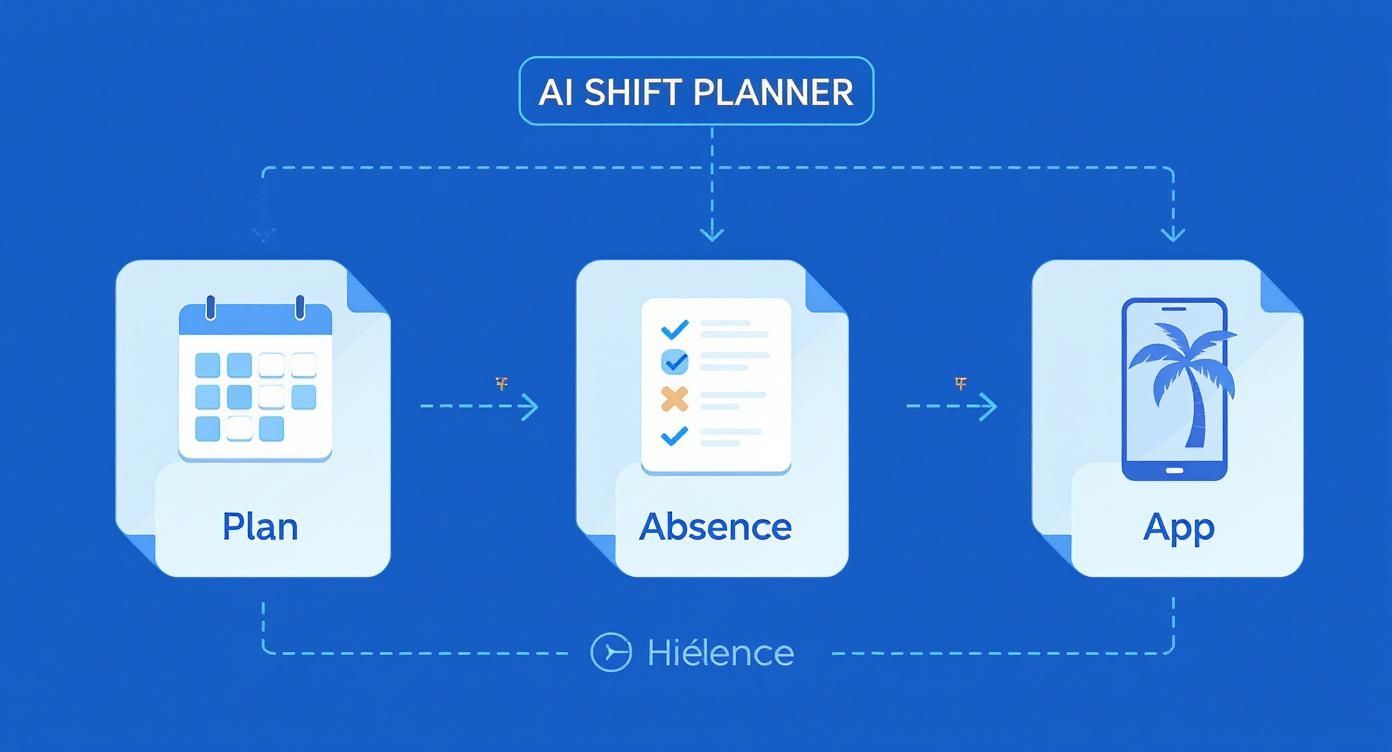
The graphic illustrates how a central platform connects calendar planning, vacation management, and the mobile app for employees into a seamless workflow.
Don’t Forget Data Protection and Training
A very important point is data protection. Make sure the provider strictly complies with GDPR and the Swiss Data Protection Act (DSG). Ideally, data is stored on servers in Switzerland or the EU.
Transparency towards your team is invaluable here: explain clearly and openly which data is collected and why.
The best software is useless if no one can operate it. Plan time from the start for thorough training of your team. Show not only planners the functions but also explain the benefits of the mobile app to employees.
If you follow these steps, the introduction will be a success. Careful preparation is key to fully exploiting the potential of modern workforce scheduling software. Our guide offers more useful tips for introducing workforce scheduling software to make your start easier.
By the way: If you’re still unsure which mistakes to avoid when creating duty rosters, our article Creating Shift Plans & Duty Rosters: Avoid the 5 Most Common Mistakes will help you.
Use Cases from Different Industries
An AI shift scheduler is anything but a one-size-fits-all solution. Think of it more like a flexible Swiss Army knife that adapts exactly to the rough edges and special needs of each industry. And this technology is no longer reserved only for large corporations.
To show you how versatile such systems are in practice, let’s look at three typical scenarios where AI fully plays to its strengths.
Event Industry: High Flexibility Required
In the event industry, no day is like the other. Personnel needs fluctuate extremely and often you have to react lightning-fast to unforeseen changes. At a festival, a security team calls in sick; at a corporate party, additional service staff with fluent French skills are suddenly needed. These are classic planning nightmares.
Here, an AI shift scheduler jumps in by filtering the entire employee pool in seconds according to exactly the required qualifications. You immediately see who is available and has the right skills. With job.rocks, for example, you can send targeted shift requests to suitable groups and fill positions in record time – without the usual phone odyssey.
Hospitality: Fair Planning and Complex Rules
In hospitality, satisfied employees are key to excellent service. Fair distribution of working hours, especially unpopular weekend and holiday shifts, is absolutely crucial for the working atmosphere. Added to this is a jungle of complex collective agreements and industry-specific labor laws that must be meticulously observed.
An AI system like job.rocks automatically ensures fair shift distribution over longer periods. It monitors in the background that all legal requirements are met and thus prevents costly errors and creeping dissatisfaction in the team. Planning becomes transparent and comprehensible for everyone.
An intelligent scheduler doesn’t just solve a mathematical problem. It creates a fair basis that positively influences the working atmosphere and noticeably strengthens employee retention.
Security Industry: Licenses and Certificates in View
In the security industry, operational capability depends on very specific licenses. An employee may only guard a certain site if they hold the necessary certificate. Manually keeping track of these qualifications is not only time-consuming but also extremely error-prone.
An AI shift scheduler manages these licenses centrally and intelligently. During planning, the system automatically suggests only employees for a shift who really possess the required qualification. If a certificate is about to expire, the scheduler proactively notifies the planner. This ensures that every deployment site is always staffed correctly and in compliance with regulations.
The demand for such intelligent solutions is growing rapidly across industries. Zurich has established itself as the AI hotspot of Switzerland, accounting for around 42% of all analyzed AI jobs. If you want to know more about hotspots for AI jobs in Switzerland, you can read here which industries drive demand.
If you work in gastronomy, you’ll find industry-specific recommendations for Switzerland in our guide Gastronomy Shift Schedule App Switzerland.
Frequently Asked Questions About Creating AI Shift Plans
Thinking about improving your personnel planning with AI but still have some questions? Completely understandable. Here I have summarized answers to the most important points that come up repeatedly in practice.
What is the best way to create a shift plan with AI?
The best approach in five steps: 1) Enter employee data and qualifications in the system, 2) Define working time rules and legal requirements, 3) Enter shift requirements, 4) Review and adjust the AI-generated plan, 5) Publish the plan and inform the team. With a well-thought-out tool like job.rocks, the whole process takes less than 10 minutes.
Does the AI shift scheduler completely replace humans?
Absolutely not. Think of AI not as a replacement but as an extremely clever assistant. It takes over the tedious, time-consuming puzzle work and provides you with a prepared plan proposal based on hard data. Routine tasks disappear.
But the final decision, human judgment, and last approval always remain with you. What you gain most is more time for what really matters – leading and supporting your team.
What about the data security of my employees?
A central point, no question. Reputable providers operating in the Swiss or European market strictly comply with the requirements of GDPR and the Swiss DSG. This is not optional but mandatory.
Usually, your data is stored on highly secure servers in Switzerland or the EU. My tip: when choosing your tool, pay close attention to transparent privacy policies and consistently encrypted data transmission. The provider should communicate this clearly and understandably.
Is setting up such software terribly complicated?
The concern is justified, but fortunately, the days of months-long IT projects are over. Modern systems are designed so you can use them quickly and intuitively.
Usually, you are guided through a process where you enter employee master data, working time models, and your internal rules step by step. A good provider does not leave you alone but supports you personally if you get stuck.
Does AI also consider my employees’ wishes?
Yes, and that is one of its greatest strengths. Instead of countless emails or paperwork, your employees can enter their availabilities, shift preferences, or vacation requests directly and easily via an app.
The AI then tries to find the best balance – between operational necessities and your team’s wishes. The result is not only a well-thought-out but also a significantly fairer shift plan, which noticeably increases team satisfaction.
How long does it take to set up an AI shift scheduler?
Initial setup usually takes between 30 minutes and 2 hours – depending on your team size and the complexity of your working time rules. Most time is spent capturing employee master data and qualifications. The technical configuration of the system itself takes less than 15 minutes with modern tools like job.rocks. After that, you create your first AI-generated plan within minutes.
How much does an AI shift scheduler cost?
Costs vary greatly depending on provider and feature scope. Some solutions like job.rocks offer a pay-per-use model starting at 1.20 CHF per deployment, which is especially attractive for flexible teams and temporary work agencies. Other providers charge monthly flat rates per employee, ranging from 3 to 15 CHF depending on features. Small teams often have free basic versions with limited features. It’s important to consider not only price but also time savings and error reduction in your calculation.
Can I use an AI shift scheduler without prior knowledge?
Absolutely. Modern AI shift schedulers are designed exactly for users without technical knowledge. The user interface works as intuitively as other everyday apps. The setup assistant guides you step by step through initial configuration. And if you get stuck, most providers offer personal support – at job.rocks, for example, directly from Switzerland.
Is an AI shift scheduler worthwhile for small teams?
Yes, definitely. Even with five to ten employees, you save several hours of planning time per week with an AI tool. You also minimize the risk of planning errors that can lead to overtime or legal issues. Especially for small teams where each employee takes on multiple roles, automatic qualification checks are a big advantage. Many providers also offer special rates or a forever-free version for smaller teams.
Are you ready to finally make your personnel planning easier, fairer, and better? See how job.rocks helps you with intelligent automation to create legally compliant shift plans in minutes instead of hours.
Learn more about smart workforce scheduling with job.rocks here