
Catering Staffing Software: Optimal Workforce Planning 2026
Never lose track again! Catering staffing software optimizes shifts, availability, and payroll for your event staff.
If, before a big event, you have WhatsApp, phone, email, and Excel all open at the same time, you don’t have a staffing problem. You have a system problem. You usually only notice this when two servers have confirmed the same shift, a cook cancels last minute, and you still can’t clearly see who is allowed to take which role.
This is exactly where Catering Staffing Software comes in. Not as a pretty calendar, but as a tool that brings together availability, qualifications, shifts, hours, and payroll preparation in one place. For catering, event service, banquets, and weddings, this is often the difference between a controlled operation and daily improvisation.
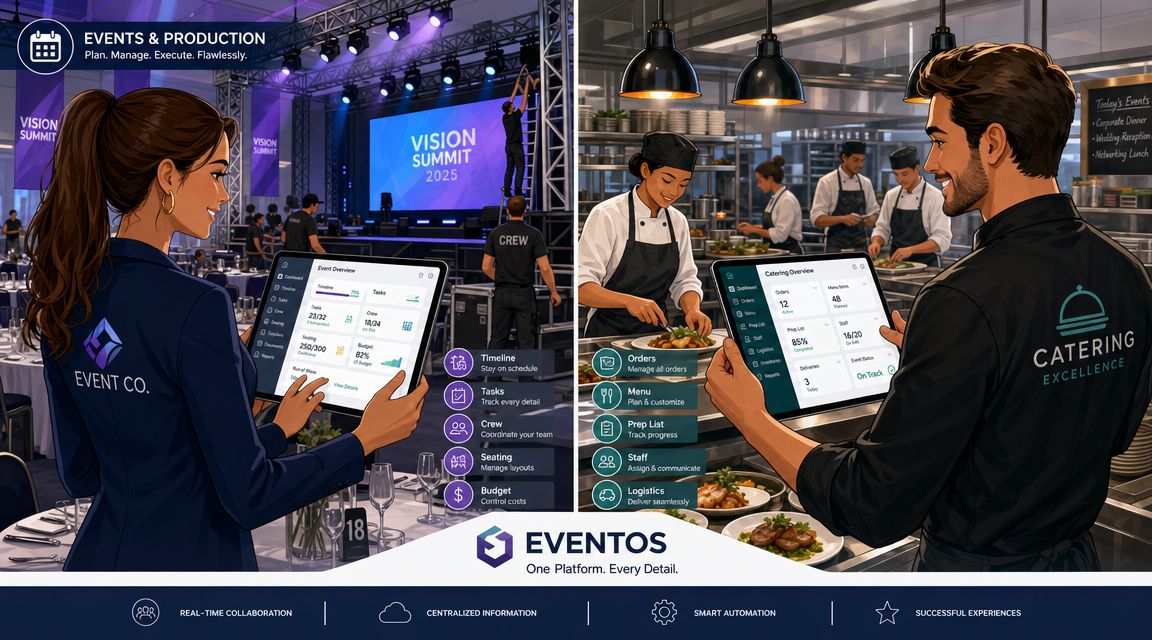
No More Staffing Tetris Before Every Event
On Thursday, you get a call. A server has canceled for Saturday evening. At the same time, a corporate party is already underway, and you still need someone with banquet experience for a wedding. You open three lists, search old chat histories, and hope no one has double-booked.
This is everyday life in many catering companies. Not because no one can plan, but because planning is spread across too many channels.
Where the Chaos Really Comes From
The problem is rarely just the absence itself. The problem is the chain reaction afterward:
- Unclear availability: You don’t know for sure who is still free that evening.
- Scattered qualifications: One has wine knowledge, another can handle the cash register, a third is allowed to drive. But none of this is neatly recorded in one place.
- Fragmented communication: Confirmations come via chat, cancellations via SMS, changes by phone call.
- Inaccurate hours: After the shift, you argue about who was really there when.
If you work like this, every change costs you an unreasonable amount of time. And in catering, something almost always changes.
Rule of thumb: If you have to manually contact several people to find a replacement, you don’t lack staff. You lack visibility into your personnel pool.
Why This Is Not an Isolated Case
The industry is particularly vulnerable to such situations. According to industry statistics on staffing structure in catering, 37% of catering companies operate with only 1 to 10 full-time employees, 82% have fewer than 50 full-time employees, 42% cite staffing as their biggest challenge, and only 14% felt well staffed heading into 2024. This means that 86% are considered understaffed.
For everyday operations, this means simply: small and medium teams must absorb fluctuations despite having little reserve. One absent driver, one missing kitchen helper, or two no-shows in service are enough to derail your entire process.
What Changes with Software
With a good solution, you no longer search in ten places at once. You see immediately:
- who is available
- who is suitable for which role
- who has already been assigned
- where gaps remain
- what changes happened and when
This doesn’t take away your responsibility. But it takes away blind juggling. And that’s exactly what you need when multiple assignments run in parallel.
What Catering Staffing Software Really Does
On Wednesday, the client tells you that instead of 14, now 18 servers are needed. On Friday morning, a driver calls in sick. In the evening, you want to know if the hours worked are correct or if you have to compare three versions of the same shift list again on Monday.
It’s on days like these that you see whether you just have a planning tool or a system that truly manages the operation.
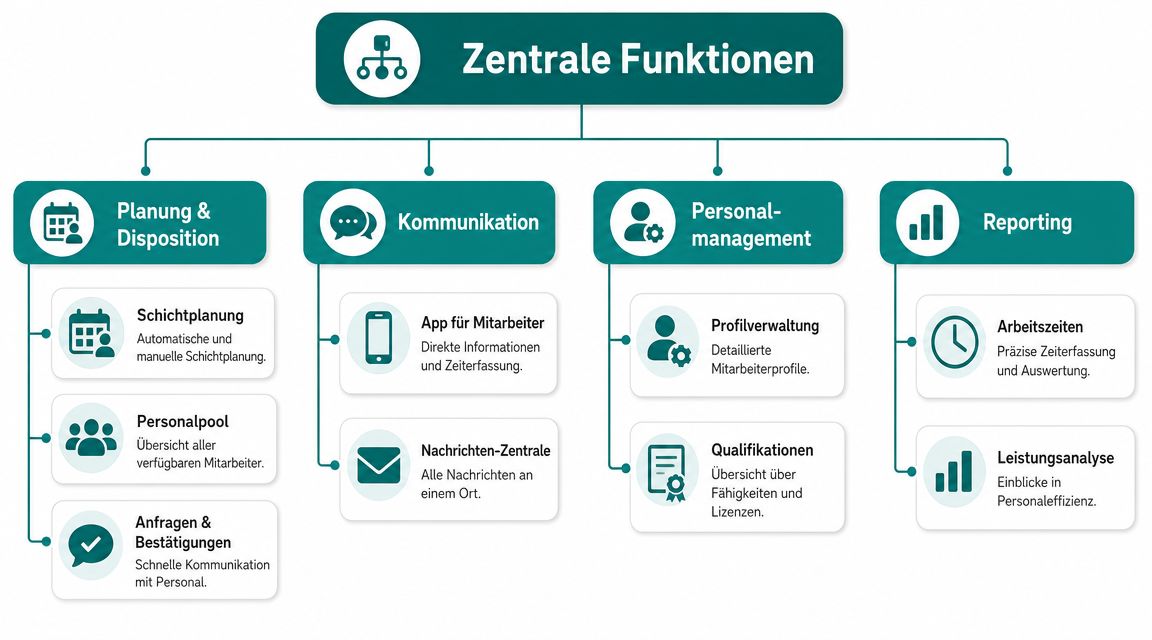
A usable Catering Staffing Software combines scheduling, communication, and time tracking in one workflow. It ensures that changes don’t get stuck, double bookings are noticed earlier, and hours after the event don’t have to be painstakingly reconstructed. Anyone just starting to explore software for operational workforce planning should pay close attention to this point.
More Than Shifts on One Screen
A calendar helps you enter data. For catering, that’s not enough.
In daily life, you have to decide in minutes: Who is technically suitable for this assignment, who is really free, who has already reliably handled similar events, and who cannot be scheduled due to rest periods or overlapping bookings. If the tool doesn’t answer these questions, the work falls back on you.
The difference is simple. You don’t manage appointments, you manage risks. Every open role, every delayed response, and every wrongly assigned person ends up on your desk.
What the Software Actually Handles in Operation
A good solution keeps the process from order to billing together.
-
Create requests and assignments cleanly
Location, times, roles, special requirements, and needed numbers are recorded in one place. This prevents kitchen, service, and logistics from working with different information. -
Combine availability and suitability
You see not only who is free but also who is suitable for exactly this task. This saves inquiries and reduces the risk of misassignments. -
Distribute changes purposefully
New start time, different meeting point, additional setup. The affected people get the change directly. You don’t have to hope a message is read in some chat. -
Record attendance and hours
After the assignment, times are centrally available. This saves arguments about start, breaks, overtime, or no-shows. -
Prepare data for payroll
Approved hours are forwarded in a structured way to payroll or administration. This is not a luxury but saves rework every month.
How You Notice the Difference Immediately
Most problems don’t arise during Monday’s planning but during last-minute changes before or during the event. This is where simple shift software separates from a solution built for catering.
| Situation | Simple Tool | Catering Staffing Software |
|---|---|---|
| Last-minute absence | You search manually in chats, lists, and contacts | You filter for free, suitable replacements |
| Two simultaneous events | Conflicts often appear late | Assignments and overlaps are immediately visible |
| Change in schedule | Info is sent multiple times and sometimes contradictorily | Update goes centrally to the right people |
| Hours after the event | Notes, screenshots, and chat histories | Times are verifiable in one place |
The Practical Benefit Is Unspectacular but Noticeable
You won’t save every assignment with software. If three people cancel at 6 a.m. on Saturday, you still need a reliable network and clear priorities.
But you won’t lose another hour searching, dealing with misunderstandings, and duplicating work. That is the real benefit. The software doesn’t replace your scheduling. It gives you the overview to make reasonable decisions under pressure.
Key Features That Change Your Daily Work
Theory doesn’t help much if you still have five open roles for Saturday at noon on Friday. What matters is what the system does for you during a real shift week.
Qualifications Instead of Gut Feeling
You don’t just look for “two more people” for a wedding. You might need a server with wine knowledge, someone for the outdoor aperitif, and a person who has already handled large banquets.
Without a system, the usual happens. You first contact your close circle, wait for answers, and realize too late that the person who confirmed is friendly but has never done a formal multi-course service.
With well-maintained profiles, you filter directly for what you really need:
- Role knowledge: Service, kitchen, bar, runner, setup
- Additional attributes: Driver’s license, language skills, cash register experience
- Assignment history: Who has reliably worked similar events
Availability Without Message Chaos
One of the biggest bottlenecks is manually collecting confirmations. When employees maintain their own availability, a large part of your inquiries disappears.
That sounds small. In daily life, it’s huge. You see before planning who is even an option instead of messaging ten people and starting over.
An overview of such tools for flexible teams can also be found at software for workforce planning, where availability queries, shift planning, and time tracking are described as a connected process.
Mobile App Instead of Radio Silence
A good employee app doesn’t solve “everything digital.” It solves very concrete problems:
- Shift details are visible: Meeting point, clothing, contact person
- Changes arrive directly: No “I didn’t see that”
- Acceptance and rejection are orderly: You know who confirmed
- Times can be recorded on the go: No calling back on Monday
If you rely on temporary staff, you need communication on the phone. Everything else stays theoretical and fails in operation.
Time Tracking and Payroll Preparation
Especially in catering, errors with hours quickly cost money. The shift ends later than planned, someone helps with teardown, another arrives late due to traffic. If you reconstruct this days later, it gets inaccurate.
A good system clearly separates planned and actual time worked. This helps with approval and handing over to payroll.
Data Protection Is Not a Side Issue
As soon as you collect availability, working hours, preferences, and personnel data in one system, the technical infrastructure becomes important. According to data protection classifications in catering software, role-based access and logs are not convenience features but architectural prerequisites if you want to combine automation with GDPR-compliant processing.
For everyday life, this means:
- Not everyone sees everything.
- Changes to shifts and times remain traceable.
- Data doesn’t end up randomly in chats, emails, and spreadsheet copies.
That sounds dry. It is. But it’s exactly what later determines whether you can resolve conflicts cleanly.
How Agencies and Restaurateurs Use It
There is no single standard case for event staff. An agency operates differently than a restaurant with a catering division. A staffing service provider again differently. The software must therefore not only map shifts but the actual operation.
The Event Agency with Three Events on the Same Day
Morning client aperitif, afternoon trade fair, evening gala dinner. The problem is rarely just the amount of staff. The problem is that the same good people are needed everywhere.
With a central system, scheduling immediately sees who is already booked and which role remains open. The agency can assemble teams per event without accidentally double-booking the same person. Customer requirements such as clothing, language skills, or experience with VIP guests can also be assigned to the shift.
Anyone working in this environment knows the mix of event logic, customer demands, and last-minute changes. That’s why it’s worth looking at personnel management in the event industry, where the connection between deployment planning, communication, and flexible personnel pools is especially visible.
The Restaurateur with Restaurant and Catering Business
A restaurant manager is building a catering business in parallel. During the week, he needs his core team in-house. On weekends, external events are added. If he pulls too many people internally, the restaurant suffers. If he calls in temps too late, the event suffers.
The software helps here in a place often overlooked. It shows not only open shifts but the conflict between core business and external deployment. The manager can first secure fixed restaurant shifts and then specifically request from the event pool.
The Staffing Service Provider with a Tight Time Window
A client calls in the morning. Three people for service and one for setup and teardown are still needed for tomorrow. Previously, this meant: phone calls, checking lists, collecting responses, calling again.
With a good solution, the scheduler first filters by availability and role, then sends a targeted request to suitable people and sees the responses collected. This saves above all one thing: unnecessary search loops.
The more last-minute the assignment, the less a pretty planning interface helps. What counts is visibility of free, suitable, and reachable employees.
Choosing the Right Software for Your Company
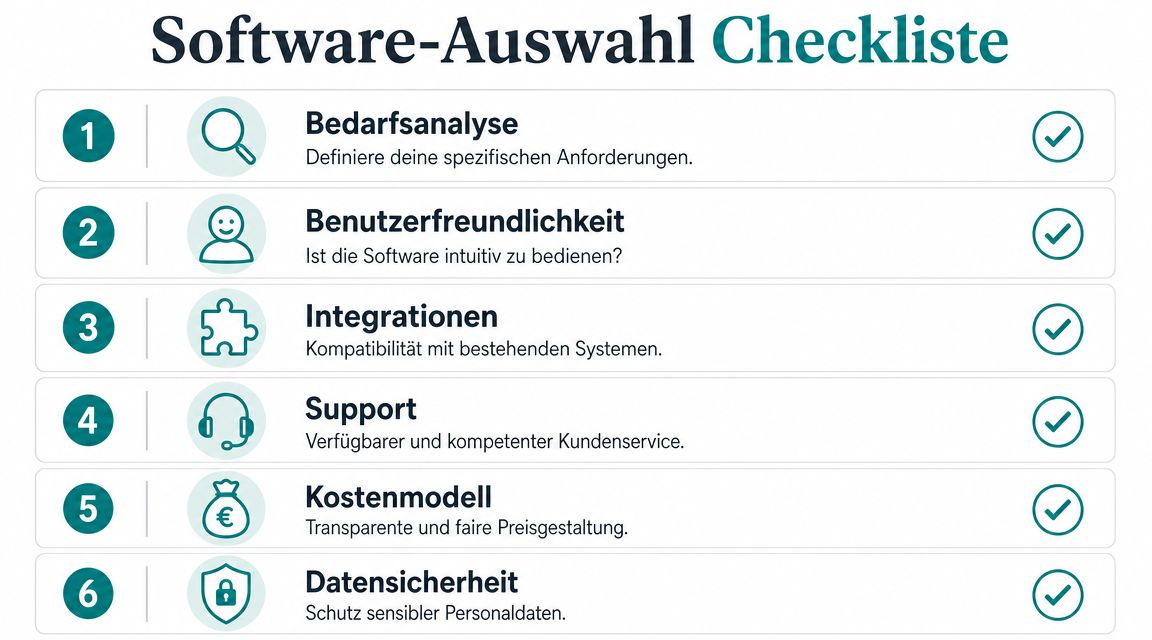
Many providers first show dashboards, apps, and calendar views. That looks neat but doesn’t answer whether the system can handle your daily reality. What matters is how well you manage absences, peak demands, and mixed role profiles.
Don’t Just Ask About Features
A frequently overlooked point according to tips for last-minute catering scheduling is not the shift planning itself but how teams manage last-minute absences and real-time demand peaks. That’s exactly what you should focus on when talking to providers.
Don’t ask: “Do you have an app?”
Ask: “How do I find a replacement in a few clicks for a server who canceled and needs to be replaced tonight by someone with banquet experience?”
That’s a big difference.
Questions You Must Ask
-
How do temps maintain their availability?
If that’s cumbersome, you’ll be sending messages again. -
Can I create custom qualifications?
You often need internal attributes like driver’s license, bar experience, or specific language skills. -
How do I see over- and understaffing?
A calendar alone isn’t enough. You need visibility of roles, available people, and staffing gaps. -
What happens with last-minute changes?
Ask for a live demo of how a shift is reassigned. -
How do hours go into payroll?
If you still export manually and rework, you save little. -
Who can see which data?
Especially with personnel data, you must be able to limit access properly.
A market overview helps you compare if you don’t want to just read marketing texts. A useful starting point is the comparison for workforce scheduling software, which focuses more on deployment logic than just interfaces.
Why Many Selection Processes Fail
The most common mistake is not a “bad” tool. The mistake is too mild a test. If you only look at standard cases in the demo, almost every software looks fine.
Instead, bring three real test cases:
| Test Case | What You Want to See |
|---|---|
| Same-day sick call | Replacement search by availability and role |
| Two events in parallel | No double booking, clear deployment view |
| Hour approval after event | Traceable changes and clean export |
Don’t test software on the ideal workflow. Test it on the worst Friday of the season.
Your Checklist for a Smooth Start
Most implementations don’t fail because of technology. They fail because data is incomplete and no one internally clearly says who does what. Then the system is set up, but your team still works via chat.
Clean Up Master Data First
Before planning the first shift, you need reliable employee profiles. Not just names and phone numbers. But what you really need for scheduling.
This includes roles, qualifications, usual locations, availability, and special notes. If this foundation is flawed, the software plans as poorly as your Excel file did before.
Define Responsibilities
Internally define before starting:
-
Who plans shifts
One person must keep an overview and make final assignments. -
Who updates profiles
New qualifications or changed contact details must be continuously updated. -
Who approves hours
Otherwise, unverified times end up in payroll. -
Who responds to absences
You need a clear hand, not five parallel inquiries.
Bring the Team Along
Employees don’t use a new system because it’s digital. They use it if it makes their work easier. So don’t just say what’s new. Say what gets easier.
- Less back and forth: Shifts and changes are directly visible.
- More clarity: Location, time, and role are in one place.
- Clean hours: Fewer disputes about shift duration.
Start Small
Don’t start right away with your biggest wedding or most important corporate client. Take a manageable assignment with several roles but limited risk.
After the pilot, look at three points:
- Where was information missing in profiles?
- Which questions kept coming from employees?
- Where did hour approval stall?
Then adjust processes. Only then go broad.
The best start is unspectacular. A small assignment, clean follow-up, clear corrections.
Why the Investment Pays Off for You
The calculation rarely depends on the monthly software price. It depends on where you lose time, nerves, and margin today. Half an hour on the phone because of an absence. Misassigned hours after a long event day. A shift plan that was sent but is already wrong again.
That’s exactly where catering staffing software brings money back into the operation. Not as an abstract digital bonus, but in everyday life. Less downtime in the office. Fewer misassignments on the floor. Fewer corrections in payroll.
How You Really Notice the Benefit
- Less time lost in scheduling: Availability, qualifications, and assignment data are bundled and ready.
- Fewer costly mistakes: Better matches reduce the risk of the wrong person in the wrong position at the event.
- Less rework on hours and payroll: Times are documented more cleanly and can be checked faster.
- More stability in daily business: Changes run centrally instead of scattered chats, calls, and notes.
The economic effect often only shows when you honestly add up the sum of small disruptions. None of them alone is dramatic. Together, they consume many hours of management, planning, and correction work every month.
That the market is moving in this direction is no coincidence. As mentioned above, catering software is clearly in higher demand worldwide. This fits the reality of many businesses: more last-minute changes, tighter staffing, and multiple parallel assignments that still have to run smoothly.
The investment pays off especially if you still manage a lot with Excel, WhatsApp, and verbal instructions today. Then you’re not buying a nice add-on tool but order in an area that otherwise constantly falls apart.
If you’re looking for a solution to manage availability, shifts, time tracking, and payroll preparation for flexible teams in one place, check out job.rocks. The platform is designed for workforce management and deployment planning in personnel-intensive industries, including events, hospitality, and catering.