
Construction Site Time Tracking App: Features & Rollout 2026
Find the ideal construction site time tracking app for 2026. Discover essential features (GPS, offline), GDPR compliance, and how to master the rollout.
At the end of the month, you sit in the office with a stack of timesheets in front of you. One is smudged, one is missing, two were only filled out from memory on Friday evening. The foreman says the workers were on three construction sites, accounting wants clean times, and one employee’s break time doesn’t match the total reported hours. At that moment, you realize that paper is not just cumbersome. It’s a risk.
A good construction site time tracking app doesn’t solve the problem simply by digitizing punch times. It must work in everyday Swiss construction life. On the shell construction, in the basement, in tunnels, during site changes on the same day, and for wage questions weeks later. And it must be introduced so that your team actually uses it.
So the question is not only which app looks nice. The better question is: Which solution delivers reliable times on site, clean data in the office, and proof that holds up during an audit?
If you want to first get an overview of mobile time tracking, this overview on mobile time tracking for companies will help you.
Table of Contents
- From Paper Chaos to Digital Time Tracking
- Core Features of a Modern Construction Site App
- Mastering Legal Requirements for Switzerland
- Seamless Data Flow from Punch to Payroll
- Introducing the App to Your Team in 4 Steps
- Checklist for Choosing Your Time Tracking App
- FAQ: Common Questions About Time Tracking on Construction Sites
From Paper Chaos to Digital Time Tracking
Stacks of timesheets at the end of the month are more than just cumbersome. They are a business risk. Illegible entries, missing reports, and times added later from memory lead to errors that become costly in payroll, government reports, and audits.
On construction sites, this problem arises not from lack of will but from the workflow. The crew arrives in the morning, changes work locations during the day, and no one wants to fill out forms in the evening. Paper is often only collected, checked, and retrospectively entered when no one remembers exactly anymore. This is exactly where questions about breaks, travel times, allowances, and correct site assignment begin.
A foreman knows the pattern. On Friday, five reports lie on the table. One is wet and barely readable, one is missing, and one has incorrect total hours. The office starts calling back, and in the end, not the documented process but the most plausible memory decides.
Practical rule: Times must be recorded where they occur. Anything reconstructed later costs money and weakens the proof.
A good time tracking app therefore does not simply replace paper with a screen. It creates a reliable process. Employees record start, break, and end times directly on site. Supervisors see deviations early. Administration works with structured data instead of interpretations.
Especially in Switzerland, this is more than a comfort issue. Anyone who records working hours digitally must set up the process so that records comply with the ArG (Swiss labor law), ordinances, and the rules of the applicable collective labor agreement (GAV). It is not decisive whether the app looks modern but whether entries are complete, traceable, and verifiable if needed. The benefit then shows not only in less office work but also in fewer disputes, cleaner payroll runs, and reliable proof for employees, site management, and audits.
If you want an overview of which solutions really work in everyday life, our overview of mobile time tracking on construction sites and in trades will help.
When switching, three questions count:
- Does the workflow fit the construction site? Recording must work under time pressure, in dirt, with gloves, and with frequent project changes.
- Is the proof reliable? Start, end, breaks, corrections, and approvals must be documented so they withstand an audit.
- Will the system be accepted by the team? If foremen, supervisors, and crew don’t understand or trust the workflow, the correction work ends up back in the office.
Core Features of a Modern Construction Site App
A construction site app is not a digital time clock with a nice interface. If it is to hold up in everyday use, it needs three things that real construction sites demand: offline capability, location verification, and a simple punch workflow.
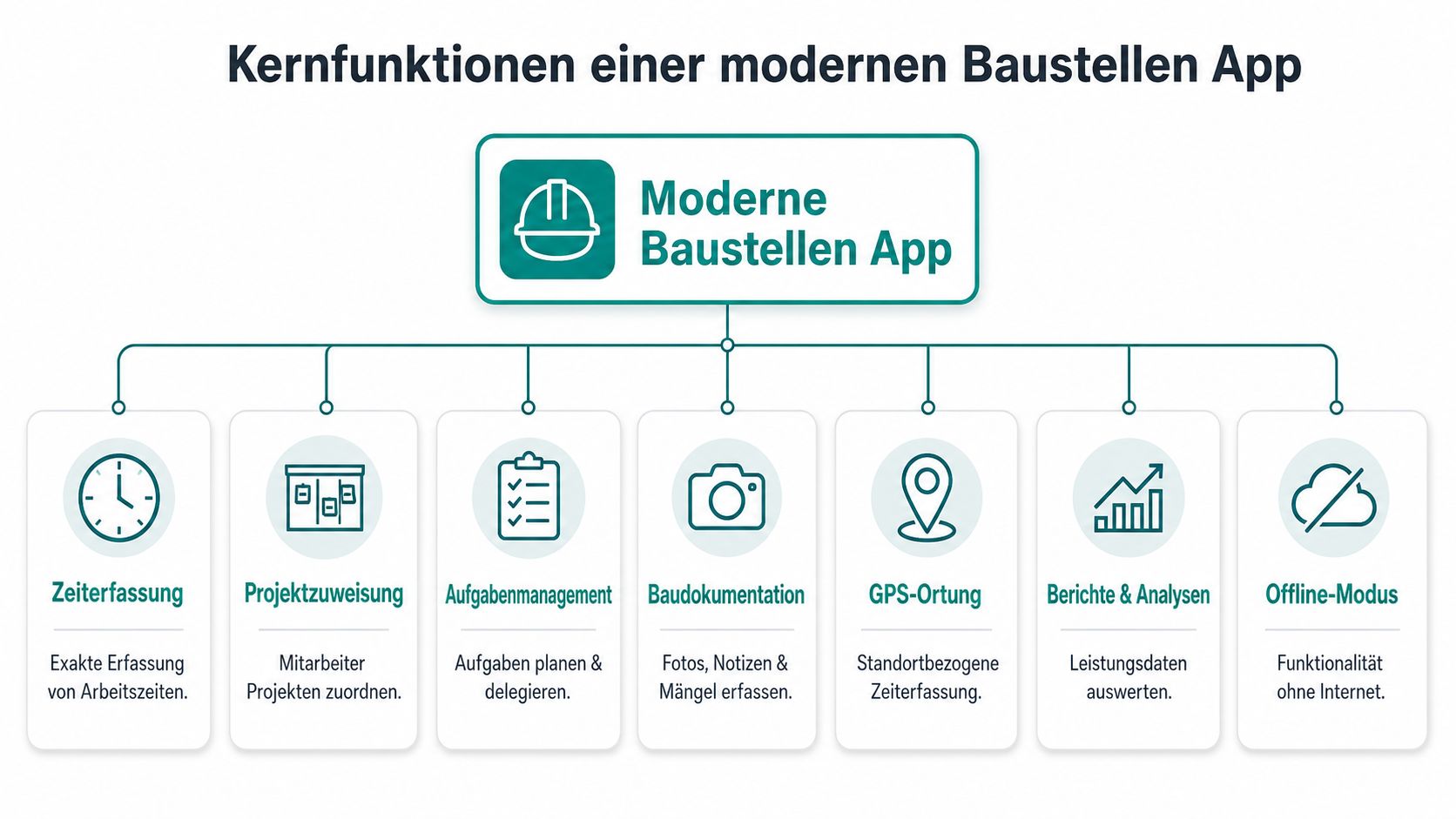
Offline First Instead of Hoping for Reception
Many construction sites have no stable reception. This is nothing unusual in basements, tunnels, or during concrete work. An app without offline mode is of little use there because it fails exactly when you need it.
For Switzerland, this is not a side issue. A construction site app must have an offline mode with local data storage because mobile network coverage on sites is often unreliable. Purely online solutions can have data loss rates of up to 15%, while apps with offline capability increase data security rates to over 99%, as Werkli on time tracking with offline mode writes.
An everyday example: Your employee starts at 6:55 a.m. in the underground garage of a new building. No network. A good app stores punch time and location locally on the device and automatically transfers everything later as soon as connection is available. A weak app just shows a loading bar or demands the entry be made later in the office.
GPS and Geo-Fencing in Everyday Construction
Location verification only makes sense if it is properly set up. Too narrow a radius, and your people stand outside the gate and cannot punch in. Too wide a radius, and someone can start their workday in the café next door.
In construction, a defined radius of typically 50 to 100 meters has proven effective. GPS radius checks reduce false or fraudulent punches by 70 to 85%. The technical recording uses GNSS sensors like GPS and Galileo with an accuracy of ±3 to 5 meters, as this expert article on mobile time tracking on construction sites describes.
Practically, it looks like this:
- Morning at construction site A: The employee arrives, opens the app, the punch button is only active within the defined radius.
- Lunch break change to construction site B: The next booking at the new location is assigned correctly.
- Evening query from site management: You see not only hours but also which location the entry belongs to.
GPS on the construction site is not meant to permanently monitor people. It serves to bind the punch point to the correct location.
A Clear Punch Workflow Saves Follow-up Questions
Many teams fail not because of technology but because of the workflow. If an employee has to click through five screens for project, activity, allowance, break, and comment, they will shortcut. Then data is missing, and the app’s advantage evaporates.
A usable workflow is short. Start, break, resume, end. If necessary, with project changes on the go. In Switzerland, recording the actual working hours with start and end times is legally required for almost all workers. A practical example from Tipee for smartphone time tracking: The foreman punches in 07:00 as arrival and 12:00 as break start, while the app simultaneously checks the GPS radius.
A good app separates mandatory from optional:
| Area | Must be visible on first click | Can be optional later |
|---|---|---|
| Presence | Start, break, end | Comment |
| Project reference | Construction site or order | Cost center |
| Special cases | Correction request | Allowances, notes, photos |
When evaluating a construction site time tracking app, ask exactly this question: Can a new employee punch in correctly on their first day without explanation? If the answer is no, you will get more support cases later than clean times.
Mastering Legal Requirements for Switzerland
Many providers sell you a punch function. That is often not enough for Switzerland. On the construction site, you don’t need a nice timer but proof that holds up in wage questions, internal audits, or inspections.
The actual working hours with start and end times must be recorded for almost all workers. In construction, employees often change sites, take breaks irregularly, and assignments are rescheduled at short notice. This is exactly where simple apps fail.
What Seamless Means in Practice
Seamless does not just mean that a daily number appears somewhere. Seamless means you can trace the work process. When did someone start, when did they pause, when did they resume, when did they stop, and which site or project was the time assigned to?
If an employee starts in the morning on a renovation, drives to an emergency call at noon, and spends the afternoon on a second site, the app must record these changes cleanly. If only a total of 9.25 hours remains later, you lack reliable documentation.
The gap between a simple punch function and legally compliant proof is clearly visible in the market. Many contents emphasize ease of use but hardly address how clean proof according to Swiss requirements is created with changing site assignments. This gap is also pointed out by Sorba on time tracking apps in Swiss construction.
Where Simple Apps Fail
Three weak points repeatedly appear in practice:
- Changes without history: If a foreman adds missing times later, it must remain visible what was originally recorded and what was adjusted later.
- Project changes without time trace: If only daily hours are stored, the assignment to multiple assignments is missing.
- Manual additions without plausibility: If corrections are added informally, discussions arise instead of clarity.
A legally compliant solution must therefore do more than start and stop. You need a traceable change log, clean assignment of work blocks, and a process for forgotten punches. Otherwise, you have digitalized uncertainty instead of less risk.
If you record times digitally but cannot trace changes cleanly, you have just moved the paper problem to the screen.
Properly Regulating Data Protection and GPS
GPS on smartphones is sensitive if poorly explained. On construction sites, this can be solved cleanly if you narrowly define the purpose: location verification only around the punch process, clear rules for data use, and access only for people who need the proof or audit.
For Swiss companies, this also includes a clean internal regulation. Who sees which data? Are locations recorded permanently or only when punching in and out? How long are the data available? Such points should be defined in writing before the start. A good overview of requirements can be found in the guide on Swiss data protection for digital personnel data.
Practically, this approach has proven effective:
- Limit the purpose: GPS only for punch verification at the work location.
- Document rules in writing: Who may correct, who approves, how additions are documented.
- Inform employees: Not with legal jargon but with clear examples.
- Consider audit cases: Before rollout, check if you could fully explain a single workday later.
If you don’t set this up cleanly, the app quickly becomes a conflict topic. If you do, it becomes protection for both sides. For the company and your employees.
Seamless Data Flow from Punch to Payroll
Friday, 4:30 p.m. The workday ends on the construction site. In the office, the real extra work begins when times from reports, WhatsApp messages, and queries must be transferred to a payroll system. This is exactly where it is decided whether a time tracking app only looks modern or really relieves the company.
How the Process Runs Without Media Breaks
A usable workflow is clear. The employee punches on site. The time is assigned directly to the correct project, the appropriate cost center, and, if necessary, the correct activity. The foreman or site manager reviews open entries promptly. Only then do approved hours go into payroll preparation, post-calculation, or ERP.
The well-known industry figures were already mentioned above. What is decisive here is something else: The economic damage is not only caused by retyping but by chain errors. A missing break, a wrong project code, or an undocumented addition otherwise ends up directly in wages, allowances, GAV-relevant evaluations, and project controlling.
That is why usable software separates itself here from a nice interface. If time data stays stuck in the app, the real benefit is missing. Only with clean review, clear approval, and reliable export does recording become a reliable process. Anyone who wants to check this before introduction should take a close look at the interfaces and system integrations for time data and payroll processes.
A typical workflow looks like this:
| Step | On the Construction Site | In the Office |
|---|---|---|
| 1 Recording | Employee punches start, break, end | Data appears promptly in the system |
| 2 Review | Foreman adds missing notes | Open entries are marked |
| 3 Approval | Team leader confirms hours | Payroll-relevant data is collected |
| 4 Export | No further input needed | Accounting takes over validated times |
Why the Benefit Goes Beyond Time Savings
Many companies first calculate saved office hours. That is too short-sighted.
The greater ROI usually arises in three areas. First, in payroll security. Hours, allowances, travel times, or break rules can be checked more cleanly before they are billed. This is important in Switzerland especially under ArG and depending on GAV because not only the sum of hours counts but also their assignment and traceability. Second, in project controlling. When times are available daily instead of only at month-end, deviations become visible earlier. Third, in disputes. A clean audit trail with timestamp, correction reason, and approval saves discussions with employees, site management, and auditors.
A practical example: An employee forgets to punch out on Wednesday. If the foreman sees the error the same or next day, the correction can usually be justified cleanly. If the same error is only noticed during payroll preparation, the context is often missing. Was there another assignment on a second site afterward? Was a break correctly deducted? Does a different allowance apply for this assignment? Then a small inaccuracy quickly becomes a case for several phone calls.
For Swiss companies, therefore, not only the recording itself is relevant but also the proof path to payroll. A good app does not just deliver hours. It documents who recorded, changed, reviewed, and approved when.
Good time tracking ends where payroll can be prepared without callbacks, recalculations, and discussions about missing receipts.
Introducing the App to Your Team in 4 Steps
Technology rarely decides success or failure. The people on the construction site do. If the foreman doesn’t cooperate, if rules are missing, or if no one answers questions on day one, the mood quickly sours. Then after a week it’s: too complicated, doesn’t work, it was easier before.
The good news: With a clean process, you usually get the introduction done calmly.
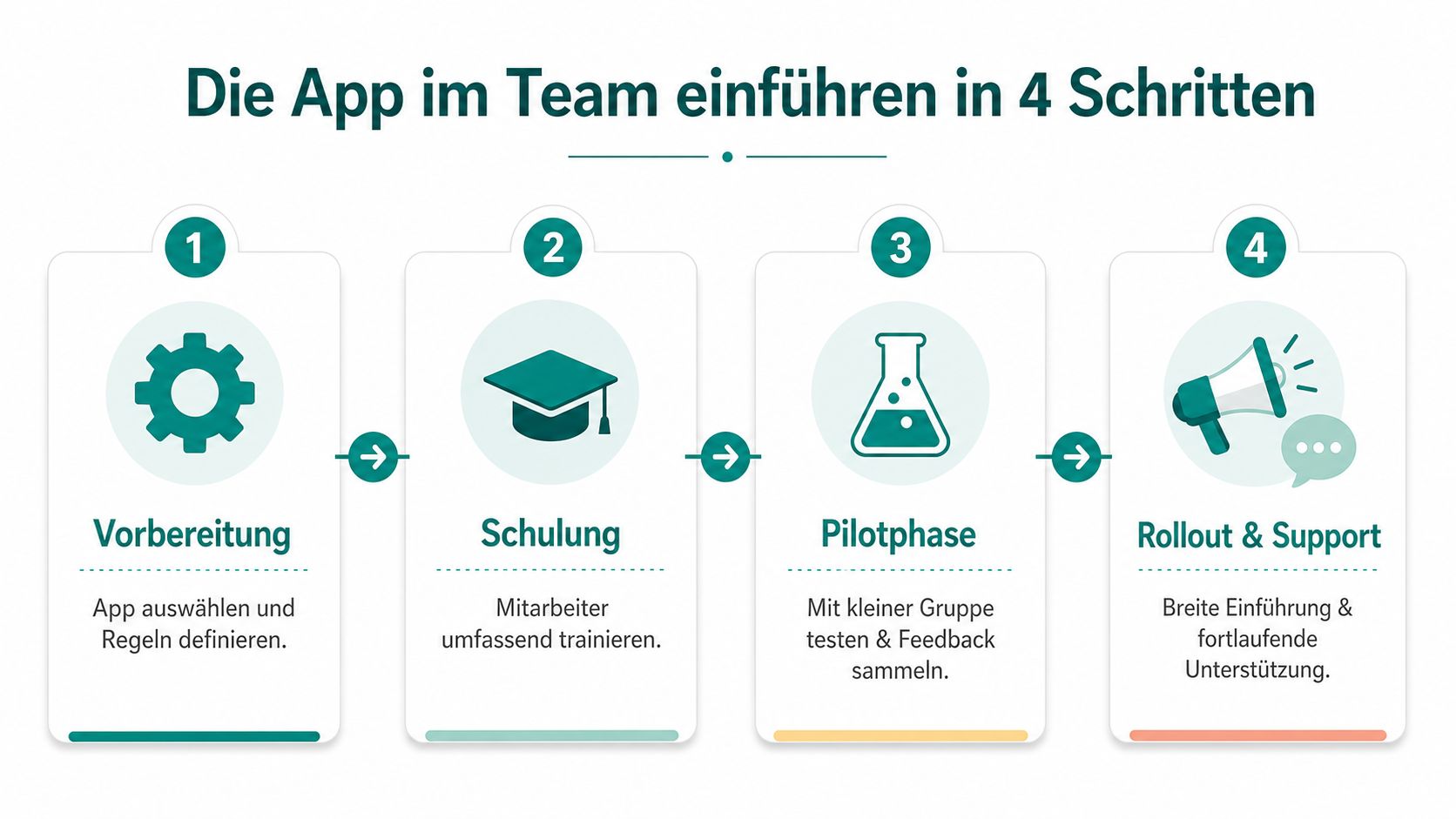
Steps 1 and 2: Rules First, Then Key Persons
Step 1 is preparation. Before starting, define when to punch, who approves corrections, and how project changes are recorded. If you leave these questions open, each site decides differently. Then you have an app but no uniform process.
Step 2 is training key persons. Don’t start with a mass presentation for everyone. Begin with foremen, supervisors, and site managers. These people answer questions on site later. If they are confident, the rest usually follows more easily.
A simple practical example: On a site with two foremen, you introduce the app there first. Both test punching in and out, breaks, project changes, and correction cases. Only when these workflows are settled do you go broader.
A short video that makes the process tangible for the team also helps:
Steps 3 and 4: Start Clean and Refine
Step 3 is the clear start date. Don’t just say the app can be tested from next week. Define a day from which only digital punching is allowed for a selected group. Otherwise, paper and app run in parallel too long, and your office maintains both.
Step 4 is feedback with consequence. Listen to feedback but don’t change rules daily. If older employees say the button is too small or the project list too long, these are valuable hints. If someone just doesn’t want to change, you don’t need a special solution but clear leadership.
This small framework is helpful:
- What must be solved immediately: Login problems, missing projects, unclear approvals.
- What is assessed after two weeks: Daily usability, length of selection masks, training needs.
- What stays deliberately: Mandatory punching at the work location, defined rules for additions.
The biggest mistake during rollout is not resistance in the team. The biggest mistake is an unclear start with too many exceptions.
Checklist for Choosing Your Time Tracking App
When comparing providers, it’s easy to lose track. Almost every solution promises easy use, clean reports, and less effort. What counts is not the promise but what you can really check on site in everyday life.
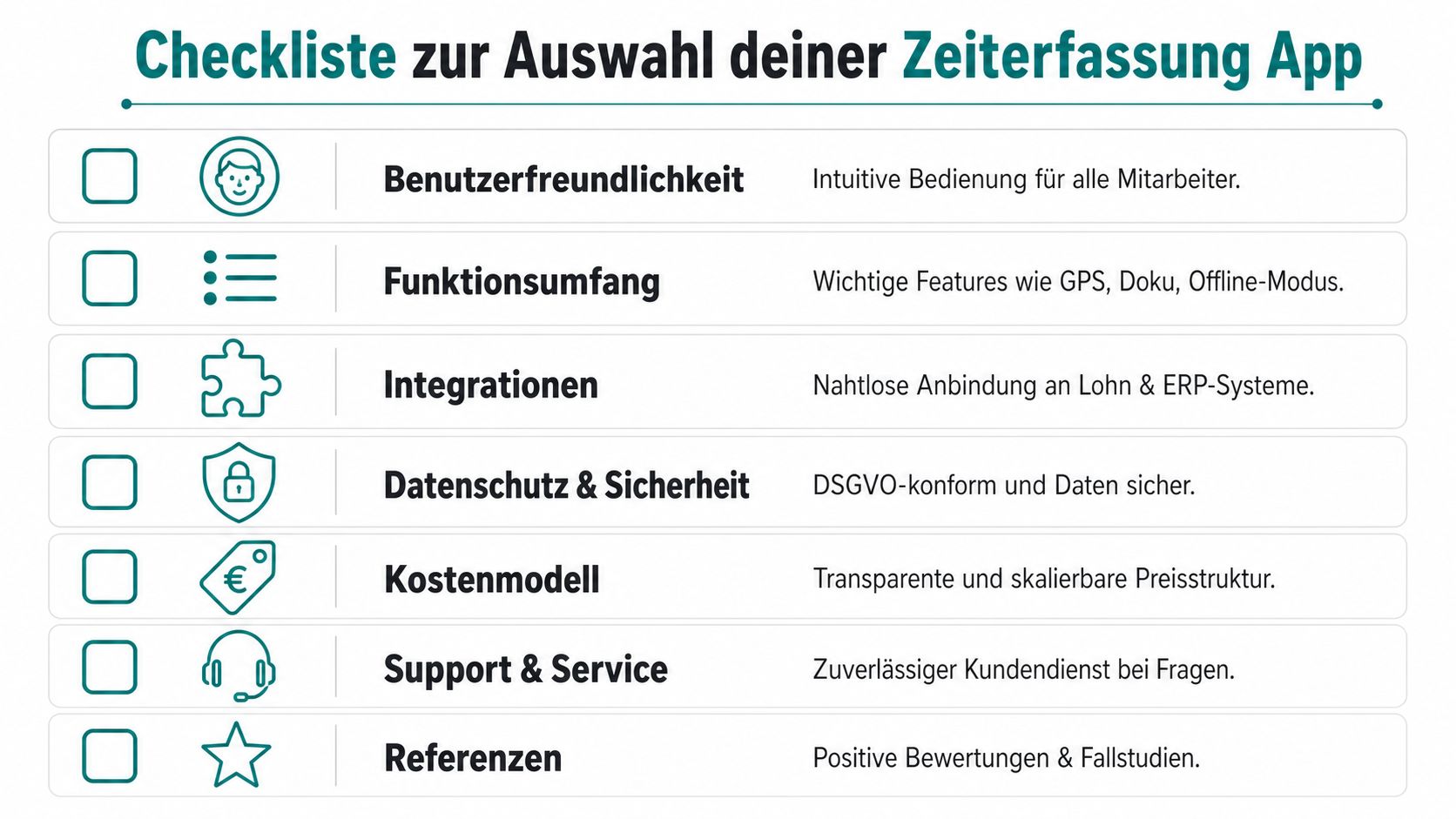
Technology and Suitability for Construction Sites
Take these questions directly into conversations with the provider:
- Does the app work without network on the construction site? Ask for a live demo showing how an employee punches in a basement or tunnel and how data is synchronized later.
- Can I define construction sites with radius? Demand a real test with location verification at the work location, not just a slide in the sales pitch.
- How fast is the punch process? An employee should be able to record start, break, and end without long searching.
- Can a site change on the same day be booked cleanly? Ask for an example with two locations and a break in between.
Legal and Proof Capability
Here marketing separates from reliable systems:
- How are changes documented? Ask to see if additions, corrections, and approvals remain traceable.
- What data does a single workday contain in proof? You want not only a sum but a comprehensible timeline.
- How is GPS used? Only when punching or continuously? This must be clearly limited and internally explainable.
- Can I set rules for breaks, projects, and approvals? Without clear rights, every correction becomes a risk.
If you work internally with checklists, a look beyond your own horizon can help. The idea behind a good selection logic is the same everywhere: clear questions, fixed criteria, no gut feeling. This is shown even by a thematically very different solution like the upcoming pregnancy checklist app, where structured lists make everyday life more plannable.
Providers and Everyday Usability
In the end, not only the product counts but also the operation around it.
| Question | How to recognize a good answer |
|---|---|
| How does the introduction proceed? | No general sales talk but a concrete start plan |
| Who helps with questions in everyday life? | Named contact person instead of anonymous ticket system |
| How are new foremen trained? | Short, repeatable training instead of one-time appointment |
| What does an extension cost? | Clear pricing logic without hidden add-on packages |
If you exit after demos and still don’t know how a forgotten punch is corrected or how a project change looks, the demo was too superficial. These scenes you must see.
FAQ: Common Questions About Time Tracking on Construction Sites
What Happens If an Employee Forgets to Punch In or Out?
Then you need a regulated addition. The employee reports the error, the foreman or site manager reviews the case and adds the time with justification. It is crucial that the change remains traceable in the system. An app without a clear correction path only creates new discussions later.
Do Older Employees React Negatively to the App?
Some do. Usually not because of the technology but because they fear surveillance or expect extra effort. Take a simple example from their everyday life: less paper, fewer queries, less dispute over missing hours. If the first two weeks are well accompanied and the foreman cooperates, resistance usually decreases noticeably.
What Does a Time Tracking App Really Cost?
That depends on the provider’s model. Some charge per user, others by function package or team size. Don’t just look at the monthly fee. Ask about training, support, exports, additional roles, and the effort in the company. A cheap app can become expensive if you have to continue working with Excel.
For Switzerland, regardless of price: A functioning construction time tracking app needs an offline mode because many sites in remote areas or basements have no stable internet. Without this function, you fall back on manual sheets or Excel lists during network outages, which increases administrative effort and endangers data integrity, as job.rocks summarizes about construction time tracking apps in Switzerland.
If you want to set up your time tracking on construction sites cleanly, mobile, and usable for payroll preparation, check out job.rocks. The platform connects time tracking, approvals, and handover to downstream processes so that individual punches become a reliable workflow. For teams with changing work locations, this is often the difference between digital paper chaos and a system that really holds up in everyday life.