
Creating a Shift Schedule with ChatGPT
Creating a shift schedule with ChatGPT - Learn how to efficiently create a shift schedule using ChatGPT. Our guide shows you prompts, templates, and more.
You know the situation. The month is almost over, two people have spontaneously requested time off, someone is sick, someone can only take certain shifts, and in front of you lies a half-empty Excel file. At that moment, ChatGPT seems like a quick rescue.
For a first draft, it can even work. If you have simple teams, clear rules, and clean input data, ChatGPT helps you structure, formulate, and prepare. But as soon as you plan professionally in Switzerland, work with personnel data, or need to comply with legal requirements precisely, it gets tricky.
Many articles only show how to generate a nice schedule with a few prompts. That’s not enough for everyday use. You need a process that allows usable drafts without losing sight of data protection, rest periods, or qualifications. This is exactly where the line between a helpful assistant and risky improvisation lies.
Table of Contents
- Your Path to AI-Supported Shift Scheduling
- Basics for AI Shift Scheduling: What ChatGPT Needs
- Formulating the Right Prompts: How to Give Instructions
- From Prompt to Table: Exporting and Reusing Data
- Checking Quality and Legal Compliance: Where ChatGPT Reaches Its Limits
- Conclusion: ChatGPT as Assistant, Not Manager
Your Path to AI-Supported Shift Scheduling
If you want to create a shift schedule with ChatGPT, first use the tool as a writing and structuring aid, not as the person responsible for planning. That’s exactly where it is useful. It sorts requirements, builds table structures, suggests formats, and helps you rephrase chaotic specifications.
In everyday life, it often looks like this: You run a small café, need one person each for early and late shifts, and have a team with manageable availabilities. Then ChatGPT can generate a usable draft from your information. In an event agency with a pool of floaters, skill mix, night work, and last-minute changes, the same approach quickly becomes fragile.
Practical rule: Use ChatGPT for the first draft. The responsibility for the real schedule remains with you.
Especially if you want to modernize your working methods, it’s worth looking at topics like flexible collaboration, self-organization, and new leadership models. The Schumm & Rösch New Work approaches provide a good framework because shift scheduling is never just about technology but always also about team culture.
Three tasks fit well with ChatGPT:
- Building structure: You have it output a shift scheme as a weekly or monthly grid.
- Sorting rules: You first formulate wishes, restrictions, and roles in a readable way.
- Comparing drafts: You test several distribution logics against each other.
ChatGPT is less suitable for everything that smells like proper workforce scheduling in ongoing operations. If you want to see how digital scheduling interacts with real planning processes, take a look at AI-based workforce scheduling. It covers the difference between a text model and real planning logic.
A Simple Practical Start
Let’s take a small restaurant. You need one service staff with bar experience and one person for the floor per evening. Then you can tell ChatGPT: “Create a weekly structure with shifts from 5 pm to 11 pm, two positions per shift, output as a table.”
This saves time at the blank sheet. But it does not replace your check whether Mia is allowed to work on Thursday, whether Leo already has enough hours, and whether someone is scheduled twice.
Basics for AI Shift Scheduling: What ChatGPT Needs
ChatGPT rarely fails because of form. It fails because of poor input. If you just write “Make me a shift schedule for next week,” you get text but no reliable plan.
According to Ordio on shift scheduling with AI, an AI needs at least current availabilities, qualifications, restrictions, required staffing per time slot, absences, and known wishes as input. Without this reliable data, suggestions become random rather than operationally viable. Legal frameworks such as maximum working hours must be fixed rules in the system, not just in the planner’s head.
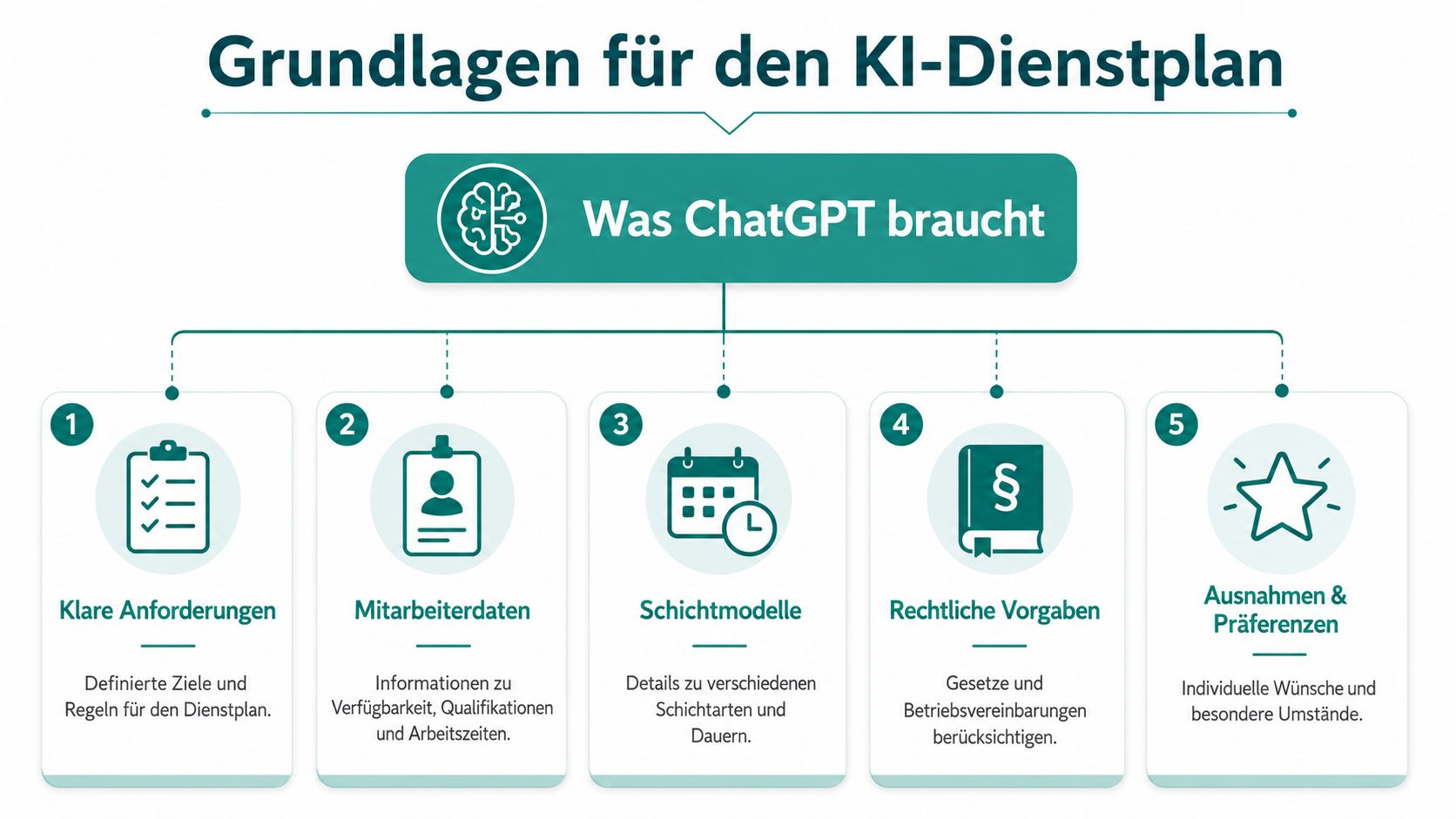
Without Clean Inputs, Only Randomness Emerges
An example from gastronomy. You only provide five names and say that weekends are busy. ChatGPT might then distribute everyone somehow over Friday and Saturday. But it does not know:
- Who is really off: Availability is not the same as a wish.
- Who can do what: A bar shift must not go to someone who only does service.
- Who is restricted: Some employees cannot do night shifts, others cannot work alone.
- Where the minimum lies: A fully staffed wedding requires different roles than a quiet Monday.
A similar example comes from healthcare. If you mix nursing assistants, specialists, and floaters, a nice shift picture is not enough. Even one wrongly assigned allocation can make the whole plan unusable.
If the input is unclear, the answer often sounds clean but is still unusable.
How to Prepare Your Data
Work with a simple table before you even go into ChatGPT. A clean starting list might look like this:
| Name | Available | Not Possible | Qualification | Wish | Absence |
|---|---|---|---|---|---|
| Nina | Mon, Tue, Fri eve | no night shifts | Service, Cashier | Fri off | - |
| Cem | Wed to Sun | no bar closing | Service | Sat late | - |
| Laura | Thu to Sun | no Sunday | Bar, Management | more evening shifts | Vacation Thu am |
For event teams, I often add two columns:
- Location: Some people work only in Zurich, others also out of town.
- Briefing status: Those familiar with a certain format or client are deployable faster.
This preparation saves you follow-up questions later. ChatGPT works better if names are written consistently, roles are clearly named, and you avoid mixed forms like “maybe,” “rather not,” or “mostly available.”
The Minimum Checklist Before the First Prompt
Before you start, check these points:
- Shift requirements: What shifts are there, when do they start, how many people do you need?
- Role profile: Which positions must be filled, e.g., reception, bar, nursing, security, or driver?
- Personnel list: Are names, availabilities, and absences up to date?
- Professional suitability: Is it clear per person which assignments are allowed or excluded?
- Rule set: Which fixed boundaries must not be violated?
If this list is not in place, even the best prompt won’t help.
Formulating the Right Prompts: How to Give Instructions
Many errors don’t arise in the plan but already in the prompt. Those who ask too broadly get a nice but vague answer. Those who ask too narrowly often forget a condition. For creating a shift schedule with ChatGPT, you need a process that gradually narrows down.
For this purpose, an iterative five-step method is recommended. According to Bildungsheldinnen on efficient shift scheduling, it consists of five steps: Define basic structure, set design guidelines, submit employee list, prioritize preferences, and refine with feedback. It is also clearly stated there that ChatGPT does not perform real compliance checks under Swiss labor law.
The Recommended Five-Step Method
The process works well if you don’t pack it into one monster prompt.
-
Define basic structure
Example: “Create a weekly schedule from Monday to Sunday with early, mid, and late shifts.” -
Specify format
Example: “Output the result as CSV with columns Day, Shift, Position, Employee.” -
Input employee data
Then add your cleaned table with names, availabilities, and roles. -
Set wishes and priorities
Example: “Prefer fair distribution of free weekends. Assign bar shifts only to qualified persons.” -
Fine-tune by follow-up
Example: “Swap the Friday late shift so that Nina is off and the bar is still staffed.”
This process feels slow but saves rework. One long prompt often causes ChatGPT to overlook or soften parts.
Prompt Examples from Everyday Life
The logic behind good prompts is simple. First structure, then personnel, then conflicts. Here are typical formulations for different industries.
| Industry | Basic Prompt to Create Structure | Refinement Prompt for Qualifications |
|---|---|---|
| Gastronomy | Create a weekly shift schedule with early and late shifts for service, kitchen, and bar as a table. | Assign bar shifts only to employees with bar experience and do not schedule anyone simultaneously for service and bar. |
| Event | Create a deployment plan for a three-day event with check-in, stage runner, setup and teardown, and evening supervision. | Assign only people with event experience to check-in and only physically suitable employees for setup and teardown. |
| Security Service | Create a plan with day, evening, and night shifts for two locations as CSV. | Assign night shifts only to authorized employees and separate location A and B clearly by permission. |
| Hospitality | Create a weekly schedule for reception, breakfast, and housekeeping with shift times and positions. | Schedule reception only with trained employees and breakfast not for those with late pre-evening shifts. |
| Healthcare | Create a plan with early, late, and weekend shifts for ward and reception. | Assign specialist tasks only to appropriately qualified employees and mark unclear assignments separately. |
An example from a wedding venue. Your first prompt is: “Create a Saturday plan for service, bar, and setup from 10 am to 2 am.” That is still too open. The better second prompt adds: “Schedule setup only for team members cleared for physical work, bar only for trained persons, output the result as a table with time and role.”
A good prompt sounds less like a wish and more like a work instruction.
What to Avoid in Prompts
A few things almost always lead to poor results:
- Mixed priorities: If everything is “important,” nothing is weighted properly.
- Unclear names: “Chris,” “Christopher,” and “C.” are easily confused.
- Hidden rules: What you only have in your head, ChatGPT cannot infer.
- Legal review in the blind: A prompt like “please check everything for legal compliance” is far too vague.
Keep rules short, concrete, and verifiable. “No bar without training” is better than “make sure of proper staffing.”
From Prompt to Table: Exporting and Reusing Data
A plan in the chat window is of little use. You need to get it into Excel, Google Sheets, or another working document so team leads, payroll, or site managers can work with it.
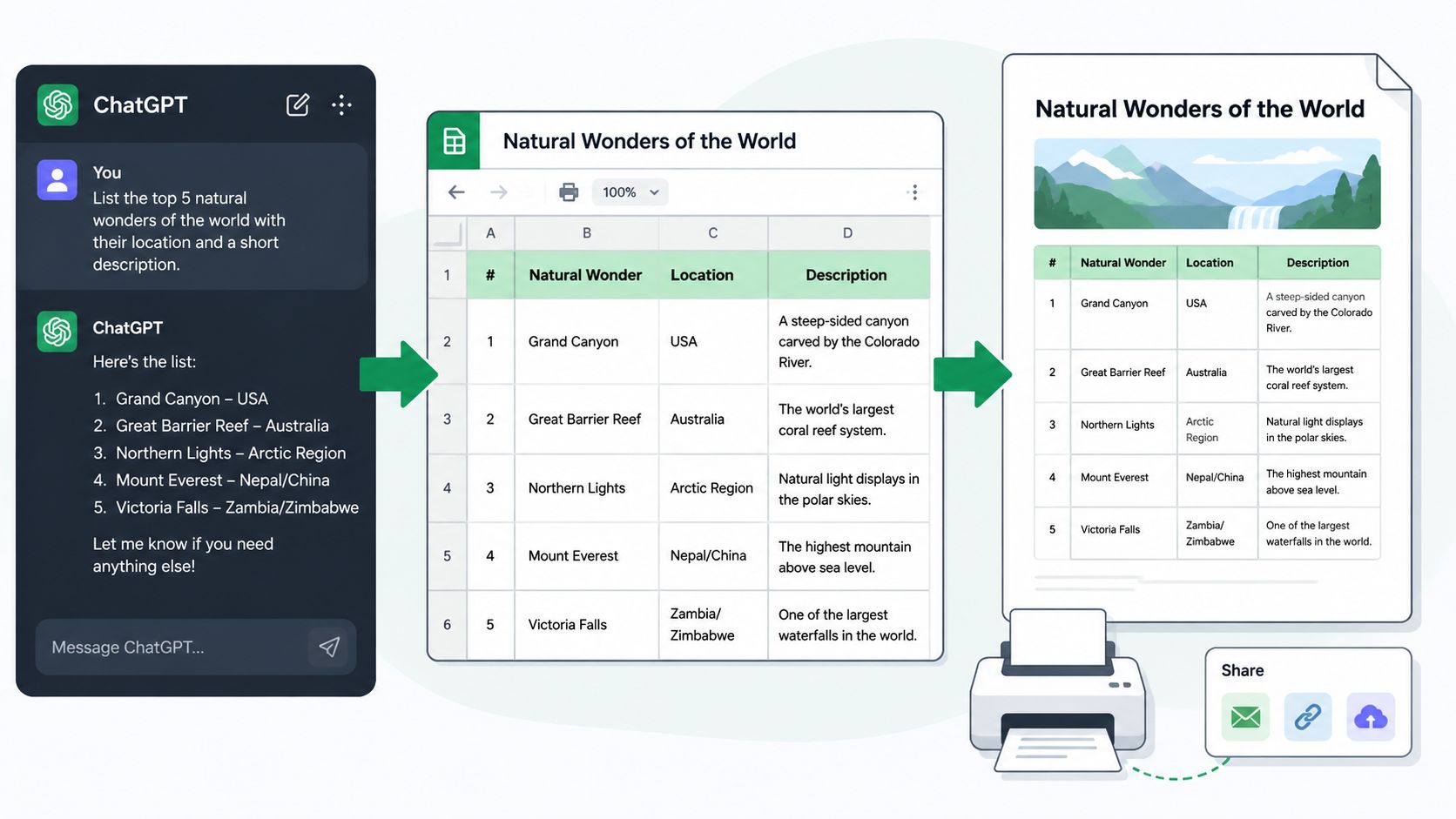
CSV Instead of Chat Window
The cleanest solution is to request the output directly in the prompt. Don’t just write “create a shift schedule,” but for example: “Output the schedule as CSV with columns Date, Shift, Role, Employee, Comment.”
Then proceed as follows:
- Copy output: Take only the pure CSV table with header.
- Paste into Excel or Google Sheets: Preferably into a blank sheet.
- Check delimiters: Depending on the program, assign comma or semicolon correctly.
- Test columns: Do date, names, and shifts appear in the right fields?
If you first need a template, a ready-made table structure often helps more than a free start. A work schedule Excel template saves you a lot of manual work here.
Typical Export Errors
The most common error is not technical but a format error in the prompt. ChatGPT likes to mix explanatory text and table data. Therefore, explicitly write: “No introduction, no running text, only CSV.”
A second error: inconsistent time formats. If once “8-16,” once “08:00 to 16:00,” and once “early” appear in the same export, you have to clean everything up later.
Rule of thumb from everyday life: What you don’t standardize in the export, you fix manually later.
If you first need to condense documents from deployments, briefings, or PDFs, a guide on creating PDF summaries with AI can help. This is useful when shift info or briefing points are still in confusing files.
A brief practical look at the process often helps more than just text:
A Simple Workflow
In daily business, this approach has proven itself:
- Collect raw data in a table.
- Use ChatGPT only for drafting and formatting.
- Request output as CSV.
- Check, filter, and color-code in Excel.
- Share internally only afterward.
This cleanly separates the idea phase from the working document.
Checking Quality and Legal Compliance: Where ChatGPT Reaches Its Limits
Monday morning, 6:30 am. The plan looks clean, all shifts are filled, yet there is an error that will be costly later. One person has too little rest time, another is not authorized for the task. This is exactly where a usable AI draft separates from responsible workforce scheduling.
Analysts at Disponic on whether ChatGPT can create a shift schedule come to the same core problem I know from practice: ChatGPT generates plausible plans but does not reliably check them against data protection, role logic, and operational rules. In the Swiss context, this weighs more because you must clearly separate and document personnel data, internal guidelines, and legal requirements.
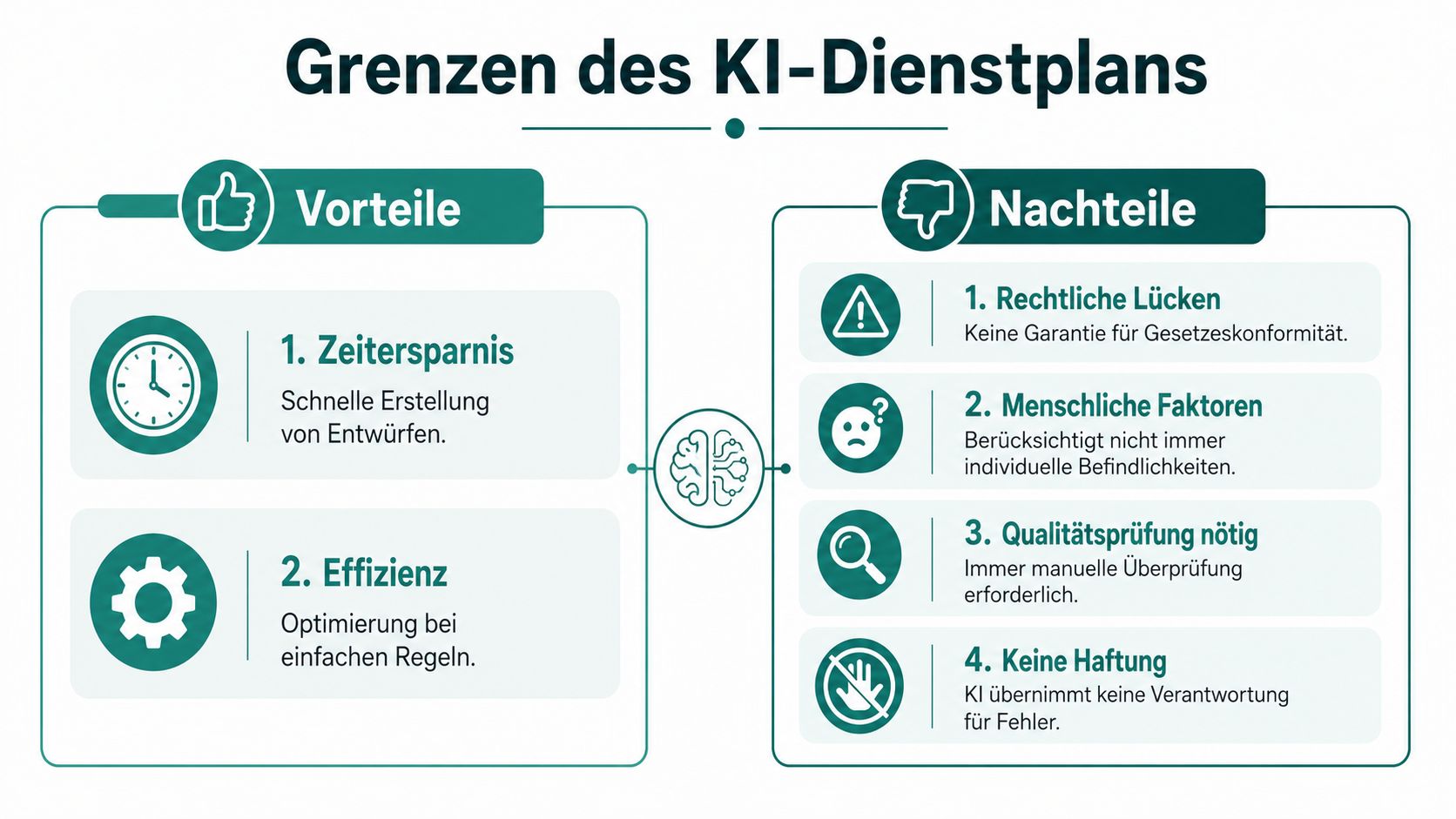
Why the Swiss Context Is Tricky
An open language model is not a closed planning process. Anyone entering real deployment data there must know very precisely beforehand which data may be entered at all and how it is protected.
In everyday life, this quickly affects more than many think. Names, availabilities, absences, qualifications, and restrictions are not harmless notes. They create personal profiles, sometimes with sensitive conclusions about health, workload, or deployability.
For test cases with fictitious names, ChatGPT is often sufficient. For real teams in events, hospitality, security, or care, it is not. As soon as you work with real personnel data in operations, you need a properly regulated process and often also a GDPR-compliant workforce scheduling with secure cloud platforms that transparently maps roles, accesses, and changes.
Where ChatGPT Becomes Factually Inaccurate
ChatGPT processes rules as text. A planning system processes rules as restrictions, conditions, and validation paths. That is a big difference.
An example from security services: Night shifts may only be assigned to certain employees, a fixed rest period applies between two assignments, and additional qualifications are required at some locations. ChatGPT can consider these requirements in the draft. But it does not reliably block a violation if the input is unclear or a condition is added later.
It becomes similarly problematic with name similarities, last-minute changes, and exceptions. Anyone who has had to adjust a plan five times in daily business knows how quickly a small text correction becomes a real staffing error.
A language model generates probable answers. A professional planning tool must prevent unauthorized assignments.
What You Really Need to Check After an AI Draft
Control does not start with the look of the table but with the risks. I always check a plan prepared by ChatGPT in a fixed order:
- Shift coverage: Is every shift fully staffed, including minimum staffing and role mix?
- Qualification: Is the assigned person allowed to perform this task at this location and time?
- Time conflicts: Are there overlaps, double shifts, too tight handovers, or missing rest periods?
- Restrictions and preferences: Were hard exclusions violated, e.g., vacations, medical restrictions, or internal no-go combinations?
- Fairness: Do unpopular shifts accumulate with the same people?
- Documentation: Is it traceable why an assignment was changed or approved?
Fairness is often underestimated. ChatGPT quickly writes that the distribution is balanced. Without clear criteria, that is just wording, not a check. Professional planning requires measurable rules, e.g., for distributing weekends, nights, or last-minute assignments.
Legal Review with ChatGPT Remains Manual
ChatGPT can help with preliminary checks if you enter the plan structured and formulate the rules very precisely. In practice, this means: shifts, times, roles, and restrictions must be clearly stated in the input. Otherwise, the model only checks a snippet and ignores the rest.
The actual risk remains with you. You must know which requirements apply, how they are interpreted in operations, and whether the draft really complies. ChatGPT is not liable. It also cannot reliably detect whether your input contains an exception, a local rule, or a missing parameter.
When a Professional Tool Is the Better Choice
For simple drafts, ChatGPT is useful. For productive planning with responsibility, it is often not enough.
| Situation | Why ChatGPT Is Not Enough |
|---|---|
| Changing pools of floaters | Changes affect multiple shifts simultaneously and must be consistently updated |
| Qualification-required roles | Approvals and exclusions must be systemically checked |
| Real personnel data in circulation | Data protection, permissions, and logging require controlled processes |
| Legally sensitive shift sequences | Text-based checks do not replace fixed rule validation |
| Ongoing operations with many adjustments | You need traceable changes, approvals, and clear responsibilities |
Within this framework, ChatGPT is an assistant for drafting, rephrasing, and first variants. The professional and legal approval belongs in a controlled process. This is exactly where the sensible use for professional shift scheduling in Switzerland ends.
Conclusion: ChatGPT as Assistant, Not Manager
Monday morning, two sick calls, one early shift open. In such a moment, ChatGPT is helpful when a clean variant must quickly be on the table. But it neither replaces responsibility nor the systematics that a reliable shift schedule in Switzerland requires.
My practical verdict is clear: ChatGPT is good for drafts, structure, formulations, and simple variants. It is not sufficient for productive planning with real employees, sensitive data, qualifications, and legal consequences.
ChatGPT works with what you input. If an exception, a restriction, or an operational rule is missing, it still builds a plan proposal. The text can be convincing but factually wrong. That is exactly why the tool should have a supporting role in the planning process, not the leading one.
What I Would Use ChatGPT For
- Initial plan drafts for small teams or clearly defined events
- Comparing shift models and making pros and cons visible
- Preparing tables as CSV, Markdown, or simple list structures
- Formulating rules clearly for internal guidelines or briefings
- Simplifying communication such as explanations of the plan for team leads
What I Would Not Use It Alone For
- Legal review of rest periods, working time limits, and special cases
- Planning with real personnel data, especially sensitive information
- Approval of binding shift schedules for ongoing operations
- Complex workforce scheduling with qualifications, exclusions, and last-minute changes
The crucial point is not whether ChatGPT can write a plan. It can. The real question is whether you bring the proposal into operations in a controlled, traceable, and legally compliant way. As soon as multiple rules apply simultaneously, changes must be documented, or data protection must be solved cleanly, you need a specialized system and a clear approval process.
If you work with ChatGPT, do so with close guidance. Only with test data. Only for clearly limited tasks. And always with a human check at the end.
If you want to move away from Excel, copy-paste tables, and manual follow-ups, check out job.rocks. The platform is made for companies working with flexible employee pools who want to manage availabilities, workforce scheduling, time tracking, and payroll preparation in a clean process. Especially for Swiss teams and industries with many qualifications, last-minute changes, and data protection requirements, this is often the more sensible solution than a chat window.
Meta description: Want to create a shift schedule with ChatGPT? Here you learn how to use it practically, which prompts work, and where data protection and legal limits set clear boundaries in Switzerland.