
Monitoring Tools: How to Find the Right Solution
Looking for the right monitoring tools for your team? Discover types, use cases, and selection criteria for more transparency and control.
Monday morning, just before shift start. Two people call in sick, a client asks for an extra worker for the evening, and the kitchen already reports that lunch service will be tight. If you then open WhatsApp groups, Excel sheets, and the calendar side by side, you’re already behind.
This is exactly what flying blind feels like in workforce planning. Not because no one is working. But because the information is scattered across five places and at the wrong moment you lack the one answer you really need. Who is actually available today? Who has the necessary qualifications? Who is already on site? Where is the workload tipping?
This happens all the time in the event sector. The setup team is at the venue, but two hostesses are still on the way and no one knows if they’re stuck in traffic or simply scheduled incorrectly. In gastronomy, it’s hardly better. The evening rush picks up, the outdoor area fills up, and you only realize late that too many new people without experienced leadership are assigned to one shift.
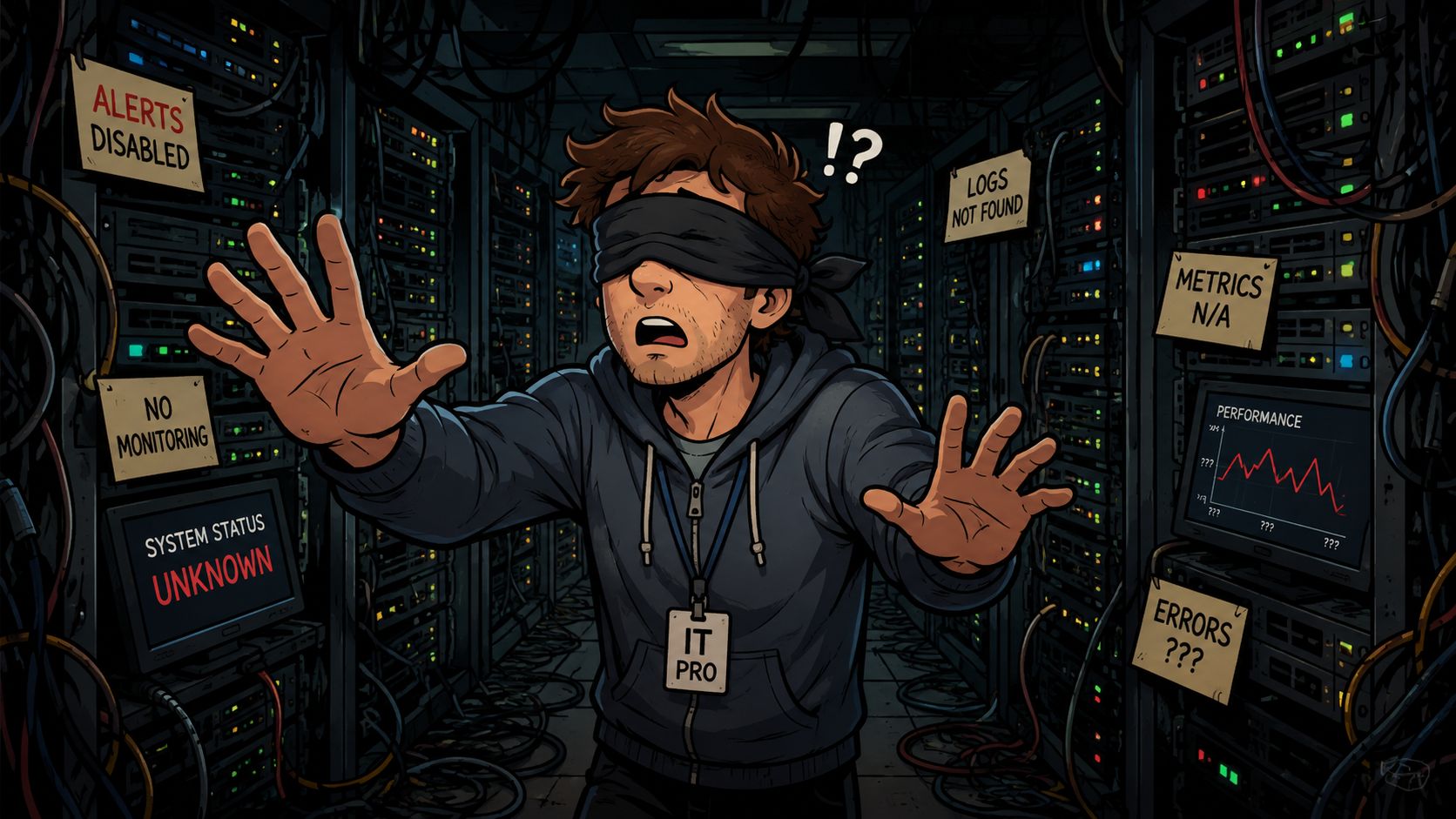
Many teams try to solve this with even more communication. More chats. More lists. More follow-ups. That rarely helps. It just shifts the problem. Instead of clarity, you get noise.
Monitoring tools tackle the issue differently. They continuously collect statuses, make deviations visible, and give you a clear picture of what is happening right now. In IT, this concerns servers, applications, or interfaces. In personnel and workforce planning, it concerns availabilities, check-ins, working hours, qualifications, breaks, and bottlenecks during ongoing operations.
Rule of thumb: If you only notice problems when someone complains, it’s not diligence you’re missing. You’re missing visibility.
The point is simple. A good tool doesn’t just plan with you. It also shows you whether your plan is actually running as you intended. This is exactly where the difference lies in everyday life between hectic chasing and clean management.
Table of Contents
- Introduction: No More Flying Blind
- What Monitoring Tools Really Are
- The Three Main Types of Monitoring Tools
- Use Cases from Your Industry
- How to Choose the Right Tool
- Implementation and What to Watch For
- Frequently Asked Questions About Monitoring and Data Protection
Introduction: No More Flying Blind
When you lack an overview in an ongoing operation, you rarely notice it during quiet moments. You notice it when three things happen at once. A guest complains about waiting time, a shift is understaffed, and the next inquiry from the team is already blinking on your phone. That’s when it shows whether you’re just planning or really have the operation under control.
In event productions, it often looks like this: The briefing was clean, the crew was assigned, the routes are set. On paper, everything fits. On site, it still falls apart because some people check in late, someone without the proper clearance is at the wrong deployment location, or the floater is already tied up elsewhere. Without monitoring, you reach for the phone and start laboriously collecting status updates.
In gastronomy, it’s similar. You plan for a normal Saturday, then spontaneous rain comes, all guests move inside, and your team is distributed to the wrong stations. The error is not necessarily in the plan. The error is often that you have no ongoing feedback from operations.
Why Pure Planning Is Not Enough
Planning is the intention. Monitoring is the feedback from reality. Both belong together.
A duty roster tells you who should be where. A monitoring tool shows you who is really there, who is missing, where delays are building up, and which rules are currently being broken. This is worth more in everyday life than the most beautiful Excel template.
- For short-term absences, you need visibility of availability and qualifications.
- For high guest volumes, you need indications of bottlenecks, not just complaints.
- For distributed teams, you need a status that doesn’t rely on calls.
Many businesses don’t suffer from a lack of readiness but from a lack of shared visibility of the current state.
Where the Benefit Lies in Everyday Life
Good monitoring tools don’t take away your thinking errors. But they make them visible earlier. That saves hectic moments. And it makes decisions cleaner.
If you see in a hotel that room cleaning on one floor is stuck, you can counteract before check-in is blocked. If you see at an evening event that part of the team is already on site and another part is still open, you don’t have to call ten people individually. You act based on a clear status picture.
That’s what this article is about. Not technical gimmicks, but tools that help you keep an overview in personnel and workforce planning, even when things get hectic outside.
What Monitoring Tools Really Are
Many confuse monitoring tools with planning software, task lists, or simple time tracking. That’s understandable but impractical in everyday life. Because each of these tools answers a different question.
A calendar shows appointments. Workforce planning assigns people to shifts. A task app records what needs to be done. Monitoring tools show you the current state of a system or process. They don’t primarily answer “What did we plan?” but “What is really happening right now?”.
The Dashboard in Operations
The simplest analogy is the dashboard in a car. It doesn’t drive for you. But it tells you if you’re speeding, the tank is running low, or the engine is overheating. Without these signals, you only notice some problems when they have already occurred.
In operations, it works the same way. A monitoring tool continuously collects signals and makes them readable. In IT, this can mean a service is not responding properly. In workforce planning, it can mean a shift is not fully staffed, a break is missed, or a team at a location has not fully checked in yet.
The distinction is important. Monitoring doesn’t do the work for you. It makes visible where you need to act.
| Term | Purpose | Typical Question |
|---|---|---|
| Planning Tool | Set assignments, shifts, appointments | Who should work tomorrow? |
| Task Tool | Manage to-dos and responsibilities | Who is handling teardown? |
| Monitoring Tool | Make status and deviations visible | Who is there now and where is it going wrong? |
How to Recognize a Good Tool
A usable tool doesn’t just deliver raw data. It makes patterns visible that you can immediately interpret in operations. Otherwise, you just have a digital version of list chaos.
Watch for these points:
- Clear statuses: You immediately see what is open, delayed, active, or completed.
- Meaningful alerts: The tool doesn’t report every little thing, only what really matters for operations.
- Actionable: The display should directly indicate what you can do.
Rule of thumb: If a tool shows lots of data but you still ask questions in chat, it’s not monitoring anything useful for your everyday work.
Especially Important for Flexible Teams
Especially with changing crews, temps, freelancers, or multiple locations, static planning is not enough. You need ongoing feedback. Who has confirmed? Who has arrived? Who has clocked in? Who is even allowed to take this assignment?
That’s why the perspective on monitoring in personnel is different from classic IT. It’s less about server values and more about operational capability in real time. Not thought technically, but practically. The room fills up. Service starts. The team distributes. And you want to see if your plan holds in real operations.
The Three Main Types of Monitoring Tools
Not every monitoring tool solves the same problem. This is one of the most common wrong purchases. A team looks for more overview but buys a tool that only monitors machines or applications. In everyday life, that helps little if your real problem is shifts, check-ins, or workflows.
Keeping Infrastructure in View
These tools monitor the technical base. They report whether servers are reachable, storage is running low, or networks react unusually. For IT teams, this is important because nothing runs smoothly without a stable foundation.
In the daily life of an event operation, this plays a background role. For example, when your POS system at the venue fails, the Wi-Fi at registration is down, or tablets for check-in don’t work properly. The tool then helps not with personnel assignment but with the question of whether the technical environment holds.
Controlling Applications
This goes deeper into programs and digital services. These tools show where an application is stalling, which interface produces errors, or why a booking doesn’t go through cleanly.
This is useful if you work with booking systems, ordering apps, guest registration, or internal portals. Suppose a restaurant uses an app for reservations and orders. If the app stalls, it’s no use just putting more staff on the floor. First, you need to see if the problem lies in the application.
Managing Processes and Teams Cleanly
For personnel and workforce planning, this group is usually the most important. Here, the tool monitors not only technology but the ongoing process. Who is available? Who has confirmed the assignment? Who is on time? Where are qualifications missing? Where are breaks getting out of hand?
This is exactly what you need in flexible teams. Not only in large companies but already when you frequently have changing deployment locations, shifting staffing, or last-minute replacements.
A few typical situations:
- Event operations: You want to see before admission if all gatekeepers and hosts are really on site.
- Gastronomy: You want to recognize if too many new people without experienced leadership are working in one shift.
- Cleaning or care: You want to check if time windows, responsibilities, and mandatory breaks are observed.
| Type | Main Goal | Example Question |
|---|---|---|
| Infrastructure Monitoring | Keep technical base in view | Is the system reachable? |
| Application Monitoring | See errors and bottlenecks in software | Why isn’t the booking interface working properly? |
| Process and Team Monitoring | Manage workflows in operations | Who is missing, who is there, where is a bottleneck forming? |
The biggest misconception in selection is simple. Many look for a “monitoring tool” but actually mean a tool for operational management in ongoing personnel deployment.
Which Category Really Helps You in Everyday Life
If you build duty rosters for flexible teams, you don’t first need the technically deepest system. You need the tool that answers your operational question. In many businesses, that is not “How fast does the server respond?” but “Can I run the deployment cleanly with the current staffing?”
That doesn’t mean IT monitoring is unimportant. It just means that for workforce planners, it often doesn’t solve the most pressing problem. Those working in hotels, agencies, security services, or gastronomy usually first need visibility of people, shifts, and real workflows.
Use Cases from Your Industry
Theory only helps up to the point where operations pick up. After that, it counts whether the tool creates clarity in real situations.
Event and Promotion
Before a big event, crew arrivals rarely go perfectly. One person is at the wrong entrance, another is stuck in traffic, and a third hasn’t seen the last deployment change. Without monitoring, dispatch spends their time calling around.
With a clear view of status and check-ins, the work shifts. You see who has confirmed, who has arrived, and where you need to follow up early. This makes a big difference especially with multiple deployment locations. Not because everything suddenly runs smoothly, but because you recognize deviations early.
Another practical point: At events, IT and operational technology often meet directly. Access systems, registrations, scanners, or cash registers depend on processes that must be staffed properly. Those who want to dive deeper will find a good perspective at IT OT in CE marking on how digital and operational systems interact in practice.
Hotel and Gastronomy
In hotels, stress often doesn’t start at reception but in the background. Rooms are not yet released, housekeeping is stuck on one floor, and guests with early check-in are already waiting at reception. If you only notice this when the queue forms, you no longer have real control.
Process monitoring shows you where tasks are stuck in such situations. Not as an abstract evaluation but as a live picture of the day. You see which areas are catching up, where you need to redistribute, and whether a bottleneck is local or affects the entire process.
In gastronomy, it’s similar. The plan can be clean but still fall apart if reservations come in differently than expected, the weather changes, or part of the team is still uncertain. Then no rigid shift sheet helps. You need visibility of how the shift is running right now.
- Service area: Where are tasks piling up?
- Kitchen: Where is the team reaching limits?
- Shift management: Who needs support instead of just more instructions?
Care and Sensitive Services
In care, support, or security services, monitoring is even more sensitive. The tool must not become an instrument of mistrust. It must secure operations.
A classic example is breaks. On paper, they are planned. In real operations, they quickly get overlooked if a handover conversation takes longer or an emergency occurs. A good tool shows management when rules are about to be broken. Then you can intervene before a small deviation becomes a serious issue.
If a tool only conveys control, the team rejects it. If it creates fair processes and clear statuses, it is accepted in everyday life.
The difference is huge. Surveillance feels like pressure. Management feels like clarity. That’s exactly why it’s worth always thinking about monitoring in personnel from the perspective of operations, not just from headquarters.
How to Choose the Right Tool
The market is full of tools, demos, and feature lists. That’s exactly where many businesses waste time. They compare interfaces instead of asking tough questions. In the end, they buy a system that looks good in tests but creates too much friction in real shift operations.
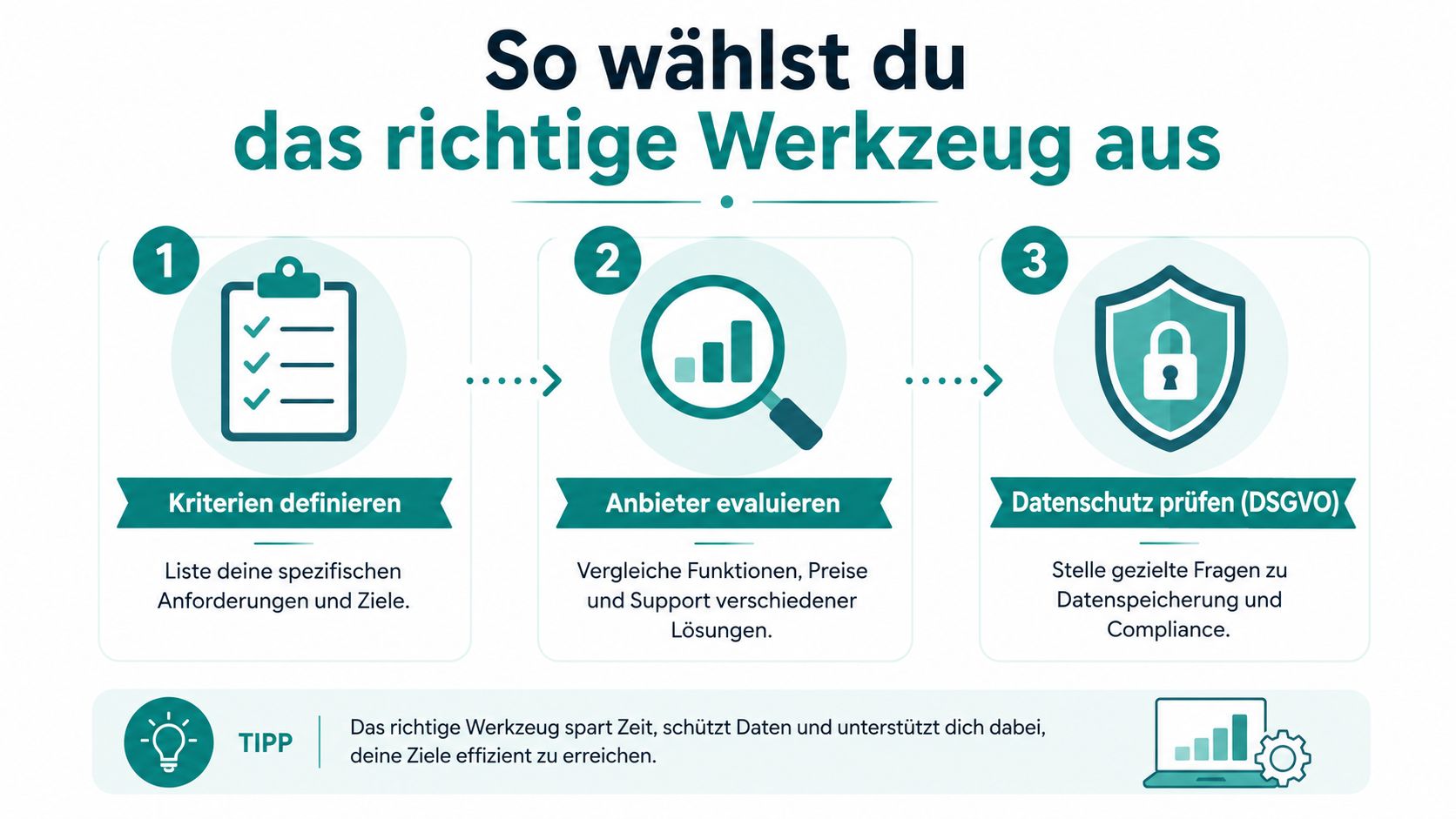
Questions to Ask the Provider
Don’t just ask what the tool can do. Ask how it behaves in your operation’s everyday life.
- Data protection: Where are the data stored and processed? If you work with personnel data, you need a clear answer.
- Integration: Is there a ready connection to your payroll, time tracking, or planning environment?
- Alerts: Can you configure notifications so that only real deviations come through?
- Reports: Can you create views that fit your weekly meetings and shift handovers?
- Growth: What happens when your team grows, you add more locations, or experience seasonal fluctuations?
The last point is often underestimated. Those who only look at the current state during selection quickly buy too small. If you want to dive deeper into this topic, it’s worth looking at Scalability in software for growing teams.
Sometimes it also helps to look outside your own industry. A good test principle is always the same: You don’t want the loudest packaging but a clear comparison of purpose, method, and meaningfulness. That’s why well-structured comparisons in other fields are useful. A good example is this detailed gut test comparison, because it shows how to distinguish offers based on clear criteria instead of advertising language.
Also interesting is a short video if you prefer to think through selection and implementation visually:
Why Many Selection Rounds Fail
The most common mistake is not a bad product. It’s an unclear question. If you look for “a monitoring tool” without naming your core problem, the process almost always ends with a demo that shows a lot but solves little.
Better check three things very soberly:
| Check Area | Good Answer | Warning Sign |
|---|---|---|
| Practicality | Shift managers understand the tool immediately | Only admins can handle it |
| Relevance of Alerts | Notifications help with intervention | Constant noise without benefit |
| Integration with Processes | Fits planning, time, and payroll | Stands alone as an isolated solution |
Don’t buy a tool for the exceptional case. Buy the tool that makes your normal stressful Tuesday easier.
If you select with this perspective, it quickly becomes clear what looks nice and what really supports you.
Implementation and What to Watch For
A new tool rarely fails because of features. It fails because the team doesn’t see the point or the start is too hectic. Especially in shift work operations, this is sensitive. When people are under pressure in everyday life, they don’t forgive unclear introductions.
Acceptance Is Created Before Rollout
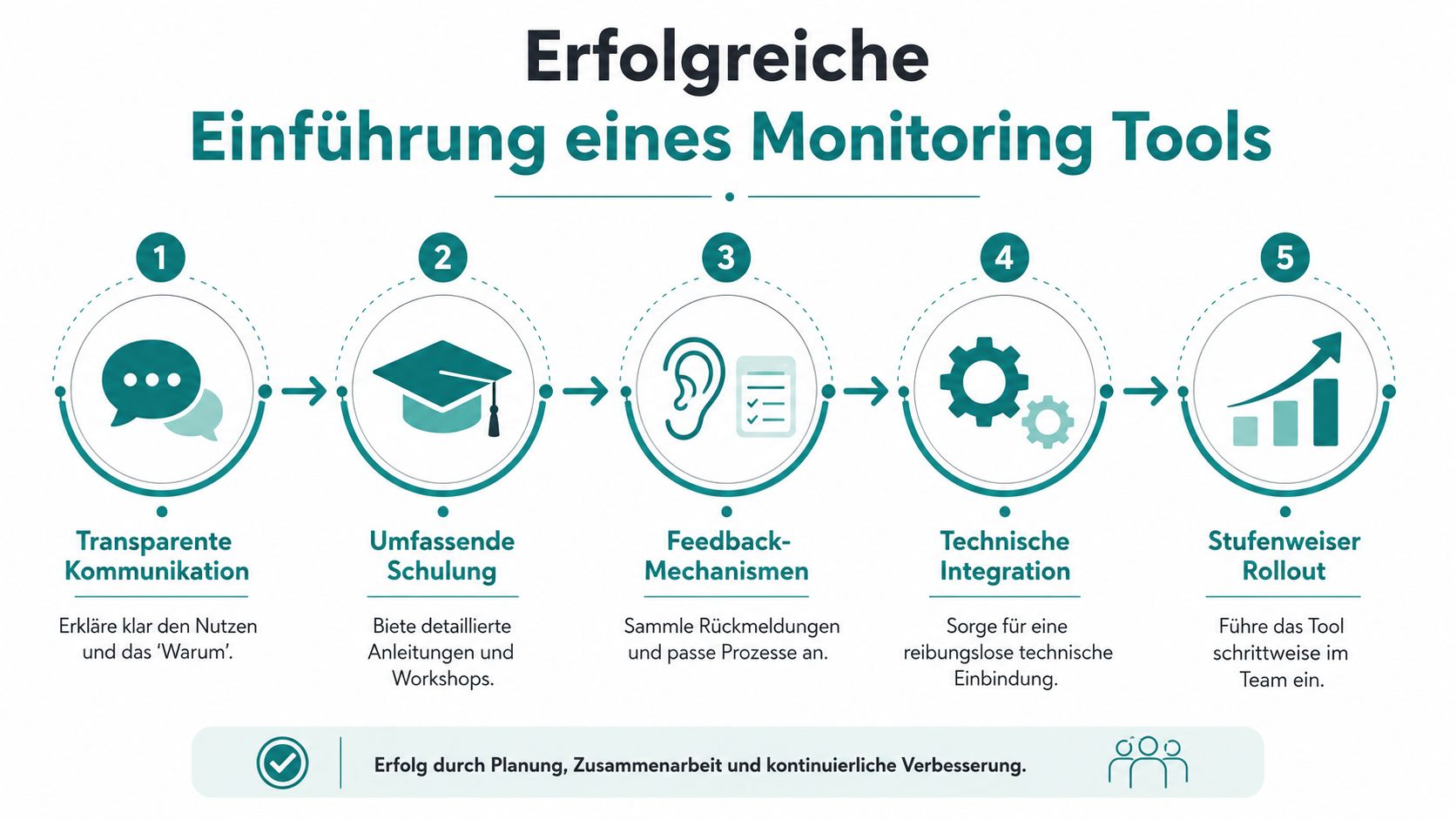
Tell the team early why the tool is coming. Not in bureaucratic language but in everyday terms. If employees only hear that more is being recorded now, they think of control. If they see that shifts become clearer, times are recorded fairly, and availabilities are considered properly, the reaction is different.
This applies especially to mobile teams. Those working on the go don’t want to click five steps to enter availability or clock a time. The easier it works in everyday life, the more likely the system will be accepted.
It also helps to clarify integration and data exchange early. If your tool is supposed to interact with other systems later, you shouldn’t tackle that only after the start. A good entry point is the look at API integrations and interfaces for workforce processes.
Start Cleanly Instead of All at Once
A pilot with one team or location is often wiser than a broad rollout. This way, you quickly notice where terms are unclear, which alerts annoy, and which views are really needed in everyday life.
Work with clear feedback loops:
- Ask shift managers: Which displays really help in daily business?
- Involve employees: Where is the operation unclear or unnecessarily complicated?
- Sharpen rules: Which alert should come through immediately, which is enough in the daily report?
You don’t recognize a good rollout by everything being perfect on day one. You recognize it by small problems becoming visible quickly and being properly fixed.
A simple sequence has proven practical: first explanation, then training, then test operation, then broad use. If you skip this sequence, the tool quickly ends up in the same corner as old lists. Available but not reliably used in real operations.
Frequently Asked Questions About Monitoring and Data Protection
Are You Allowed to Monitor Employees at All?
You can’t just observe every movement because it’s technically possible. In personnel everyday life, a clear purpose is needed. Recording working hours, scheduling assignments, tracking presence at deployment locations, or detecting break violations early can be justifiably necessary. The key is to communicate openly what is recorded and why.
What Applies with Works Council or Staff Representation?
As soon as a system is suitable to make behavior or performance visible, you should involve the representation early. This creates clarity and prevents later resistance. In many companies, this is exactly the point where good initiatives unnecessarily stall.
How to Implement Data Protection Properly
Pay attention to clear access rights, fixed deletion periods, and a provider who handles data protection transparently. If you work with teams in Switzerland or want to classify the data issue properly, this overview on Swiss data protection in workforce software helps.
In short: Not everything measurable should be measured. Measure only what is really necessary for workforce planning, fairness, and operational safety.
If you want to finally guess less and manage more precisely with shift planning, availabilities, time tracking, and ongoing visibility of your deployments, check out job.rocks. The platform is designed for flexible teams and helps you organize personnel in events, gastronomy, hospitality, and other deployment-driven industries clearly, mobile, and data protection compliant.