
Software for Cleaning Companies: Simplified Deployment Planning
Plan changing cleaning teams, locations, and working hours centrally – with mobile deployment planning instead of Excel, paper, and WhatsApp chaos.
Monday morning, 6:40 a.m. Three people call in sick, two others are already at the first location, and paper lists from Friday are still lying on the desk in the office. Your phone is on the table, WhatsApp groups are buzzing, and somewhere there’s still no confirmation whether the school opens earlier than usual today. This is exactly the point where many companies realize that Excel can barely handle shift planning, but quickly reaches its limits with changing teams, multiple locations, and last-minute absences.
The Swiss cleaning industry is a typical environment for this. It is labor-intensive, spread over many deployment sites, and in daily operations, clean handovers, clear availabilities, and reliable time tracking count. Anyone working here with slips of paper, chat messages, and spreadsheets loses not only time but also oversight of location, person, and assignment.
Table of Contents
- Why Cleaning Companies Need Specialized Software
- The Five Core Functions of Modern Cleaning Software
- Multi-Location Logic as a Decisive Difference
- Typical Use Cases from Practice
- Data Protection and Compliance in Switzerland
- Selection Checklist for Your Software Evaluation
- Your Next Step to Digital Deployment Planning
Why Cleaning Companies Need Specialized Software
When Monday Starts with Three Absences
For a cleaning company with 30 employees and 12 locations, a simple spreadsheet is sufficient only until the first sick leave occurs. Then you need to quickly see who is available, which locations are affected, and who has the necessary experience. This is exactly where the familiar gaps arise in practice because phone lists, WhatsApp groups, and handwritten time sheets do not come together in a unified picture.
A typical mistake looks like this: planning is done in Excel, team feedback comes via voice message, and location managers later ask why a shift was assigned twice. This not only costs time in the office but also leads to misunderstandings on site. For companies with distributed deployment sites, part-time models, and last-minute personnel changes, this is simply an unnecessary risk.
Practical rule: If you have to search WhatsApp first thing in the morning before you can say who is working where, you are already too far from a clean process.
The switch from paper and individual lists to mobile solutions was a real turning point for many companies. Modern building service providers typically bundle time tracking, personnel planning, accounting, and controlling in one platform today because otherwise work falls apart between office and site. A useful starting point for comparing such processes is the Practical Guide to Digital Deployment Planning if you want to first check your own planning process.
Where Generic Tools Reach Their Limits
Generic planning tools often think in tasks or projects. But a cleaning company thinks in locations, shifts, substitutions, wage rates, and service lists. This is not a small difference but the reason why standard software often looks neat in everyday use but does not support real coordination.
The Swiss starting point intensifies this. The market is personnel-intensive, distributed, and shift changes often happen at short notice. In addition, modern digital processes are not only supposed to save work but also have to be traceable because working hours and deployment data must not simply stand loosely side by side. Anyone who ignores this only builds a prettier Excel file but no reliable deployment control.
For practice, this means you need software that not only stores names and dates but also combines availability, qualification, location reference, and substitution logic. Otherwise, you plan formally but have to manually piece everything together again with every absence. This is exactly where the company loses the most time.
The Five Core Functions of Modern Cleaning Software
1. Deployment Planning with Availability Query
If a colleague cancels early in the morning, you don’t need a phone marathon. You need immediate insight in the software into who is free that day, who is already working at a location, and who is even eligible for the deployment. This counts especially in Swiss cleaning companies because teams often change, multiple locations run in parallel, and substitutions often have to be organized at short notice.
A typical example is a Zurich office building with regular evening cleaning and a school with fixed time windows during the day. If someone is absent, the planning must immediately show who knows the location, which shift is open, and when the person is available. Without availability query, you plan blindly.
2. Mobile Time Tracking
Paper slips on the passenger seat are still a classic in the cleaning industry, but they don’t help if you want to bill precisely by location at the end of the month. Mobile time tracking solves this because employees clock in and out directly at the deployment site. The recorded times thus end up where they are needed instead of being copied in the office later.
Practical advantage: When time is recorded on site, you don’t have to piece it together later from queries and handwriting.
For Swiss companies, this is more than convenience. Since the revised data protection law, stricter requirements apply to handling personnel data, and clean recording with role rights and logging is much more sustainable than loose Excel files. You can find more about this in the Guide to Swiss Data Protection Requirements if you want to check the legal framework.
3. Qualification Filter
Not every cleaner can take on every assignment. In a medical practice, a laboratory, or a location with special access conditions, you need different people than in a simple office building. A qualification filter saves you from exactly the wrong assignment because the software only shows suitable employees for selection.
This is especially helpful in daily operations when someone gets sick and you need a quick replacement. Instead of deciding by gut feeling, you filter by experience, location knowledge, or special requirements. This way, the right person ends up in the right place without you having to explain three times what matters.
4. Employee App
The app is the place where your teams work, not the office. There they see deployment details, receive reminders, report availabilities, and confirm services. This is valuable for cleaning because you don’t have to roll out every schedule change by phone.
For an evening location, for example, the app can bundle deployment information, access instructions, and the relevant checklist in one place. Employees clock in directly on site, confirm completed items, and report queries without media breaks. This keeps the line between planning and execution short.
5. Payroll Integration
The best planning helps little if payroll preparation afterwards is manual again. Especially in the cleaning industry, wage rates can depend on collective agreements, canton, function, or deployment time. Therefore, the clean linking of shift, confirmed hours, and the appropriate wage rate is an important test. Check in the demo which data can be transferred to your payroll system and which controls are planned before billing.
If you want to set only one priority today, then these three in order: mobile time tracking, availability query, payroll connection. The app and qualification filter are almost always more important in daily operations than a nice dashboard that only shows numbers. Functions like reporting or evaluations can often be added later.
Multi-Location Logic as a Decisive Difference
Why a Location Is Never Just a Data Record
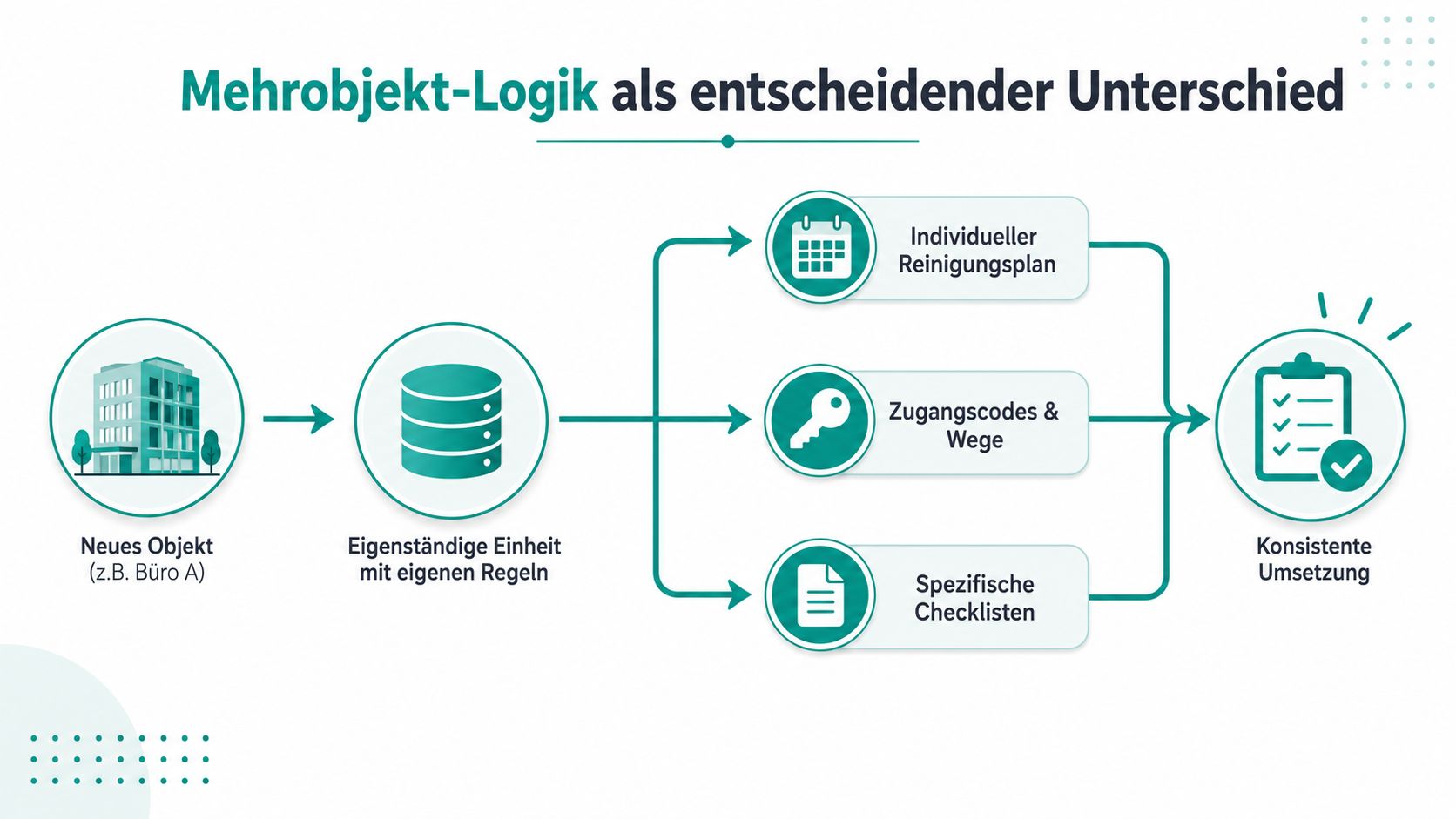
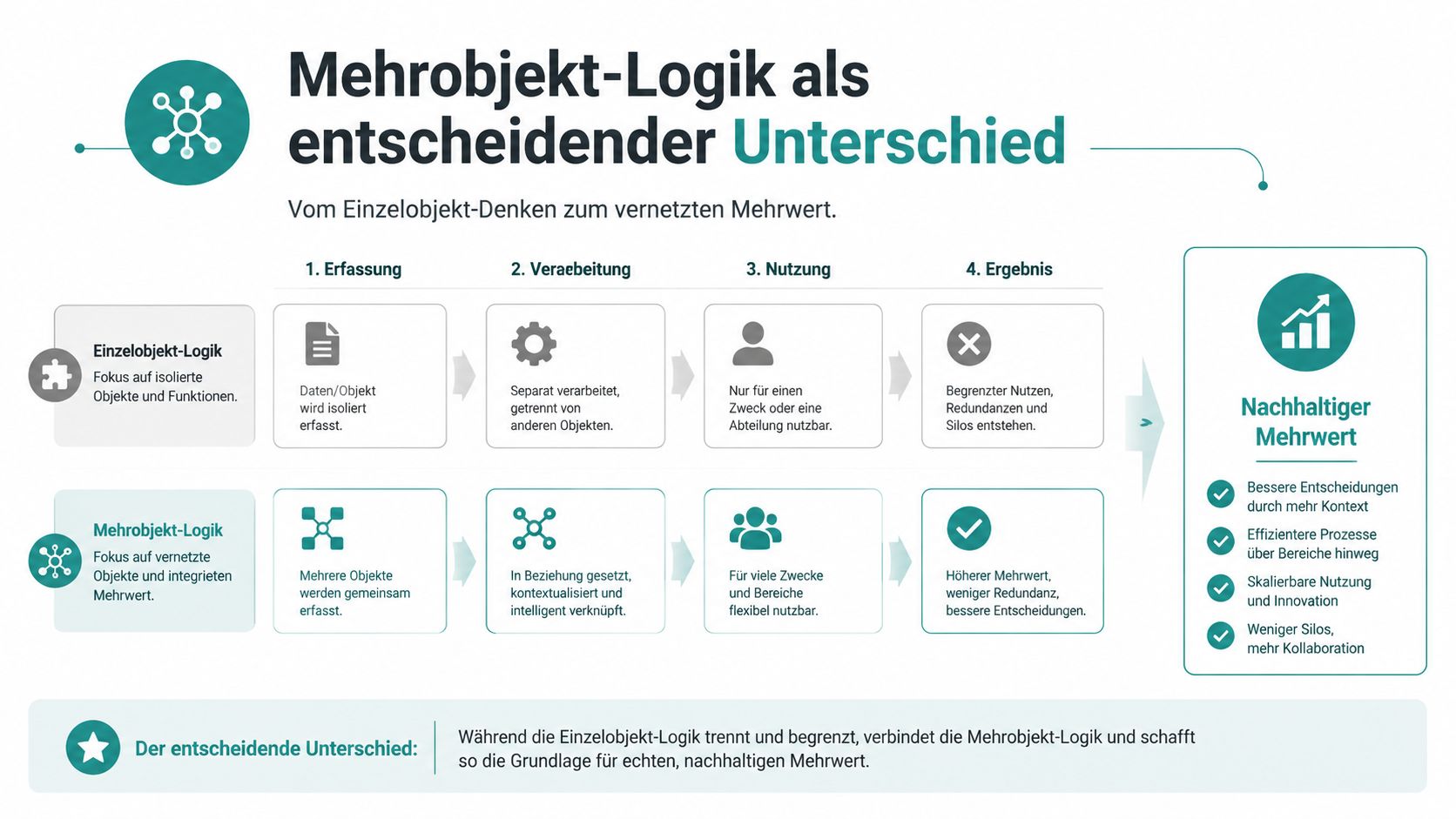
In cleaning, a location is more than an address. It has a billing recipient, its own service plan, a time account, and often also substitution logic for holidays or absences. Exactly this multi-location logic separates specialized software from general planning.
An office building, a school, and a medical practice do not run the same way. In the office, maybe the evening routine counts; in the school, the fixed time in the daily schedule; in the practice, the strict order of tasks. Anyone who treats everything like a normal assignment loses the differences between contract, deployment, and billing.
The Swiss environment makes this even clearer. The market is professionally organized and labor-intensive, and coordination effort grows with every additional location. Good software must therefore manage each location independently, not just the employee next to it. Otherwise, planning quickly becomes confusing.
What the Logic Changes in Daily Operations
If you have three locations, the difference is immediately clear. The office building gets its own shift, the school its own cleaning plan, and the practice its own substitution rule. Mobile time tracking runs per location, and in the end, contract billing is again linked to exactly this data record.
This is where the real benefit lies. Paper reports, WhatsApp agreements, and duplicate notes disappear because shift planning, time tracking, and billing use the same data basis. This saves not only queries but also the typical office work that otherwise accumulates at the end of the month.
Rule of thumb from practice: As soon as you can no longer see location, time, and billing in one go, you are planning against reality.
Generic tools can map parts of this. But they rarely distinguish cleanly between billing recipient, location plan, and substitution rule. This is exactly where real cleaning software separates from a general calendar or a task board. Anyone who wants to test this difference can also look at the special planning for deployment companies in healthcare because similar availability and location logics occur there.
Typical Use Cases from Practice
Illness, Part-Time, and Evening Shifts
The first real-world test is always the same: someone is absent. Without software, you call around, manually check who can work today, and hope the info reaches the location on time. With a digital solution, you immediately see free employees, check qualifications, and send the new plan directly to the app.
The second case is part-time. Many people in cleaning do not work the same every day, and coordination becomes tricky exactly then. If availabilities are not kept up to date, you schedule someone who has already committed elsewhere. A good app with availability updates prevents exactly these gaps.
Comparison of the Three Most Common Cases
| Case | Without Digital Help | What You Need in the Software |
|---|---|---|
| Sick leave | Phone chain, WhatsApp, queries | Availability query, substitution logic, instant notification |
| Part-time change | Manual lists, error-prone coordination | Current availability, recurring shift patterns |
| Evening and weekend shifts | Paper schedule and many individual agreements | Mobile app, push notifications, clear location info |
The third case concerns times outside office hours. Evening and weekend deployments often run with less reference to the office, so the team needs all important info directly on the device. Anyone who has to call first loses time and nerves. With mobile confirmation, the office also knows later what was actually done.
Such processes quickly show whether software only makes planning prettier or really supports deployment. If you most often have sick leave, you must first check substitution logic. If part-time is the rule, availability and reminders count. If your company has many deployments outside business hours, the app with clear location info is the most important component.
Data Protection and Compliance in Switzerland
Why Time Data Must Not Be Handled Carelessly
As soon as you digitally store working time, location, or availability, you process personal data. In Switzerland, since the revised Data Protection Act of September 1, 2023, a clear framework applies. Processing personal data requires transparency, purpose limitation, and appropriate security. For particularly sensitive data or profiling with high risk, additional requirements apply under the DPA, in practice also where sensitive personnel data is used or automatically evaluated [job.rocks].
For daily operations, this means concretely that a mobile app is not a gimmick. If cleaning staff record clock-in and clock-out times, location data, or availabilities via app, you need clear information and technical protective measures. An Excel list without role rights, logs, and controlled access is poorly compliant.
What You Must Document Internally
Working hours, change logs, and payroll preparation should be traceable. Not because you want to collect bureaucracy, but because you must be able to immediately show what was planned, confirmed, and changed when in case of queries or a payroll dispute. This is especially important in cleaning with shift changes, multi-location logic, and last-minute deployments.
Practical rule: If you cannot explain changes later, the process was not clean enough.
The typical checkpoints are clear. Who changed the deployment? When was availability adjusted? Which hours were confirmed on site? Software with logging and role rights is much better suited for this than loose tables or handwritten reports. Anyone who tests these questions early saves unnecessary discussions later.
Selection Checklist for Your Software Evaluation
How to Test a Solution in Your Operation
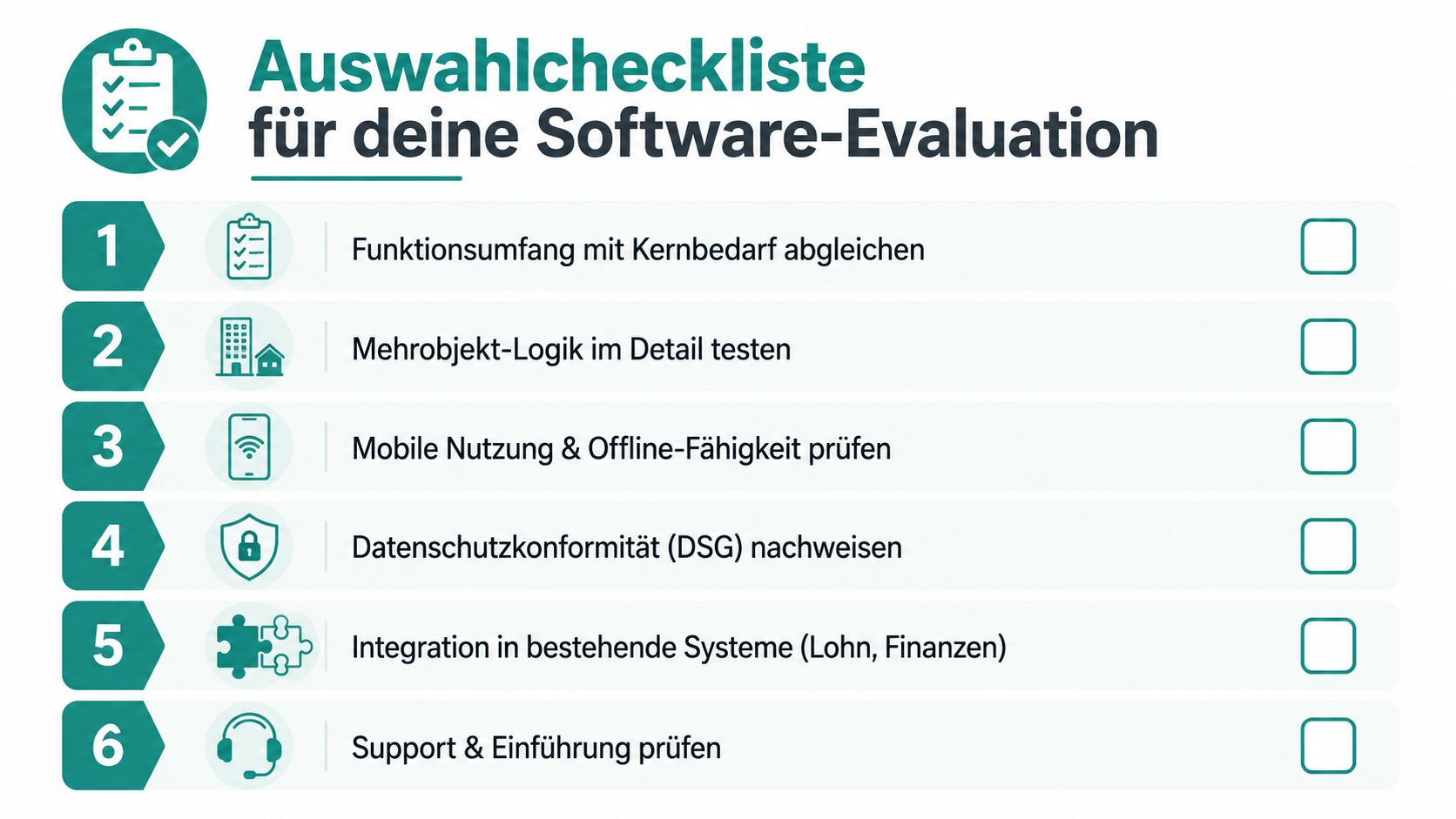
Selection does not start with a product sheet but with your daily routine. Take three real locations, one sick leave, and one part-time change, then check whether the software can map this without tinkering. If the system only becomes usable after many detours, it does not fit your company.
First, pay attention to multi-location logic. Each location must be able to be managed independently, with the appropriate billing recipient, own shifts, and clean time allocation. Then test mobile use because your teams do not work in the office but on site.
Four Points You Should Check Immediately
- Location logic and substitution: Can the software cleanly separate multiple properties and reschedule absences directly?
- Mobile recording in daily use: Does clocking in and out work where people actually work?
- Payroll preparation: Can hours and wage rates be linked so you don’t have to calculate afterwards?
- Auditability: Are changes, confirmations, and availabilities stored traceably?
For a reliable test, you need real locations, not a demo data set. A four-week proof-of-concept with real deployments shows whether collective agreements, service catalogs, and payroll office fit together. In such a test, you also notice whether the operation in the team is understandable or only looks good on paper.
A sober look helps with operating costs. Compare not only the license or price per deployment but also the effort for planning, coordination, time tracking, implementation, and payroll preparation. The decisive factor is whether the solution reduces administrative work in your real daily routine and grows with your deployment volume.
Don’t ask for colorful masks in the demo. Ask about absences, part-time, location changes, and payroll preparation.
Your Next Step to Digital Deployment Planning
If you still work with Excel, paper, and WhatsApp in your operation today, you don’t have to rebuild everything at once. Start where you do the most rework, i.e., with availability, mobile confirmation, and time tracking on site. Once these three points run smoothly, the rest of the planning will also become noticeably calmer.
For smaller companies with few locations, a clean start with mobile recording and a clear location structure is often enough. Medium-sized companies should also check substitution logic and payroll preparation because most errors occur there in daily operations. For larger teams, it is especially important that new locations can be created quickly and shifts can be moved without office chaos.
The cantons set their own frameworks for minimum wages, and this makes payroll preparation in cleaning tricky. If the software does not cleanly link shift, hour, and wage rate, you settle at the wrong time with the wrong rate. Such errors are not a marginal topic; they land directly in daily operations, in audits, and in payroll. Therefore, digital planning should always also consider the payroll side.
For a first practical test, take three real locations, check the current planning, and mark the point where the most manual rework happens in daily business. That is where the first digital step belongs. job.rocks bundles deployment planning, time tracking, and availability control for flexible teams. You can use it to check whether your cleaning company can move from the paper world to clean location planning.