
Spitex Scheduling Software: Optimally Manage Your Team
Spitex Scheduling Software: Discover core features, selection criteria & a plan for successful implementation. Manage your team optimally.
You sit in the office on Monday morning, the coffee is getting cold, and the phone won’t stop ringing. An employee calls in sick. A client needs an additional visit the same day. Weekend notes are scattered on paper, in WhatsApp, and somewhere in an Excel file. You shuffle times back and forth, call people, send messages, and hope that in the end no one ends up in the wrong place.
This is exactly the point where many look for Spitex scheduling software. Not because a new tool sounds nice, but because otherwise every day starts with patchwork. When planning, communication, time tracking, and qualifications are stored in different places, you pay the price with hectic pace, mistakes, and frustration in the team.
The crux is rarely just the technology. The bigger question almost always is: How do you introduce a new way of working into the team so that it is perceived not as control but as relief? This is exactly where it is decided whether software helps in everyday Spitex work or is bypassed after a short time.
Table of Contents
- The Daily Struggle with Scheduling
- What Spitex Scheduling Software Really Is
- The 5 Core Functions for a Smooth Process
- Ensuring Compliance and Legal Security
- Choosing the Right Software for Your Operation
- Winning the Team for Change and Implementing the Software
- Measuring Success and Reaping the Rewards
The Daily Struggle with Scheduling
Monday, 7:12 a.m. The first route is already underway, but the plan only holds halfway. A specialist calls in sick. Mr. Meier’s midday visit must be moved forward because he has a doctor’s appointment in the afternoon. A new colleague doesn’t know she has to pick up an apartment key from the safe for Mrs. Keller. Such days are not the exception in Spitex but part of the business.
If you still work with Excel, paper lists, and individual chats, you not only lose time. You mainly lose overview. Who is really available today? Who has which qualification? Who knows the client? Who can step in without creating the next gap? These are questions quickly answered by call in stressful moments.
Studies in healthcare show that those responsible for planning spend up to 40% of their working time on administrative ad-hoc tasks such as last-minute rescheduling and the associated communication (Study on administrative ad-hoc tasks in healthcare). This matches what many managers experience daily. The actual plan is often just the starting point. The rest of the day consists of corrections.
Those who see scheduling only as a weekly plan underestimate the real effort. The work is almost always in the changes.
A typical example: You adjust a shift in the morning, send three messages, call a substitute, and enter the new time in the list. Two hours later, another version of the plan is circulating because a colleague still has the printout from the previous day in her bag. This is where chaos arises. Not because the team works poorly, but because the information does not live in one place.
If you know this situation, it’s worth taking a look at digital scheduling in outpatient care. Not as a technology project, but as an answer to a daily routine that is hardly manageable with manual work anymore.
What Spitex Scheduling Software Really Is
Many first imagine a Spitex scheduling software as just a calendar on the screen. That’s too limited. A calendar shows appointments. A useful scheduling solution connects appointments with people, qualifications, availabilities, locations, service types, and actually performed hours.
A Calendar Manages Appointments. A Scheduling Solution Manages Work
Let’s take a simple case. Mrs. Muster needs basic care in the morning, wound care on Thursday, and prefers consistent caregivers. In a calendar, you can enter visits. Nothing more. In a proper Spitex solution, you store which services are needed, which specialist is suitable, who is working in the neighborhood, and who is actually free that day.
That makes the difference in everyday work. You no longer search through three lists and two heads for the right person. The system brings the necessary information together so you can make sensible decisions.
Rule of thumb: If your team maintains availability, holidays, qualifications, and changes in different places, you don’t have planning. You only have several half-truths.
A Shared Data Base Relieves Pressure During the Day
A good solution becomes the central working basis. Management, dispatch, and employees access the same current status. Changes don’t end up in side channels but where everyone can see them. This reduces misunderstandings and saves inquiries.
Practically, this looks like:
- Employees report availability directly in the system. You don’t have to search chat histories first.
- Absences appear immediately in the plan. Holidays, training, and sickness are not handled separately.
- Client data and assignment info are linked. Address, access notes, and required services are attached to the assignment.
- Performed hours flow back into the overview. You see not only what was planned but also what actually happened.
Another often underestimated point: A good solution detects conflicts early. If the same person has two assignments at the same time, if a qualification is missing, or if a rest period is tight, the system should not remain silent. It should make the conflict visible before someone sets off.
The Goal Is Less Searching and Clearer Decisions
In everyday Spitex work, you don’t need a pretty tool that only displays appointments colorfully. You need a tool that holds the operation together. This also includes the mobile side. Employees see assignments on the go, report inquiries, record times directly at the client, and don’t have to enter slips after work.
Therefore, the better question when choosing software is not: Does the software have a calendar? The better question is: Does it help you keep the day organized even when three things go wrong at once?
The 5 Core Functions for a Smooth Process
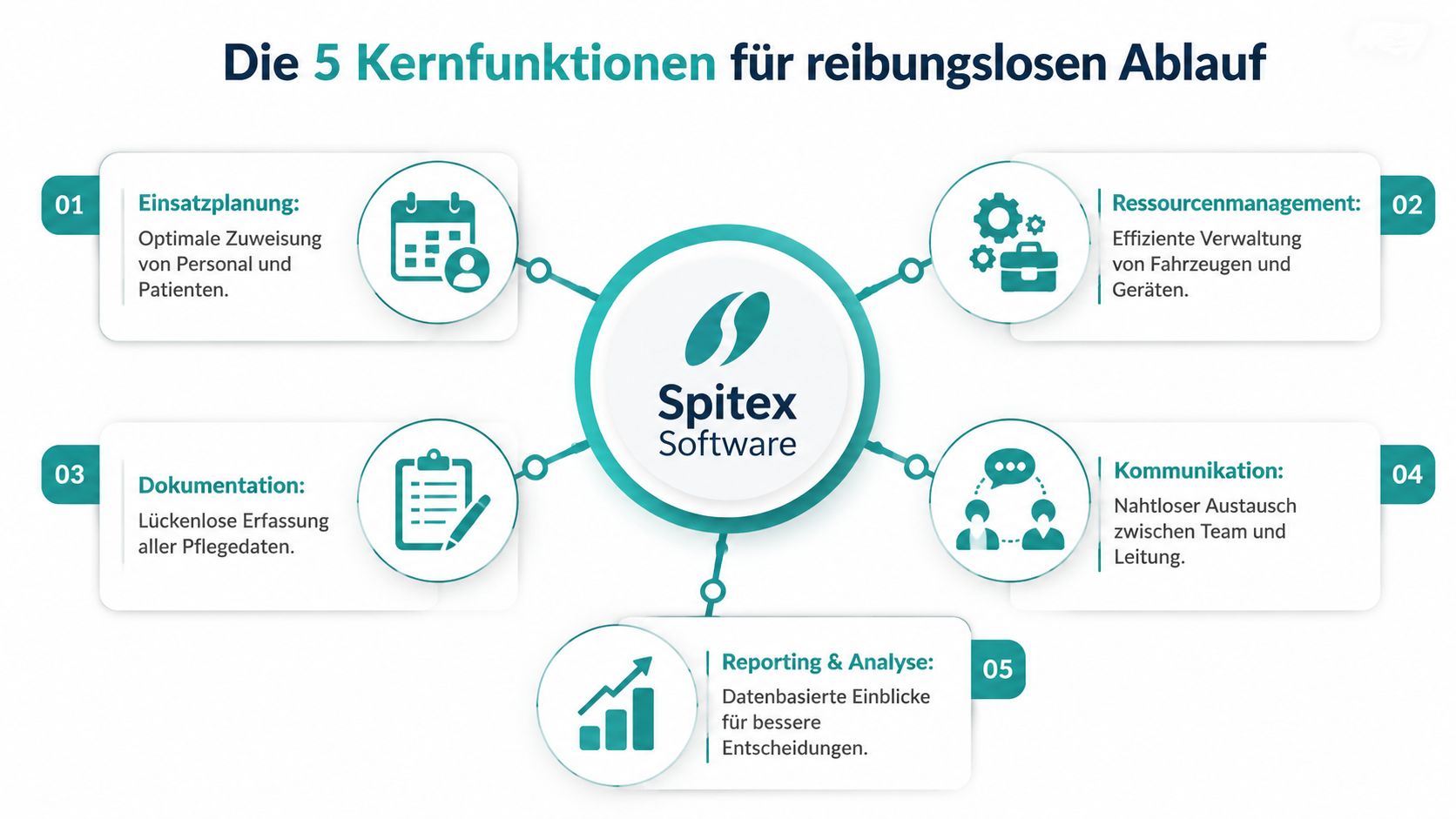
When selecting Spitex scheduling software, don’t be dazzled by long feature lists. In daily work, only a few areas really matter. If these five work well, hectic dispatch turns into a reliable process.
Plan Instead of Constantly Rescheduling
The first core function is actual scheduling. That sounds trivial but isn’t. A good solution lets you create recurring series, shift shifts, and reassign assignments in a few steps.
An example from the morning routine: Two clients fall into the same time slot, and an employee is suddenly unavailable. In a good system, you drag the assignment to another person, immediately check for conflicts, and see if the route still makes sense. In a poor solution, you first have to open several views and then communicate the change separately.
Manage Absences and Availabilities Cleanly
The second area concerns holidays, preferred times, days off, and spontaneous absences. This doesn’t belong in individual chats. When employees maintain their availability directly in the app, you plan with real data instead of assumptions.
This is especially helpful for part-time teams. A colleague can only work until noon on Tuesday, a worker only fills in during the evening, a substitute is only active in a certain area. When this data is current, you avoid unnecessary inquiries and embarrassing wrong requests.
- Record holiday requests directly instead of forwarding by email.
- Make preferred times visible before the monthly plan is set.
- Report short-term absences centrally so three people don’t look for replacements simultaneously.
Don’t Manage Qualifications in Your Head
Spitex depends on the right staffing. Not everyone is allowed to perform every service. This is where simple tools often fail. They show available people but not professional suitability.
You need someone with wound management experience for Mrs. Muster. Then the search must not start with all available names. It must start with the professionally suitable people. Otherwise, planning becomes a guessing game.
When qualifications only reside in the team leader’s head, every holiday week becomes uncertain.
Record Times and Services Where They Occur
The fourth function concerns mobile recording. This is more than digital clocking in. Employees document start, end, and services directly at the client. This gradually eliminates paperwork from the operation.
A practical example: A nursing assistant finishes her last visit in the evening, immediately enters the service, and adds a short note for the next visit. The next morning, this information is already where it’s needed. No callback. No deciphering handwriting afterward.
Plan Routes Sensibly
The fifth function is route and tour planning. In Spitex, not only care time but also travel time costs energy. If assignments are geographically illogical, the team first notices stress. Then delays and disputes follow.
A useful solution orders appointments not only by time but also considering routes, neighborhoods, and sequences. This is especially helpful when you have to redistribute at short notice.
In summary:
| Function Area | How to Recognize a Useful Solution | Example from Daily Work |
|---|---|---|
| Scheduling | Changes are quick and conflicts immediately visible | Handling a sick call in the morning without plan chaos |
| Availability | The team maintains data themselves | Properly considering part-time wishes in the monthly plan |
| Qualifications | Filters show only suitable people | Assigning wound care only to qualified staff |
| Time and Service Recording | Recording happens mobile at the assignment | No entering paper lists in the evening |
| Route Planning | Sequence and routes are considered | Fewer unnecessary trips between neighborhoods |
Ensuring Compliance and Legal Security
Compliance seems dry to many teams until the first conflict arises. A wrong handover of hours, unclear plan change, or too broad access to sensitive client data is enough to turn a small negligence into a serious problem. In Spitex, this concerns not only management but everyone who plans, documents, or can view data.
Legal Rules Must Run Along in Daily Work
The hardest mistakes rarely happen intentionally. They happen because the day is fast. Someone steps in spontaneously. A break isn’t properly recorded on the paper plan. A change is agreed on by phone but not documented anywhere. Later, everyone involved remembers differently.
Therefore, software must not only map rules but carry them along in daily work. When working hours, rest breaks, and plan changes are visible in the system, the risk that something gets lost in passing decreases. The handover to payroll is also cleaner when only approved and plausible hours are forwarded.
A good basic understanding of this topic is also provided by the article on GDPR and NIS2 for software teams. Not because Spitex works like a software team, but because it clearly describes how data protection and security requirements must be concretely thought through in operations.
Data Protection Starts with Roles and Logs
Not everyone needs access to everything. A nurse needs different information than dispatch or payroll. If everyone sees everything, it becomes tricky. If no one knows who changed what, it becomes difficult in case of disputes.
Therefore, you should pay attention to these points in a scheduling solution:
- Set role rights cleanly. Employees see only what they need for their work.
- Be able to trace changes. Who changed what and when.
- Check hours before handover. So raw entries don’t go directly into payroll.
- Keep client data protected. Access must not be too broad out of convenience.
Clean logs seem unspectacular in daily work. In conflicts, they often are what protects your back.
Those who see compliance only as filing think too small. In a good operation, legal security runs directly with daily planning.
Choosing the Right Software for Your Operation
The market is full of tools, demos, and promises. Most look good in sales. In daily work, it quickly becomes clear whether the solution is built for Spitex or just sounds like general shift planning. You don’t need the longest feature list. You need software that fits your team size, routes, services, and working style.
What You Really Need to Watch for in Daily Work
Don’t start with the question of which software is currently popular. Start with your recurring problems. Does most time go into monthly planning? Into sick calls? Into phone chains? Into entering times? Into conflicts around qualifications? Only when this is clear can you properly evaluate providers.
Then comes the operating model. Some teams want a solution where the provider handles ongoing operation and maintenance. Others want to keep more control internally. Both have consequences for effort, support, and speed in daily work.
A second point is often underestimated. The operation must fit not only for management but also for employees with little tech affinity who must see shifts, report availability, and record times without needing support every time.
If a new colleague can’t find her assignment after a short introduction, the problem rarely lies with the colleague.
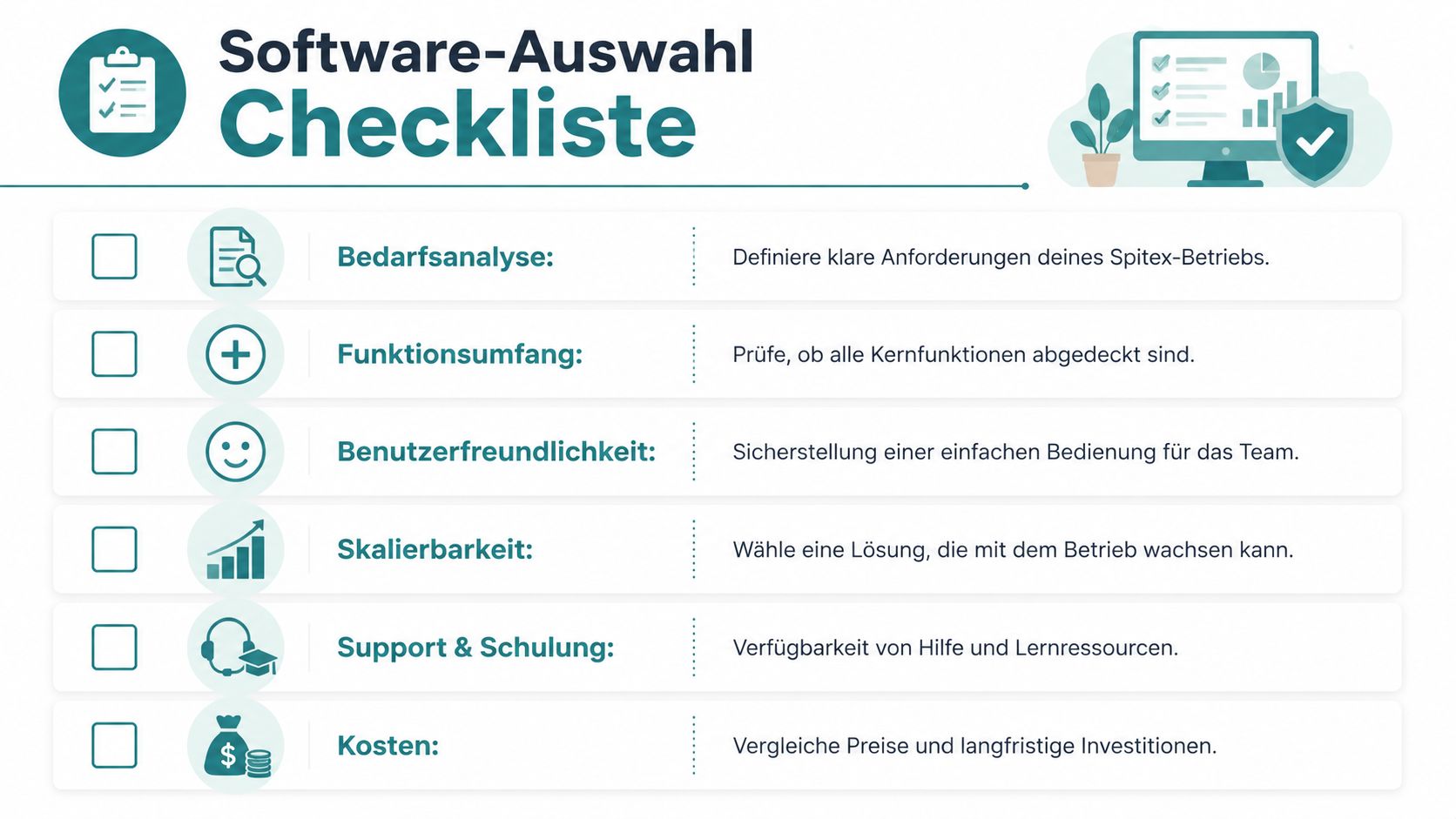
Checklist for Software Selection
This table helps you conduct clearer conversations with providers.
| Criterion | What to Watch For | Priority |
|---|---|---|
| Needs Analysis | Does the solution fit routes, part-time models, qualifications, and short-term changes in your operation | High |
| Feature Scope | Does the system cover scheduling, availability, mobile recording, role rights, and hour approval | High |
| User-Friendliness | Does the team understand basic functions without long training | High |
| Interfaces | Can the solution connect with payroll or client management | High |
| Support & Training | Can you get help even when something blocks daily business | Medium |
| Cost Model | Are licenses, setup, training, and later extra costs clearly explained | High |
| Operating Model | Does the hosting form fit your internal possibilities | Medium |
When comparing offers, it often helps to look beyond your own industry. At nova360 solutions for dealerships, you can see how strongly industry-specific software depends on clear processes, roles, and discipline. It’s not a Spitex tool, but the idea behind it is useful: A solution only works if it takes the real daily work of an industry seriously.
Thoroughly Check Providers During Discussions
In meetings with providers, don’t stop at glossy images. Have them show real processes:
- Sick call the same morning. How is an assignment reassigned?
- New employee in the team. How quickly is she schedulable and assigned rights?
- Client with special requirements. How does the system filter suitable qualifications?
- Incorrect time recording. How does correction and approval work?
- Route change on the go. What does the employee see on mobile, and how is she informed?
One option among many is Spitex software comparison. There you get a feel for which points in scheduling, time tracking, and personnel management should be compared. Still, your own test with real daily scenarios remains decisive.
Winning the Team for Change and Implementing the Software
Implementation rarely fails because of the software alone. It fails because the team doesn’t see the point, defends old habits, or is left alone with open questions after the start. In Spitex, this is especially sensitive because people have no time for long tech exercises. They want to know what really changes for their shift.
A good start makes the process visible.
Resistance Is Normal, Silence Is Dangerous
If employees react skeptically, that’s not a bad sign. Usually, something concrete is behind it. Fear of control. Concern about more effort. Frustration over previous software changes. You don’t have to talk these objections away. You have to hear them early.
Say clearly why you are switching. Not in tech language but in everyday tone. Fewer callbacks. Clearer changes. Less double entry. Fairer distribution of assignments. If you only formulate the benefit for management, you lose the team before you start.
How to Introduce the Software to the Team
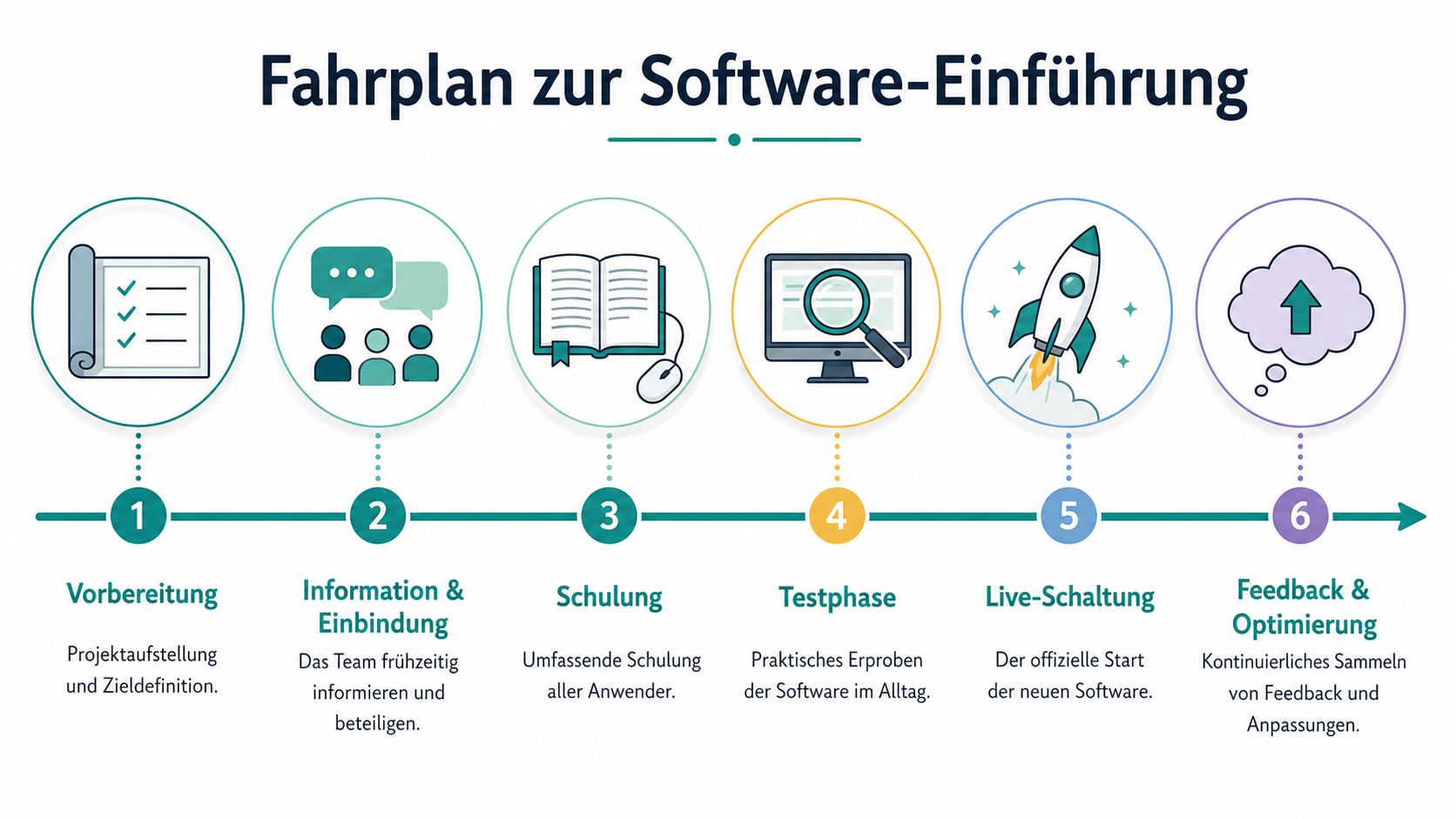
The process must be manageable. This sequence has proven itself in everyday Spitex work:
-
Form a small project team
Don’t include only supporters. Also bring in a critical thinker. If critical voices work early on, later grumbling in the hallway decreases. -
Record daily work
Write down how planning works today. Where gaps arise. Where you double work. Which info is missing on the go. This gives you material for training and later rules. -
Communicate before the start
Explain early what happens when. Not only on the day of the switch. Those who know what’s coming react more calmly. -
Train role-specifically
Management needs different content than a nursing assistant. Show each group only what they really need.
After preparation, a short practical look helps. The video below shows typical thoughts on digital scheduling and makes the topic more tangible.
Pilot Group Instead of Full Speed for Everyone
Start small. One team, one area, or a clearly defined group is enough. There you quickly notice which labels are unclear, which rights are missing, and where employees get stuck. You want to see these teething problems on a small scale, not at the full launch.
Practically, this means:
- Test with real routes instead of training examples.
- Collect feedback daily in the first days.
- Make small corrections immediately so the team sees that feedback has consequences.
- Make first reliefs visible, such as fewer calls or clearer shift info.
Don’t say at the start that everything will be easier now. Rather show at a real shift what has concretely become easier.
For the implementation phase, a guide like Digitizing Scheduling with Practical Guide can help if you need internal structure for pilot, training, and live start. The most important thing in the end is one thing: Those affected must be involved. Otherwise, the new solution remains a foreign body.
Measuring Success and Reaping the Rewards
After the start, it shows whether the new way of working holds. You don’t have to press everything into numbers. A few clearly chosen observations suffice. How much searching does dispatch still have? How often are there inquiries about plan changes? How cleanly do hours arrive in payroll preparation? How do employees react to last-minute adjustments?
The benefit often first becomes visible in small things. The evening shift no longer has to enter times afterward. Management no longer searches qualifications in old lists. New employees find their assignments without a phone round. This seems unspectacular but noticeably changes the pressure in the operation.
A look at everyday life after implementation helps classification.
Pause regularly after the start and check three levels:
- Planning
Are changes made orderly or still in crisis mode? - Team
Do employees feel informed and fairly assigned? - Administration
Do times, approvals, and handovers run cleaner than before?
If you answer these questions honestly, you quickly notice whether Spitex scheduling software has really arrived in the operation. The biggest gain in the end is not just a tidier plan. It is more calm in dispatch and more time for what really matters: good care for the client.
If you want to check how digital scheduling, mobile time tracking, qualification filters, and hour approval come together in one system, you’ll find a practical overview for operations with flexible teams at job.rocks.
Meta Description: Are you looking for Spitex scheduling software that really helps in daily work? Learn what to watch for in selection, implementation, team acceptance, and legal security.