
Technician Scheduling Software: How to Choose
Compare workforce scheduling, field service software and trade ERP for Swiss technician teams. Check travel time, materials and mobile responses in a demo.
The morning often starts innocently. Then a technician calls, stuck in traffic; the vehicle still has materials from the previous evening, and for today’s assignment, the exact qualification the customer requires is missing. While someone in the office shifts rows in Excel, two teams wait on the construction site and a customer is already asking about the arrival time.
Technician scheduling software brings people, qualifications, locations and time slots together. The key question is whether you mainly need to assign staff, manage service jobs or run the entire trade business. These tasks do not all call for the same software.
Which software fits your technician scheduling?
- Workforce scheduling software: Consider this category when availability, qualifications, assignments and mobile responses are central. Staff scheduling does not automatically include inventory or route planning.
- Field service software: Consider this category when customer assets, service jobs, maintenance appointments, travel and service reports belong together. Ask to see which functions are actually included.
- Trade ERP: Consider this category when quotes, purchasing, inventory, job costs and invoicing drive the workflow. Check how mobile dispatch connects to it.
Where job.rocks fits: For flexible teams, you can evaluate job.rocks for staff planning with availability, an employee app and time tracking. Do not assume it includes inventory management, automatic route optimisation or asset maintenance. Clarify those requirements and any necessary integrations separately.
One test job instead of a long feature list
Use a fictional installation job with test users in the demo, without inviting real employees:
- Assignment: Schedule a qualified technician and an assistant with suitable availability and skills. Check what appears when assignments overlap.
- Travel and materials: Separate work on site, travel time and preparation. Show where the vehicle, tools and material approval are recorded – in this software or a connected system.
- Change on the road: Move the appointment. Check on a smartphone whether the location and time are current and how the employee responds. Sending a push notification is not acceptance.
- Completion: Record actual hours and breaks, correct a test entry and check approval and the handover to the back office. Planned time is not time worked.
For each step, record whether it is included, requires an extra module or integration, or remains manual. If staffing is your bottleneck, discuss this workflow in a job.rocks demo. If materials and service history are decisive, start the comparison with those requirements.
Table of Contents
- Introduction to Modern Technician Planning
- Requirements and Feature Checklist
- Integrations and Automation
- GDPR and Compliance Points
- Implementation Plan and Change Management
- KPI Measurement and Continuous Optimization
- Industry-Specific Use Cases
- Conclusion and Next Steps
Introduction to Modern Technician Planning
The worst is not a major failure, but a small mistake in the morning. A technician cancels at short notice, the replacement lacks the necessary certification, the vehicle is already on the way, and the office only realizes after dispatch starts that the job requires special tools. Such situations make classic planning boards and Excel lists fragile in Swiss service, craft, and installation teams.
Why Excel Quickly Reaches Its Limits in Daily Use
Excel can be sufficient for small, stable workflows. When availability, vehicles, materials and changes sit in separate lists, you have to identify overlaps and outdated information yourself. Start by checking which reconciliations are currently manual.
A plan is only useful if it is still correct after the third change.
For technician teams, this costs more than nerves. If a job is postponed, a vehicle is missing, or a customer reports a different site, the disorder extends throughout the day, leading to delayed deployments and dissatisfied employees. In companies with many jobs, even a small planning error affects multiple teams and regions.
What Good Technician Software Does Differently
A usable solution combines availability, qualification, and deployment details before the day begins. It shows who is really ready for deployment, who needs which materials, and who can be sensibly assigned to which site. That’s why this is not about pretty calendars but about reliable control.
If you want to link duty rosters, deployment details, and mobile feedback cleanly, you need a process that doesn’t end with assignment. The software must make changes visible, collect confirmations on mobile devices, and record time tracking directly at the deployment. This saves inquiries between office, driver, and site and gives you a stable basis for the next job.
In the guide below, you go step by step through selection, implementation, and operation. You check functions, integrations, data protection, rollout, and metrics as a manager would in daily life, not as a salesperson would in a demo.
Requirements and Feature Checklist
A clean plan often fails not at dispatch but in the small gaps in between. A technician is scheduled, but the qualification doesn’t quite fit, the material is still in the warehouse, or feedback from the deployment is missing. This is where invisible coordination costs arise that become expensive in daily operations.
The Checkpoints You Really Need
Start with availability. Can the software show at a glance who is deployable today, tomorrow, and in the coming week, including part-time, absences, and last-minute cancellations? Then check the qualification logic. A technician may be highly skilled, but without valid authorization for the job, that doesn’t help you.
Next comes the job itself: site address, job number, time slot, task and status must be clear. Establish where vehicles, tools and material requirements are recorded. Derive time reserves from your own travel times, rework and delays; a fixed percentage does not suit every job.
Practical rule: If a job is created without a material list and responsibility, the software just pushes the error forward faster.
The following checklist helps you in conversations with providers:
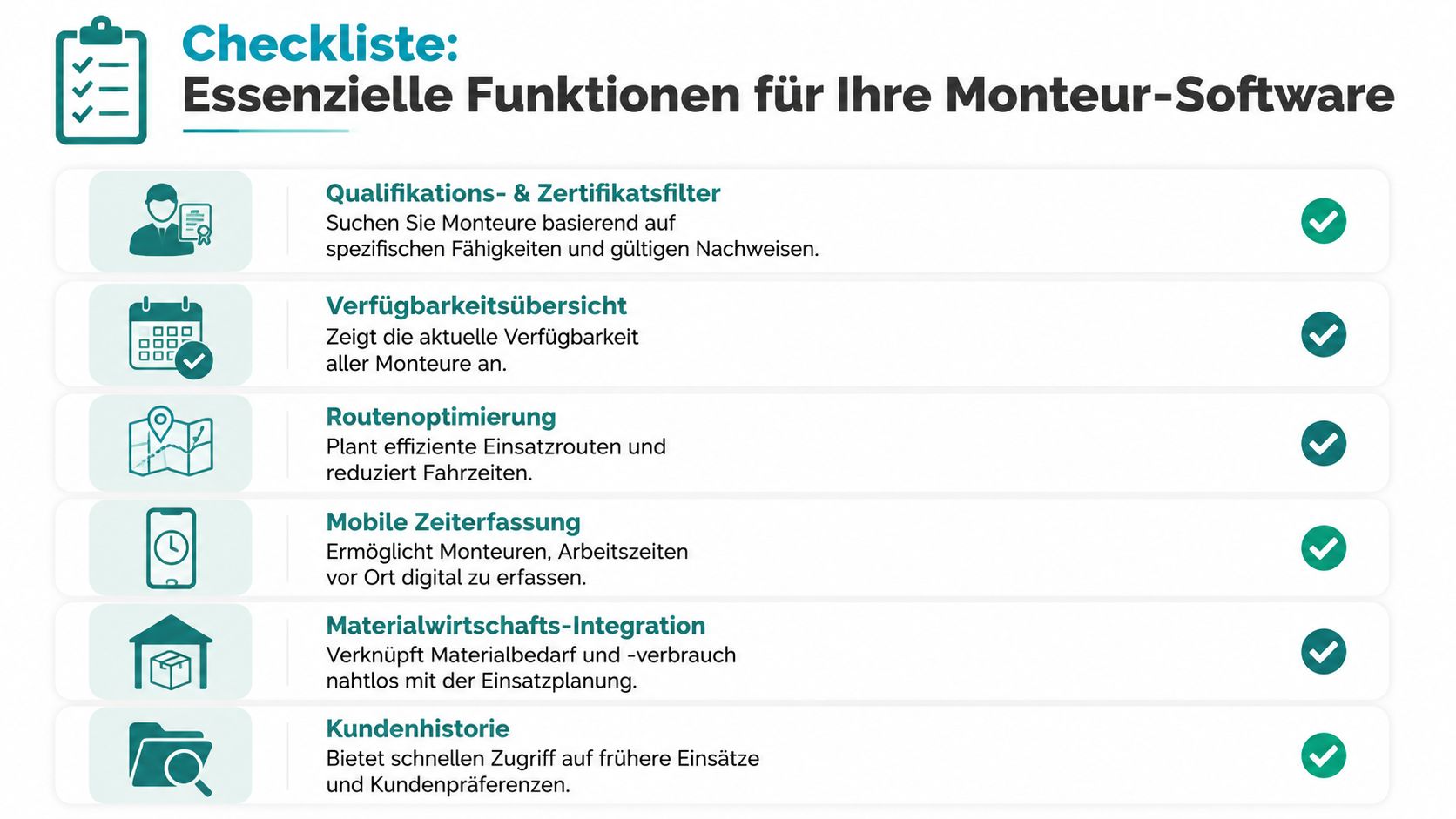
- Qualification and certificate filters: Can you filter technicians by skill, function, and valid proof?
- Availability overview: Do you see real-time changes for absences, holidays, and last-minute switches?
- Deployment details: Are address, job, time window, and task fully recorded?
- Capacity buffer: Can a buffer per job or team be cleanly mapped?
- Mobile confirmation: Can technicians confirm deployments directly on their smartphones?
- Mobile time tracking: Are start, end, and breaks recorded directly on site?
- Status and feedback: Can the team report progress from the field?
- Material reference: Can material needs before start and material consumption after deployment be documented?
Where Clear Structure Saves Money and Time
A craft business in Switzerland needs more than shift assignment. Materials, vehicles, equipment, and project status must be tracked; otherwise, you only create a digitally prettier version of the old chaos. The real burden lies in ongoing coordination between dispatch, site, and office, especially when a job is postponed or a replacement technician must step in.
Those who cleanly combine resources, appointments, and changes save time exactly where it is lost in daily business. The right solution reduces inquiries, keeps responsibilities visible, and makes adjustments during operation traceable. A good overview of API interfaces for deployment planning can also be found at job.rocks if you want to check how data between planning, time tracking, and administration interact.
The software doesn’t have to do everything, but what it does must work reliably in the field. Otherwise, you just shift the work from the planning board to the phone and back to the office.
Integrations and Automation
Once technicians are on the move, an island solution is no longer enough. Time tracking, payroll preparation, deployment planning, and material movements must be synchronized, or the office will enter the same numbers twice. In an event operation with changing teams, this becomes especially clear because a deployment must first be confirmed, then driven, then recorded, and finally billed.
How Data Flows Without Media Breaks
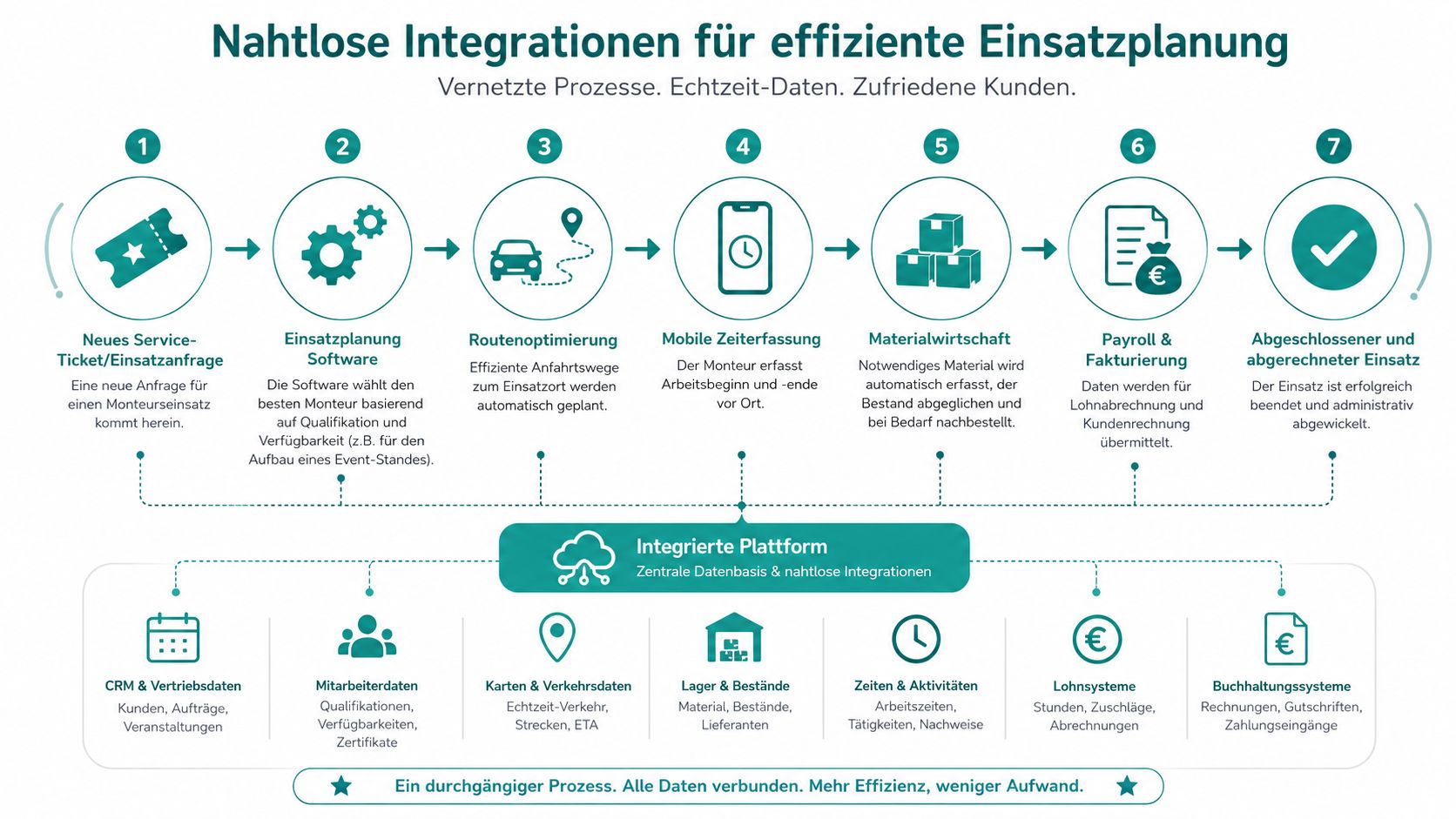
The clean process starts with the request. A job comes in, dispatch assigns it to a suitable technician, and the mobile app delivers deployment details, time window, and location directly to the device. Upon arrival, the technician records start and end times on site, adds feedback, and confirms the deployment via mobile.
Afterwards, the software should not only store hours but make them usable for payroll and invoicing. If times, surcharges, and deviations are already in the system, payroll preparation no longer needs to be pieced together from paper, emails, and manual corrections. This is exactly the difference between a tool that manages and a system that takes work off your hands.
What to Look for in Interfaces
First, check whether the platform offers standard APIs and which data really synchronizes. Times, deployment status, vehicles, material consumption, and billing data must not end up in separate tables, or you will be reconciling manually again later. For teams with multiple locations, it’s also worth looking at internal interface processes, for example via the API integrations and interfaces of job.rocks, if mobile confirmations and deployment data are to integrate into existing workflows.
A second practical example from the event sector illustrates the benefit well. If an additional request for setting up a booth comes in in the morning, dispatch must immediately see which technician is available, how the route looks, and whether the material is already allocated. Only then is the deployment released so that payroll and billing data do not need to be reworked later.
If your data flows are separate, you pay for the same deployment twice, once at dispatch and once in the office.
job.rocks can be considered an option for flexible teams because availability, shifts, and time tracking can be combined. It doesn’t replace clean dispatch logic but reduces the gap between deployment acceptance, confirmation, and time tracking.
GDPR and Compliance Points
In Switzerland, personnel deployment planning requires not only speed but also compliance. The high regulation of the labor market makes clean working and rest times mandatory, or else overtime, delays, and fines threaten (roapp.io). For technician teams, this means the software must be more than a calendar; it also becomes a proof tool.
Which Data You Should Keep Cleanly
You should only record what is necessary for the deployment. This includes name, function, qualification, deployment time, confirmation, time tracking, and changes to the job. As soon as you use mobile feedback or location references, you need clear authorization concepts so not everyone can see everything.
A good system keeps change logs so you can later trace who changed or confirmed a deployment. This is especially important for last-minute rebookings, where the biggest errors often creep in. Those working on paper or in chaotic chats can hardly prove this trail cleanly later.
What You Must Regulate Internally
Define retention periods, deletion rules, and separate roles for dispatch, management, and admin. A company log alone is not enough if no one knows which data is deleted when and who may access it. For managers who must think broadly about such duties, the article Mastering Compliance Rules for CTOs by PandaNerds offers a useful view on organizational responsibility.
Here, too, looking at typical technician practice helps. If the deployment plan combines working time, changes, and approvals, you need the same care as in payroll. That’s why an internal review of access rights is not a formality but part of daily operational security.
For a cleanly documented solution, it’s also worth comparing with a GDPR-compliant deployment planning if you want to see how mobile planning and legal requirements can be combined.
Implementation Plan and Change Management
A rollout rarely fails because of the software itself. It fails because dispatch, technicians, and management work differently and no one leads the transition cleanly. That’s why the start needs a clear process with real data, short feedback loops, and fixed responsibilities.
How to Start Without Chaos
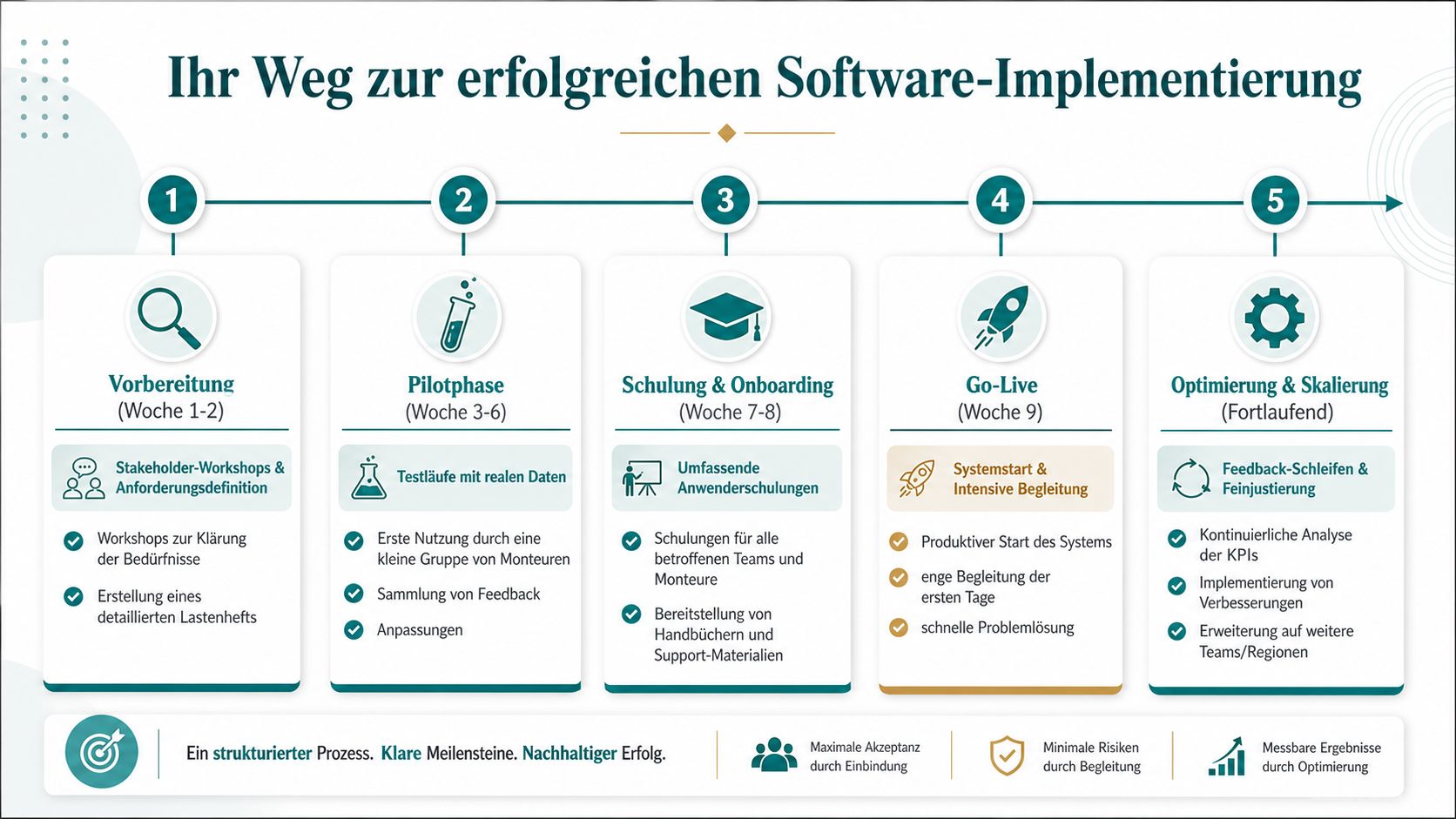
First, plan a pilot with a small team and a real mix of jobs. The platform should not be tested in fair-weather mode but where last-minute changes, material needs, and changing availabilities really occur. Only then do you see if the operation holds up in daily use.
Choose a planning horizon that suits your jobs. Account for delivery dates, qualifications and available resources. Allow for training and corrections, then adjust reserves using pilot experience rather than adopting fixed time or staffing uplifts without testing them.
Never start with the entire company if the process is not yet stable in a small team.
What Must Be Set in the Pilot Phase
In the first phase, clarify requirements with dispatch, management, and one or two experienced technicians. Then real jobs are created so the team experiences the software not abstractly but at a construction site, a service deployment, or a last-minute modification. Feedback flows directly into adjustments instead of being collected only after weeks.
In the second phase, you train all affected roles. Technicians need clear processes for confirmation, time tracking, and status reporting, while dispatch mainly learns how to quickly and cleanly enter changes. Only when both sides speak the same process does a productive start make sense.
How to Build Acceptance in the Team
Communicate openly what stays the same and what changes. Technicians accept new software faster when they notice fewer inquiries and clearer deployment details. The office accepts it faster when time tracking runs cleaner and reconciliation with payroll requires less manual work.
A good rollout doesn’t end at go-live. Afterwards, you need review meetings, small adjustments, and clear feedback from the field. If the system convinces in practice, you can gradually connect more teams or locations without slowing down operations.
KPI Measurement and Continuous Optimization
A plan only works if you measure its effect. For technician deployments, it’s not pretty reports but metrics that show whether teams arrive on time, are sensibly utilized, and have enough room for changes. Without this visibility, planning remains gut feeling.
Which Metrics Really Help You
The first metric is punctuality. It shows whether deployments start and finish as planned. Then comes utilization per person and per vehicle, because this shows whether technicians or vehicles are under- or over-planned.
Overstaffing and understaffing also belong on a dashboard because both consume money and time. Absences show whether planning is too tight or if availabilities in the system are maintained too inaccurately. If you regularly review these values, you recognize patterns, for example on certain weekdays, teams, or job types.
How to Make Decisions Based on Numbers
A monthly report only helps if it leads to action. If deployments are regularly planned too tightly, you can adjust the capacity buffer. If unequal vehicle utilization appears, you reorganize routes or teams. And if absences stand out in one area, you check availabilities and deployment lead times.
The metrics don’t have to be complicated, but they must be consistently recorded. Clean time tracking on site, clear deployment statuses, and complete job data are often enough to identify reliable patterns. Then you only need fixed review routines, ideally together with dispatch and team leadership.
What is not measured usually remains a feeling. What is cleanly recorded can be planned better next month.
Those who take the numbers seriously improve not only the daily plan. They also see whether the software helps where it should, namely with availability, reliability, and clean handover between field and office.
Industry-Specific Use Cases
Not every industry needs the same depth in deployment planning. An event agency needs quick changes, a hotel needs reliable shift coverage, a security service needs clear approvals, and a logistics department needs plannable availabilities. The software must fit the deployment reality, not the other way around.
Four Short Cases from Everyday Life
A hypothetical event job illustrates the distinction: technicians are needed for setup and service staff for the event itself. Plan these roles separately and check availability and qualifications for each assignment. An available person is not automatically suitable for both tasks.
In hotels and restaurants, it often comes down to shifts with different functions and wage classes. Those staffing early, late, and weekend shifts must track availability and function per deployment cleanly, or the planning won’t be economically viable. For such teams, mobile feedback and a clear shift overview are often the first noticeable gain.
In security services, seamless assignment counts. A short-notice absence must not only be noticed at the deployment site because handover would be too late there. A solution bundling availability, confirmation, and time tracking in one process reduces exactly these breaks.
What Technician Focus Brings in Practice
In logistics and technical services, the connection to vehicle and material is especially strong. A team can only drive cleanly if the route, deployment window, and necessary material fit together. That’s why the link between dispatch and mobile feedback is so important for these industries.
Those working in construction can orient themselves on specialized deployment planning for construction software in Switzerland when availability, deployment details, and mobile time tracking are to be combined. And if your company also needs to map emergency services and quick response, a look at typical cost and process patterns, as shown in the article Understanding Heating Emergency Service Costs by Energiekonzepte4you GmbH, helps.
The order remains the same. First availability, then qualification, then deployment details, then mobile confirmation. Those who keep this line have less chaos and more predictability across multiple industries.
Conclusion and Next Steps
In technician planning in Switzerland, the biggest costs often arise where they are hardly visible in daily business: qualifications, material reconciliation, travel times, last-minute changes, and legal requirements around working hours. This is exactly where clean dispatch separates from mere shift assignment. Those who do not manage these points together produce inquiries, idle times, and double handling. Excel and loose agreements can record changes but do not guide the deployment through the entire process.
Therefore, test a solution in real daily life. Can it filter technicians by qualification, manage deployments with all details, provide mobile confirmation, and record times cleanly? Can it pass data on to payroll and billing without requiring rework? Only when these handovers work does the software truly relieve the operation.
The right start remains small and concrete. Take a pilot team with real jobs, involve dispatch early, and get feedback directly from the field. In a technician team, you quickly see whether the material status is correct, whether a deployment window is realistically planned, and whether mobile feedback really arrives. If you then roll out to more teams or locations, friction and rework decrease noticeably because the process has already been tested under real conditions.
If you want to start all this with a platform that combines deployment planning, availability, mobile time tracking, and payroll handovers for flexible teams, check out job.rocks. There you can see how your technician planning can be mapped in daily life and whether the process fits your team.