
Time Tracking for Agencies: Practical Guide 2026
Optimize your project billing with time tracking for agencies. Practical guide for event and promotion teams.
Everything is still running smoothly on Friday evening. On Saturday, shifts get rescheduled, someone spontaneously fills in at a second booth, breaks are squeezed between two waves of visitors, and by Monday, the back office lacks a clear overview. Who was where and for how long, who left early, who took on an additional task—this often can only be pieced together from WhatsApp chats, notes, and memories. This is exactly where time tracking for agencies decides between clean invoicing, reliable planning, and less unpaid work.
Table of Contents
- Why Time Tracking for Agencies Becomes a Revenue Lever
- Defining Requirements and Roles for Mobile Field Teams
- GDPR-Compliant Data Collection in the Swiss Agency Context
- Comparing Collection Logics for Hybrid Agency Models
- Selection Criteria and Implementation Roadmap for Your Agency
- Anchoring Routines, Approvals, and Quality Assurance in Daily Work
Why Time Tracking for Agencies Becomes a Revenue Lever
A promotion team is working three events over a weekend. One person switches last minute from the info booth to accreditation, two breaks are staggered, and by Monday no one remembers exactly which hours belong to which assignment. This is not an edge case; it is everyday life in event and promotion agencies. Those who track time accurately here not only prevent chaos in the back office but also make billable work visible.

A well-documented assignment is worth real money. According to an industry-wide cited analysis, about 15% of hours worked in project-based service companies remain unbilled if not properly documented, which for a 500,000 euro annual turnover corresponds to a potential revenue loss of 75,000 euros. The linked analysis makes the economic point clear, especially for Swiss agencies where transparency of time and effort directly impacts margin, invoicing, and resource planning. The classification of the 15-percent gap for agencies is therefore not a theoretical figure but a warning signal for everyday operations.
Practical rule: If an hour is not recorded immediately after the assignment, it quickly ends up in the “later” drawer. For mobile teams, “later” often means: never properly assigned.
Especially with changing locations, time tracking may seem like a control tool, but it is primarily protection for the agency itself. It keeps open what is billable, what remains internal, and where a team was under-budgeted. The invoice only balances if the effort is fully visible.
In the end, it’s not about bureaucracy but about management. Those who document mobile hours accurately calculate budgets more realistically, recognize overload earlier, and avoid unpaid work that often hides in everyday event and promotion assignments. The next step is to determine which information mobile teams really need and which rather get in the way.
Job analysis in the agency context helps where you want to not only collect deployment data but also evaluate it in daily operations.
Defining Requirements and Roles for Mobile Field Teams
Who Needs Which Information in the Field
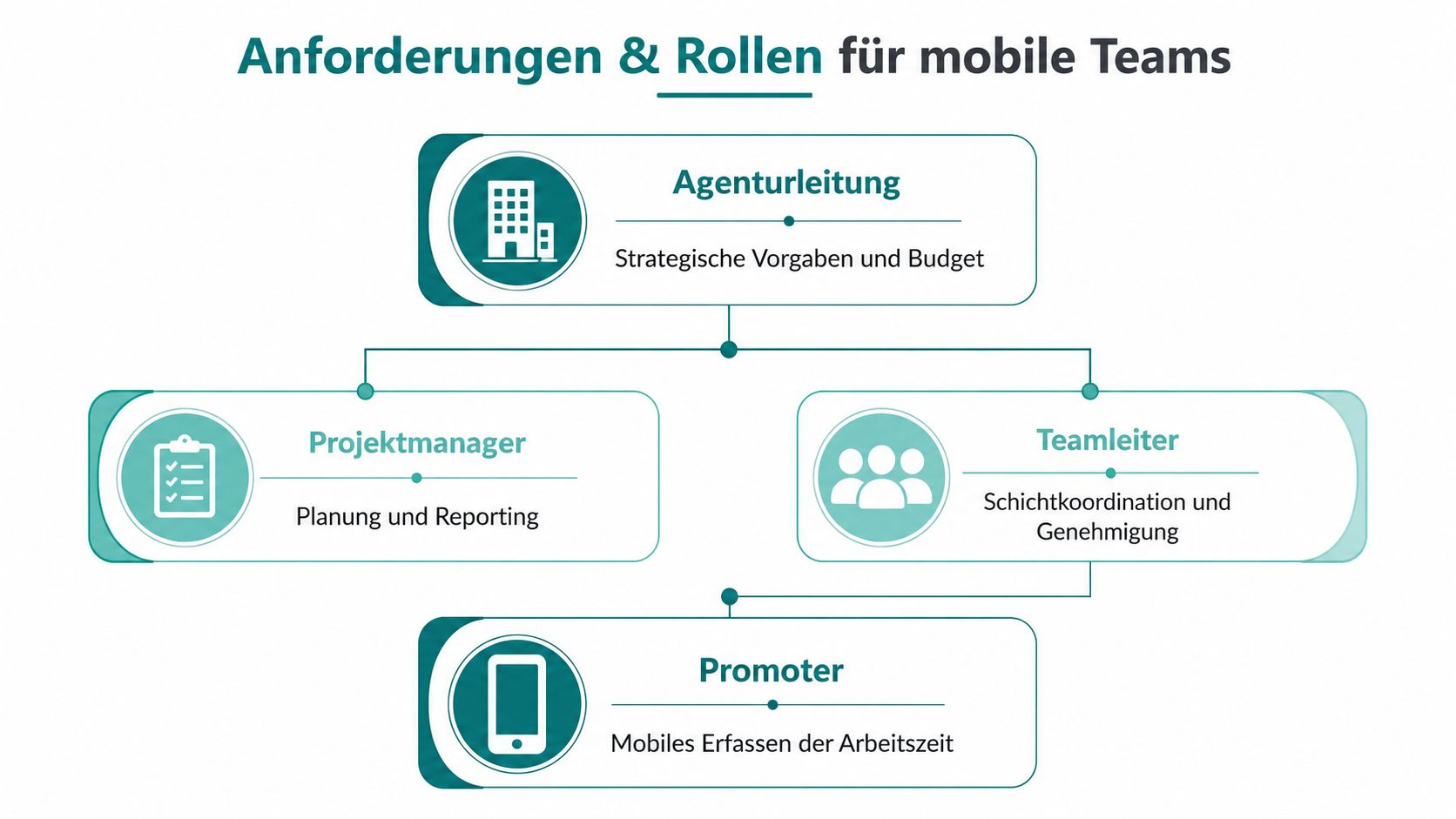
In event, promotion, and staffing agencies, rarely does everyone work the same way. On site, a team leader often coordinates, approves breaks, and records special cases. Then there are promoters who record their times directly on the go, and the back office that checks approvals and processes data for payroll preparation. If these roles are not clearly separated, every app demands too much from too many people, and every list becomes unnecessarily long.
The useful logic remains simple. On site, the team only needs information that truly describes the assignment: location, shift start, breaks, actual shift end, and brief notes on special tasks. Back office and administration then need assignment to client, project, and phase, plus a view on internal activities. Anything beyond that makes mobile tracking cumbersome without improving daily operations.
Practical phrase from everyday life: What a person can’t enter in ten seconds under stress is often forgotten later.
Which Categories Really Matter
Overly detailed categories slow down mobile teams. Instead of tracking every little thing separately, a minimum set that reflects real agency work is sufficient. Industry-recommended orientation includes categories like Concept, Design, Copywriting, Production, Consulting, Project Management, and Correction. This fits closely enough to the work without turning the app into a form graveyard. The introduction with clear categories and routines shows exactly this approach for agencies.
For mobile teams, a simple structure works best:
- Client and Project: So every hour lands where it will later be billed or internally evaluated.
- Phase or Assignment Type: For example setup, support, teardown, or follow-up, so the day remains understandable later.
- Breaks and Interruptions: Because short shifts without breaks immediately lead to incorrect total times.
- Special Tasks: For example material handover, spontaneous substitution, or client briefing on site.
- Approval Status: Who checked before the data goes to the back office.
The team leader’s role is clearly defined. They don’t confirm every minute but check plausibility: is the shift complete, is a break missing, does the assignment to the order fit? This keeps the process light enough for the field and reliable enough for administration.
Mobile time tracking on the go fits exactly where you don’t plan assignments at a desk but update them on the way to the next location. For handling data and permissions, it’s also worth a look at the Data Protection Cloud Guide, especially when several people in the field and back office access the same information.
GDPR-Compliant Data Collection in the Swiss Agency Context
What You Must Collect and What You Don’t
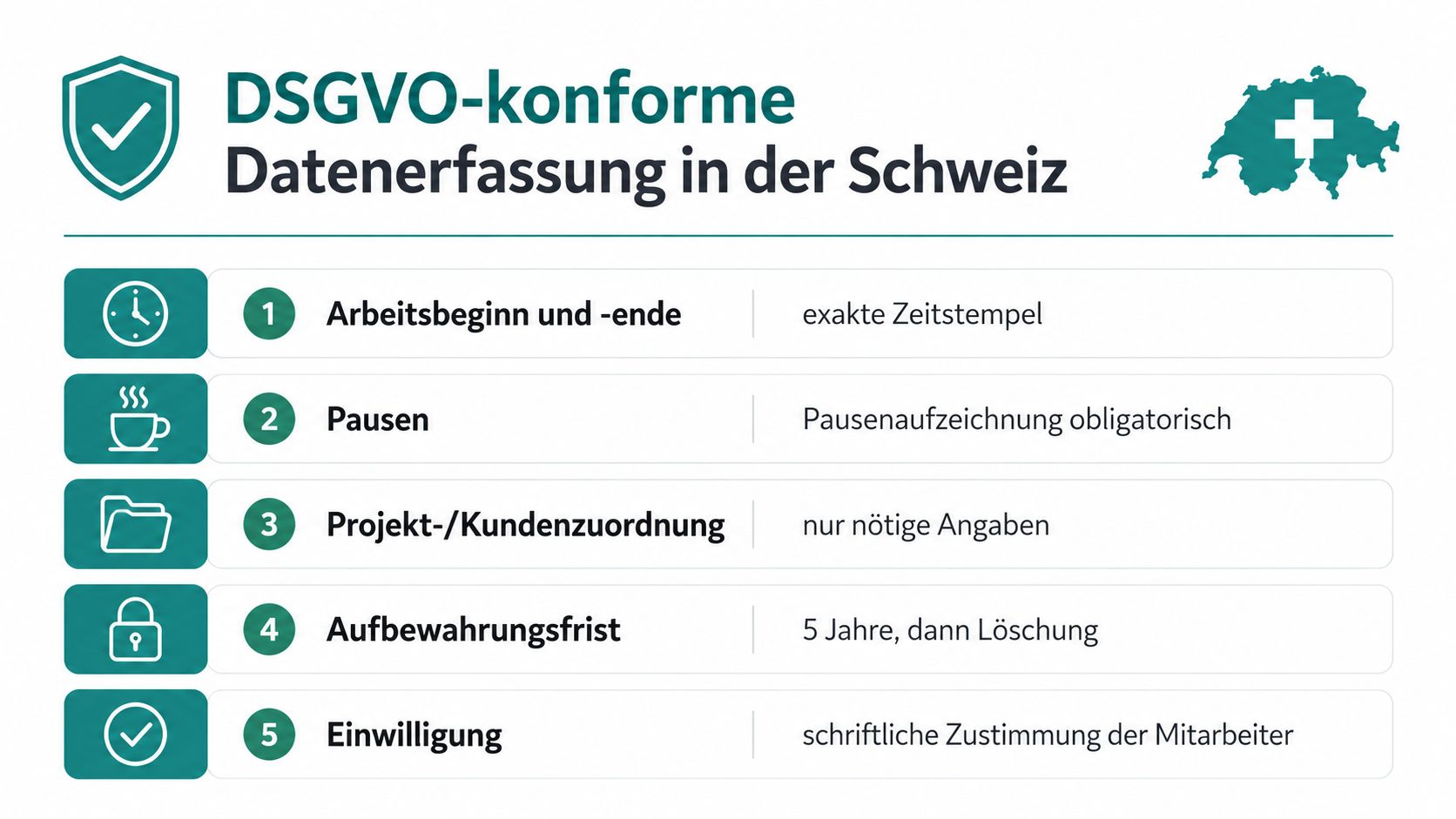
A mobile shift starts in the parking lot, not at the desk, and the tracking must work exactly there. For agencies in Switzerland, this means documenting start of work, end of work, breaks, and overtime cleanly so that short assignments, spontaneous extensions, and split shifts remain traceable later. The labor law and Ordinance 1 set the framework. For office employees, a weekly working time of 45 hours generally applies; for all other employees, 50 hours. The Swiss overview of time tracking in agencies summarizes this point clearly for agencies.
In practice, it’s not the monthly number but the individual assignment that counts. If your promotion team works 47 hours each week during a campaign for several weeks, you must record the extra hours so you can later see whether planning was too tight, breaks were too short, or a team on site was permanently overloaded. For event, promotion, and staffing agencies with flexible pools, this is not an administrative luxury but the basis for reliable documentation.
Working with Data Minimization and Reflecting Mobile Reality
Only collect what you really need in the field. Location data, availability, and qualification certificates can be useful additional info if directly related to the assignment, approval, or payroll preparation. Fields without a clear connection to the assignment should not be standard in your system. Lean tracking makes mobile entries faster and reduces errors that later have to be corrected in the back office.
Especially with changing locations, you need clear rules for breaks and last-minute shift changes. Breaks should be confirmed during the assignment or at the latest at the end of the day so short interruptions don’t get lost. If a shift changes on site, a short note explaining why the time was different than planned is needed. This keeps documentation clean and usable for team leaders and back office.
Anyone processing personal data in cloud-based systems should not leave access, storage, and responsibilities to chance. The Data Protection Cloud Guide helps organize these questions practically without complicating daily operations. For Swiss agencies, it is especially important that purpose limitation and access groups are clearly defined.
Handling mobile teams does not require collecting data in advance but clear boundaries. The Swiss data protection overview for agencies helps you align these rules with field reality, not office logic.
Comparing Collection Logics for Hybrid Agency Models
Three Methods That Work Differently in the Field
Mobile teams don’t need one perfect logic. They need one that fits their day. Live clock-in/out via app on site works well for short promotion shifts downtown when the team arrives, starts, and clocks out at the end. Retroactive entry fits better when a long event day with changing breaks runs and the team only updates times cleanly in the evening. A hybrid model combines both, with immediate entry and subsequent review by team leader or back office.
| Collection Logic | Typical Assignments | Strengths | Risks |
|---|---|---|---|
| Live clock-in/out | Short promotion shifts, clear start and end | High data quality, hardly any memory gaps | Requires stable on-site processes |
| Retroactive entry | Long event days, flexible breaks, hectic days | Flexible for hectic workflows | Accuracy drops quickly |
| Hybrid approach | Multi-day trade show assignments, mobile pools, changing locations | Combines speed and review | Requires clear approvals |
What Works Better in Which Case
Live clock-in/out is strong when the situation is clear. A person arrives, clocks in, takes a break, clocks out. This is the cleanest option for short assignments because little correction is needed later. The problem arises when reception is unstable on site or shift changes happen every second.
Retroactive entries are more flexible in daily business but accuracy suffers quickly. The often-cited study on recording accuracy shows that daily recording achieves only about 67% accuracy when time is recalled later, and that less frequent retroactive entries reach only 36% to 55%. This explains why many agencies eventually move away from pure retroactive entry for mobile assignments. The numbers on recording accuracy are a good indication why the gap between assignment and entry should remain small.
Hybrid wins where mobility and review come together. The person records on the go, the leader reviews afterward.
For event and staffing agencies, this is usually the most practical way. You get enough speed for the assignment and enough control for approval and billing. Those who only allow live clock-in/out stumble with spontaneous changes. Those who only allow retroactive entry lose precision too quickly.
Selection Criteria and Implementation Roadmap for Your Agency
What You Should Really Look for in a Tool
For mobile time tracking, it’s not the longest feature list that counts but whether the system works cleanly without stable Wi-Fi, whether team leaders can approve shifts, and whether data flows directly into payroll preparation. For event, promotion, and staffing agencies, it must also be clear that client, location, phase, and internal activities can be maintained with little effort. If the interface feels too complicated in the field, your team won’t use it consistently.
A tool must work in the rhythm of daily business. A hostess clocks in at the booth, a promoter changes shifts at the next location, the leader reviews the entries later. If many fields have to be opened or complicated forms clicked through first, usage quickly drops. That’s exactly why looking at workflows, not just features, is worthwhile.
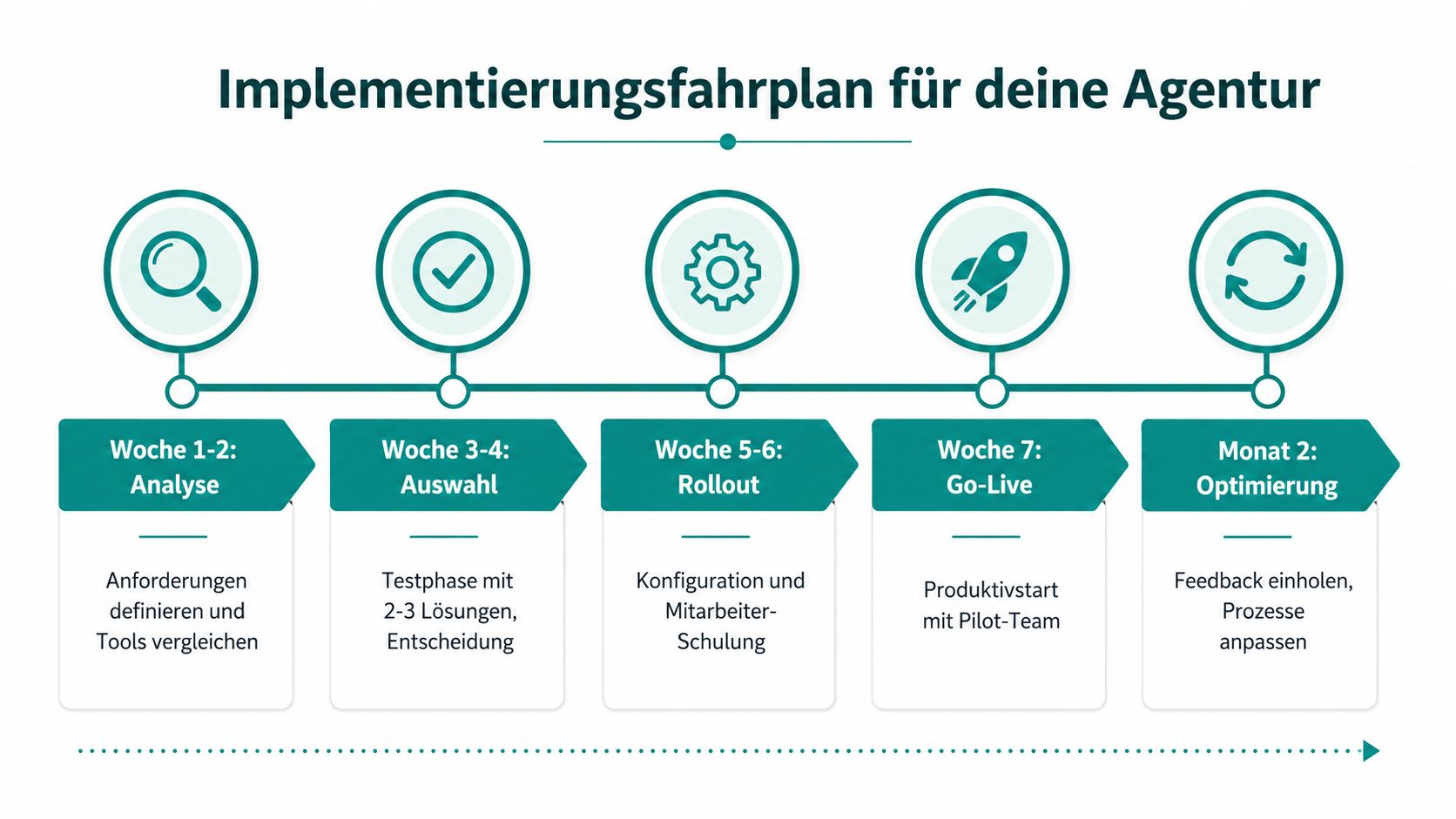
Implementation is best done with a clear process. First, define requirements, then test two or three solutions with a small deployment team, then adjust project and client structure and roll out to the entire pool. The connection of organization, process, and time tracking helps where you want to organize internal workflows cleanly before software start. For many agencies, this is the point where it becomes clear whether software and deployment logic really fit together.
A Roadmap That Works in Agencies
- Weeks 1 to 2, Analysis. Clarify which assignments must be tracked mobile, who approves, and which data goes to the back office.
- Weeks 3 to 4, Selection. Test two to three solutions with real assignments, not office tests.
- Weeks 5 to 6, Rollout. Set up categories, approvals, and training, but keep the structure lean.
- Week 7, Go-live. Start with a pilot team and closely monitor only the first real assignments.
- Month 2, Adjustment. Collect feedback, remove unnecessary fields, and clarify open approvals.
The most common stumbling blocks are always the same. Too many categories reduce acceptance. Unclear approval responsibilities make data unusable. Missing interfaces to administration cause someone to maintain everything twice. A usable tool won’t take this work off your hands completely but ensures it doesn’t fall apart in daily operations.
If you’re looking for a solution that maps mobile time tracking, approvals, and handover to payroll preparation in an environment with changing assignments, job.rocks belongs on your shortlist. It’s not a marketing promise but a question of whether your process with mobile teams really runs smoothly. The question is simple in the end: Does the solution support your agency’s daily operations or create new friction?
Anchoring Routines, Approvals, and Quality Assurance in Daily Work
Time tracking rarely fails in agencies because of software but because of workflows before and after. If team leaders on site briefly check at the end of each shift whether start, break, and end are plausible, the effort doesn’t pile up at month-end. That’s where errors usually occur, such as a missing break, a callout that seems too long, or an assignment that doesn’t fit planning. Such anomalies should be commented on immediately so the back office doesn’t have to ask and payroll preparation stays clean.
Practical check: Don’t control every minute but review entries that stand out, come in late, or don’t fit the deployment plan.
Resistance in the team often arises when time tracking feels like control. This can be eased if you clearly explain which times are billable and which remain internal, and if training takes place directly in the app. On site, short explanations work better than long PDF attachments that get lost in everyday life. Mobile teams need less administration and fewer queries, not more discussions about every booking.
For quality assurance, spot checks are enough. You look at individual assignments, check approvals, breaks, and noticeable deviations, and only correct where something is inconsistent. This keeps tracking usable in daily business without every entry turning into control pressure.
The cluster pages on promotion time tracking and event deployment planning are good next steps if you want to map mobile deployment logic even more cleanly.