
Gastronomy Shift Scheduling Software: Your Path to the Perfect Plan
Looking for gastronomy shift scheduling software that saves you time and is legally compliant? Discover what to look for—from apps to payroll.
It’s just before the lunch service. Two people call in sick, a temp asks via WhatsApp if she can start later, and your Excel schedule is still on the office computer. While the first guests are already waiting out front, you’re searching through the chaos in the back for the latest version of the shift plan. This is exactly what everyday life looks like in many businesses.
The problem is rarely just the plan itself. The problem is the entire chain behind it. Who is available? Who is allowed behind the bar? Who has taken their break? Who actually worked? And how do these hours get into payroll without typos? Good gastronomy shift scheduling software not only brings order to shifts but connects planning, time tracking, and payroll preparation in a smooth workflow.
If you still work today with notes, Excel, and chat groups, you feel the consequences every day. Follow-up questions, last-minute gaps, unclear hour balances, and unnecessary correction efforts at the end of the month. This is exactly where a suitable solution comes in.
Table of Contents
- No More Paper Chaos and Calls: Your Digital Shift Plan
- What Good Shift Scheduling Software for Gastronomy Must Be Able to Do
- GDPR and Labor Law: The Invisible Helpers in the System
- More Than Just Planning: Mobile Features for Your Team
- Seamless Processes: From Time Tracking to Payroll
- Checklist for Selecting and Implementing Your Software
- How job.rocks Simplifies Everyday Life in Gastronomy
No More Paper Chaos and Calls: Your Digital Shift Plan
The classic gastronomy schedule often looks like this: an Excel file for the week, a paper list in the break room, and next to it a phone that rings nonstop. Someone can’t work on Friday after all. Someone else didn’t see the changed shift. And in the end, two people work at the same time in service while there’s a gap in the kitchen.
In a small restaurant, this happens quickly. You enter all shifts on Monday. On Tuesday, a service employee calls out. You call three temps, reach one, send two messages, and change the Excel file. On Wednesday, someone still works with the old printout. Suddenly, you have discussions about who was informed when.
With a digital solution, the same case runs differently. You open the plan, mark the free shift, and specifically offer it to suitable people. Employees see the change directly on their smartphones. Who confirms is recorded in the system. No more guessing, no screenshots from chat histories.
Everyday Comparison
| Task | Manual Effort (Excel & Phone) | With Shift Scheduling Software |
|---|---|---|
| Create weekly shift plan | Multiple files, copying old plans, high risk of confusion | Open templates, assign shifts, save plan centrally |
| Cover last-minute absence | Phone chain, chat messages, unclear feedback | Offer free shift digitally and see feedback directly in system |
| Communicate changes | Replace printouts, update group chat | Change is visible directly in the plan |
| Check availabilities | Verbal agreements, notes, private messages | Employees maintain their own times |
| Check hours at month-end | Compare and enter timesheets | Worked hours are collected and available |
Those who plan with Excel in gastronomy rarely plan only with Excel. Usually, phone, paper, and chat are involved. That’s exactly what makes the process so error-prone.
Switching to gastronomy shift scheduling software is therefore not a gimmick. It relieves pressure from daily business. You spend less time on follow-up calls and gain more peace in managing the operation itself.
How You Immediately Notice the Difference
- Changes remain visible: You see who was scheduled and which shift was later adjusted.
- The plan is in one place: Not on the office computer, not in chat, not on the bulletin board.
- The team becomes more independent: Employees check themselves instead of constantly asking you.
- Errors are noticed earlier: Double bookings or gaps stand out faster.
What Good Shift Scheduling Software for Gastronomy Must Be Able to Do
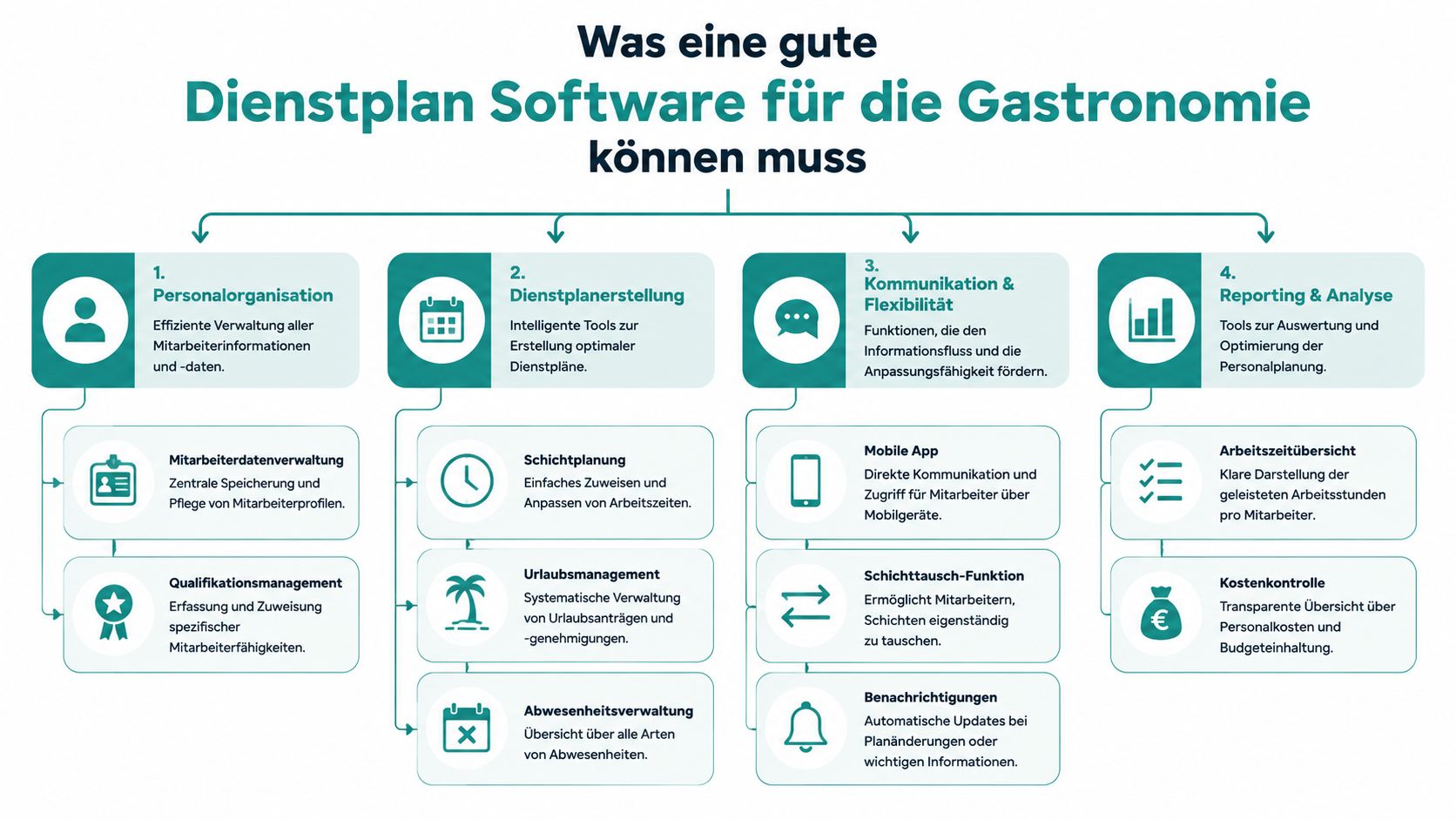
A good solution is not a digital calendar with a pretty interface. It must withstand gastronomy’s daily reality. That means changing availabilities, temps, part-time, qualifications, spontaneous changes, and a month-end where hours must be correct.
When evaluating software, don’t first look at the number of features. Look at whether it shortens your process. If after a week of testing you still collect availabilities via chat, the tool doesn’t fit.
Templates Instead of Starting from Scratch Every Week
The biggest time waster in restaurants is often repetition. Friday evenings almost always run similarly. Weekday lunches too. That’s why you need shift templates.
A simple example: You run a bistro with breakfast, lunch service, and evening operation. Instead of entering the same blocks every week, you create templates. Kitchen morning shift, service lunch, bar evening. Then you drag these shifts into the week and only assign names.
This is also practical for events. If you regularly have banquets or catering, you save suitable staffing as patterns. So you don’t forget that for the aperitif someone with bar experience must be scheduled and for setup someone with key responsibility.
Availabilities and Qualifications Directly in the Plan
The second biggest lever is self-service. Employees enter their availabilities themselves. Vacations, days off, preferred times, and blocked times no longer land in private messages but directly where you plan.
Even more important is the qualification filter. In gastronomy, you can’t just assign anyone anywhere. A new temp might be able to carry and clear, but not yet run their own station. At the bar, you need people who know drink workflows. Hotel breakfast requires different routines than evening service.
A usable solution therefore shows you not only free names but suitable names. Who may handle the cash register. Who has kitchen experience. Who speaks enough English for international guests. Such filters save you hectic reassignments later.
Rule of thumb: If the software only writes names in boxes but doesn’t properly consider roles, skills, and availabilities, it just shifts your problem to another screen.
Operation also counts. Planning usually happens on desktop. The team works mostly mobile. This exact mix must work in daily life. A good overview can be found at Shift Scheduling Software for Gastronomy by job.rocks.
What I Would Always Check When Choosing
- Templates for recurring shifts: Otherwise, you build the same plan anew every week.
- Absences in the same system: Vacations and days off must not end up in a side list.
- Shift swaps with approval: Employees may swap but not bypass management.
- Roles and stations: Service is not just service. Bar is not just runner.
- Mobile use for the team: If no one likes opening the app, everything falls back on you.
GDPR and Labor Law: The Invisible Helpers in the System
Many businesses only realize how thin their documentation is during disputes or audits. A handwritten note, a chat history, and a retrospectively changed Excel plan might seem sufficient in daily life. But as soon as working hours, breaks, or access to personnel data need clarification, it becomes tedious.
Good software protects you not only from disorder but also from blind spots. It reminds you of breaks, shows questionable shift sequences, and documents changes transparently. This is not distrust of your team. It is clean business management.
Warnings Before Trouble Arises
Take a typical case. A cook works a long evening shift on Saturday and is supposed to be back in the kitchen early Sunday. On paper, this easily slips through. In the system, the problematic combination immediately stands out or is directly flagged.
Clear documentation also helps with last-minute schedule changes. Who was informed when. Who agreed. Which shift was moved. Especially in an environment with many part-time workers, this brings peace. If you want to dive deeper into secure planning, see GDPR-compliant shift scheduling and secure cloud platforms for a practical classification.
A well-maintained system doesn’t take responsibility off your shoulders. It just ensures you see problems earlier and can prove later what was decided.
Data Protection Is Not a Side Issue in Daily Life
In gastronomy, personnel data often lies in surprisingly many places: office folders, old email attachments, private devices, or chat groups. This is exactly where unnecessary risks arise. Better is a central storage with clear access rights. Shift managers see what they need for operations. Payroll sees what they need for accounting. Not everyone sees everything.
Also important is how a provider handles data themselves. A good orientation is the page how Echt AG protects your data. There you see which points you should also check with other software. Access concepts, storage location, data processing agreements, and traceable security measures.
What You Should Watch for in Your Business
- Clear roles in the system: Not every manager needs access to all personnel data.
- Change logs: When an entry is adjusted, it should remain traceable.
- Time tracking without gaps: Additions must be visible and not silently disappear.
- Documentation of breaks: Especially for long shifts, this saves later discussions.
- No personnel data in private chats: Shift info belongs in a system, not scattered messenger histories.
More Than Just Planning: Mobile Features for Your Team
The best plan is useless if your team doesn’t see it in time. In gastronomy, it’s often not the planning at the desk but the last hour before the shift that counts. This is exactly where an app shows whether it helps in daily life or just looks nice.
The Employee’s Perspective
Imagine a service employee who works in the restaurant, at an aperitif, and occasionally on Sunday at hotel breakfast. She opens the app in the morning and immediately sees her upcoming shifts. Not just date and time, but also location, role, and contact person.
In the afternoon, she notices she has an appointment next week. Instead of messaging you, she enters her availability directly. You see this later when planning. No asking, no transferring chat messages into Excel.
Then a real gastronomy case happens. She can’t take an evening shift and offers it for swap. Not randomly to everyone, but within the system. You keep the approval. So the shift doesn’t get lost somewhere in the team but lands neatly with a suitable person.
When Changes Arrive Without Friction
Many misunderstandings don’t happen during planning but during changes. An employee looks at an old printout in the morning, a colleague reads WhatsApp too late, and suddenly someone is missing at the station. Good mobile features close exactly this gap.
Important are not only push notifications. Important is that employees can act themselves in the app.
- View shifts: Who works when, where, and in which role.
- Report availability: Free, blocked, or only available at certain times.
- Initiate swaps: Not via chat chain but with traceable approval.
- Receive reminders: Before the shift or when the plan changes.
A quick look at the process in dynamic teams often helps more than any list:
When employees can check and adjust their plan in seconds, the number of follow-up questions drops almost by itself. Not because of technology, but because the path becomes shorter.
Especially for temps, students, and changing workplaces, this is worth gold. They don’t have to ask first if something changed. They see it themselves. This not only relieves management but makes the operation more predictable for the team.
Seamless Processes: From Time Tracking to Payroll
Many businesses now plan digitally but fall back to manual work at month-end. Then times from apps, paper slips, or Excel lists are gathered and entered for payroll. This is exactly where errors arise that later cost money and nerves.
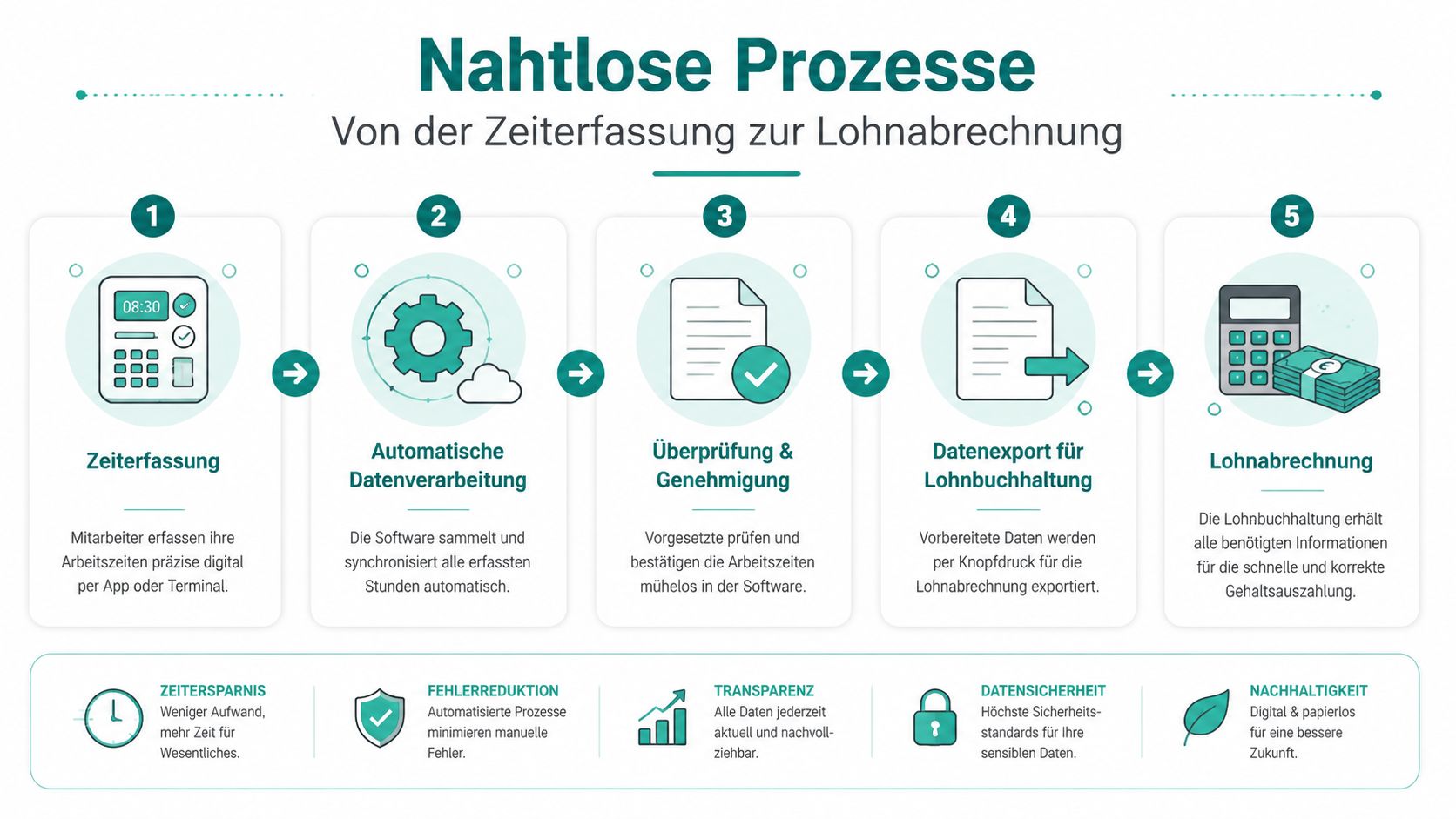
The clean process doesn’t start at payroll. It starts at clock-in. When planning, time tracking, and approval are connected, you no longer have to piece together working hours from three sources.
How a Clean Month-End Closing Works
Take a bartender on the evening shift. He clocks in at shift start via app. During the shift, it’s clear which assignment belongs to which role. After finishing, he clocks out. The time lands directly with the right employee and the right shift.
Then you, as the responsible person, review the entries. Was the time plausible? Was there an extension due to a late table? Was a break recorded correctly? You approve the shift or correct it with a comment. This way, no silent changes happen without context.
For accounting, this is a completely different state than a collection of loose timesheets. The hours are already organized. If you want to see how mobile tracking is organized in gastronomy businesses, the page Time Tracking Gastronomy App by job.rocks is a good starting point.
Where Manual Errors Disappear
Errors usually occur at transitions. Someone notes a shift on paper. Later someone else types it into a list. Then a third person transfers it into payroll software. Each step invites typos, missing surcharges, or wrong assignments.
With an end-to-end gastronomy shift scheduling software, exactly these breaks disappear.
- Planned shift and worked time are side by side: You see deviations immediately.
- Surcharges are not searched separately: Night, weekend, or holiday rules can be mapped in the system.
- Approvals remain documented: Payroll doesn’t work with unchecked raw data.
- Exports are prepared: Instead of recalculating, you hand over verified data.
A typical bottleneck in restaurants is not the recording itself. That often works somehow. The problem is the later correction. Whoever still argues at month-end whether someone left earlier or stayed longer didn’t build control at recording time. But too late.
Checklist for Selecting and Implementing Your Software
Many businesses buy too early based on appearance. A pretty calendar doesn’t replace a functioning process. You need a solution that fits your business. Not a demo model restaurant.
A café with a small core team needs something different than a hotel with breakfast, banquet, and bar. A catering company needs different priorities than a restaurant with a fixed weekly structure. So first ask yourself the right questions before comparing providers.
Questions to Ask Yourself
- How do you really plan today: With Excel, paper, WhatsApp, or already partially digital? Only if you honestly look at the current state do you see the gaps.
- Where does most stress arise: With last-minute absences, vacation planning, hour control, or payroll preparation?
- Which roles do you need in the plan: Kitchen, service, bar, breakfast, banquet, runner, cash register, key responsibility?
- How flexible is your team: Permanent employees, part-time, temps, students, freelancers?
- Which rules must be mapped: Breaks, surcharges, workplaces, approvals, absences?
Write these points down before every demo. Otherwise, you risk being dazzled by side issues.
Questions to Ask the Provider
A good test starts with concrete everyday situations. Not with general statements.
Important check: Don’t just have them show how a plan is created. Have them show how a missed shift is reassigned, how a time is corrected, and how the month-end closing is prepared.
These questions almost always pay off:
- Can the software map our surcharge rules: Especially for evening, Sunday, or holiday shifts?
- How does data import work at the start: Employees, roles, contracts, absences, and old master data?
- How easy is access for the team: App, browser, or both?
- What happens with shift swaps: Can the team swap themselves, and where is your approval?
- What does support look like in daily life: Who helps if a problem arises on the weekend?
- Which data can you export: Not just pretty views but really usable handovers for payroll?
For implementation itself, a simple rule applies. Don’t start with everything at once. Take a manageable area first. For example, service and bar. When the process works, add kitchen, events, or other locations. This way, you don’t overwhelm your team or yourself.
How job.rocks Simplifies Everyday Life in Gastronomy
When you think about the whole chain, it quickly becomes clear what matters. Planning alone is not enough. You need availabilities in the same process, roles and qualifications in staffing, mobile feedback from the team, clean time tracking, and a usable handover to payroll.
This is exactly where job.rocks comes in. The platform bundles shift scheduling, employee app, time tracking, and payroll preparation in one system. For gastronomy businesses, this is especially helpful when you work with changing teams, multiple roles, or different workplaces. Instead of just placing names in shifts, you plan by availability, function, and suitable qualification.
In daily life, this means, for example, you staff an event not only with available people but with those who really fit bar, service, or setup. Employees see their shifts on mobile, report absences, or offer shifts for swap. Worked hours then don’t end up in a second system but stay in the same process until approval and handover to accounting.
For restaurants, hotels, caterers, and other businesses with flexible staff, this is often the point where shift chaos becomes a clear process. Not because suddenly everything is perfect. But because less gets lost between different lists, chats, and notes.
If you want not only to digitize your shift plan but also set up the entire process cleanly from shift assignment to payroll preparation, check out job.rocks. You get a direct impression of how planning, team communication, and time tracking can be combined in a gastronomy business.