
Temporary Staff Planning Software: The 2026 Guide
Are you looking for the best temporary staff planning software? Our guide compares features, costs, and GDPR pitfalls to help you make the right choice.
You are probably exactly at the point where the old planning no longer works. Assignments come in at short notice, employees report availability via chat, someone sends a photo of their report, someone else calls about an absence, and in the end, your team tries to keep everything somehow together in Excel. As long as you schedule ten people, that still works. With multiple clients, changing locations, and different qualifications, the system collapses.
This is exactly where temporary staff planning software turns from a nice add-on into a fundamental working basis. Not because of pretty interfaces, but because two things come together in the Swiss market: high deployment frequency and legal risk. You don’t just have to fill shifts. You must be able to prove who worked where and when, which hours were approved, and whether your data processing complies with the Swiss nDSG and collective labor agreements (GAV).
The selection often fails not due to a lack of tools but because of asking the wrong questions. Many teams only compare shift calendars, push notifications, and prices per user. That’s not enough. If time tracking on site fails, hours are not properly recorded afterward, or the export to payroll requires manual rework, you will pay the price later in the form of inquiries, corrections, and disputes.
To help you quickly recognize what works in your practice, this first overview is here.
| Area | How to recognize a usable solution | Typical purchasing mistake |
|---|---|---|
| Availability | Employees maintain their own times, qualifications are stored in profiles | Only look at calendars, but don’t check qualification logic |
| Scheduling | Open assignments can be sent specifically to suitable people | Everyone receives the same request, although only some are suitable |
| Mobile Use | App or mobile interface is truly usable in daily work | Testing demo only in the office, not in the field |
| Time Tracking | Hours are clearly assigned to assignment and location | Only record start and end times without reference to the task |
| Payroll Preparation | Approved hours proceed without rework | Accepting CSV export with manual work as “integration” |
| Legal | Changes are traceable, roles and access rights are clearly regulated | Checking data protection only by ticking a box in the contract |
Table of Contents
- Why Excel is no longer enough for staff planning
- Core functions of every good planning software
- Your decision matrix for software comparison
- Integration with payroll and time tracking
- Legal security focus: GDPR and Swiss nDSG
- Cost models and the true price of implementation
- The best software for your industry
- Frequently asked questions
Why Excel is no longer enough for staff planning
When planning still seems small but is already costly
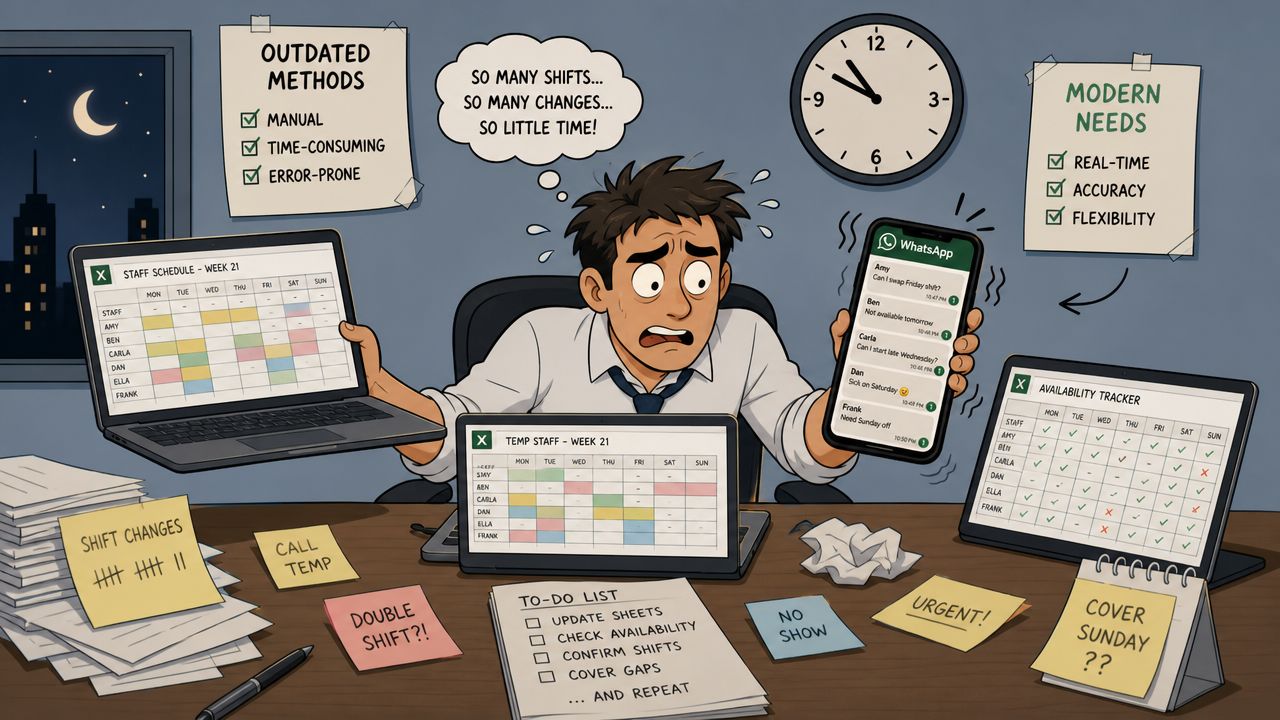
Excel rarely fails at the first shift. It fails at the third change on the same day. An employee cancels for the evening, a replacement is available but lacks the necessary experience, and the client still expects punctual staffing. Then the familiar pattern begins: searching chat history, opening old files, cross-checking lists, checking phone numbers.
Many teams stick with it because “it still works.” That is often a misconception. The real burden is not in creating the plan but in corrections, inquiries, and transferring to the next process stage.
In Switzerland, around 364,941 people were in temporary employment in 2017, as noted in the article about temporary work in Switzerland on team.jobs. This scale shows that flexible work is not a niche topic. Those working with temporary staff operate in an environment with constantly changing pools and high staffing dynamics. That’s exactly where manual methods quickly reach their limits.
Practical rule: As soon as your team maintains availability in one place, plans shifts in a second, and checks hours in a third, you no longer have a system. You have a chain of errors.
If you still work today with a work schedule Excel template for shift planning, that’s no flaw. It’s just a sign that you should check whether your process still fits the reality of your operation.
Warning signs in everyday work
A few signals almost always appear before a team switches to software:
- Double data maintenance. Master data is in Excel, contact data on phones, qualifications in PDFs or emails.
- Unclear availability. Employees write “maybe” or respond late, and no one knows what has already been considered in the plan.
- Misplacements. Someone is scheduled even though a specific qualification or experience was required.
- Subsequent corrections. Hours don’t match the assignment because reports and planning diverge.
- Dependence on individuals. If the scheduler is absent, hardly anyone understands the planning status.
A practical example from events and hospitality: For a weekend, you need service staff, team leaders, and setup/breakdown personnel. On Wednesday, the Excel sheet still looks neat. By Friday, several availabilities change, a client postpones the start, two new people join. Without a central system, every phone call starts with the same question: “Who has the latest version?”
Core functions of every good planning software
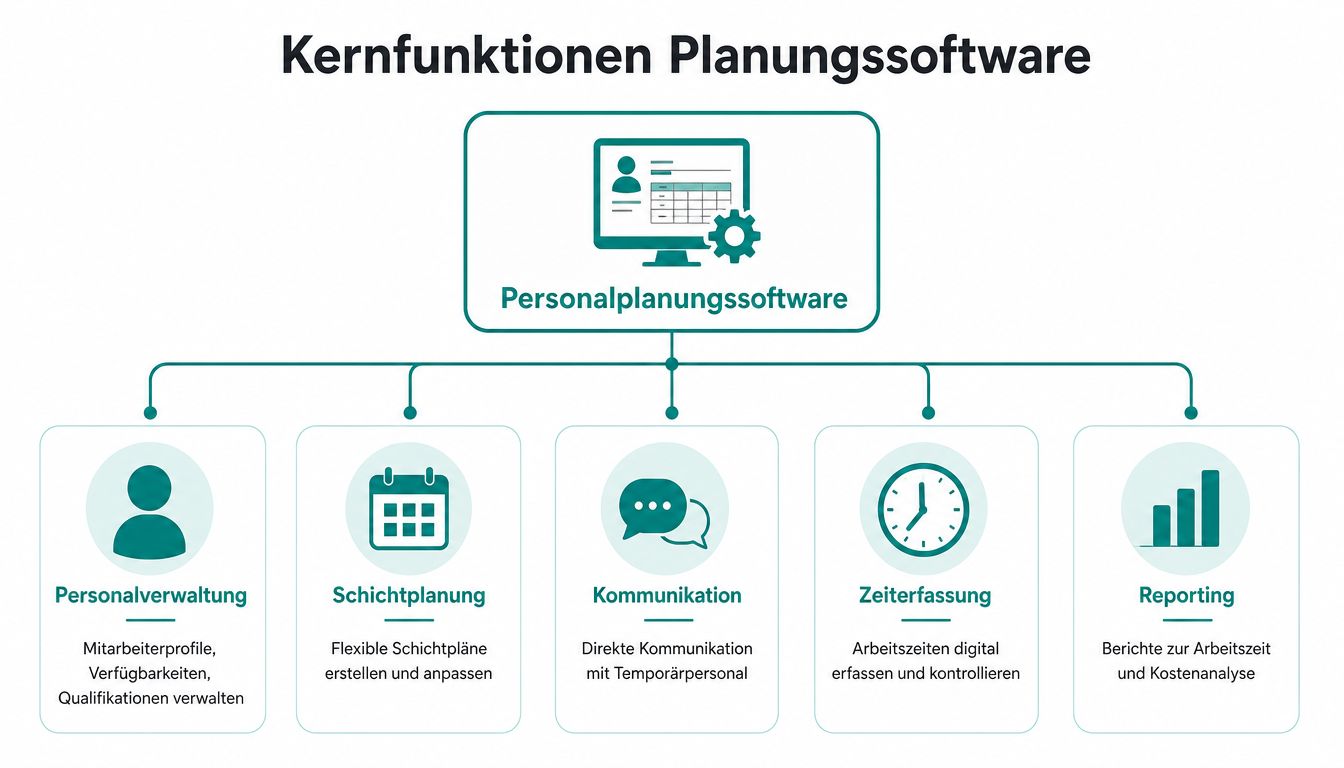
In the end, it’s not the prettiest interface that decides but whether your team can work smoothly in the early shift, during last-minute absences, and before payroll runs. Good planning software for temporary staff maps exactly this operational chain: availability, suitability, assignment, feedback, time approval, and handover to payroll.
Master data and availability
This is where simple shift planning separates from a system that truly works in the Swiss temporary staffing business. Good temporary staff planning software must immediately answer three questions: Who is available, who is professionally qualified, and who has documents, roles, or deployment limits properly stored?
Here’s what I would specifically look for in the selection process:
- Profiles with sufficient depth. Name and phone number are not enough. You need qualifications, documents, language skills, assignment history, roles, and ideally blocking notes or deployment restrictions.
- Self-maintenance of availability. Employees must be able to report and update their availability themselves. Otherwise, scheduling maintains old data and plans based on assumptions.
- Filters that help operationally. Searching by education, language, location, experience, or client approval must not rely on free text or PDF attachments.
- Traceable changes. When availability, documents, or deployment rights are changed, it should be logged. This helps not only operationally but also with data protection questions under nDSG.
A typical demo mistake: The provider shows nice employee cards but no clean rights and document logic. That’s where it gets expensive later. In the Swiss market, you want to see how the tool handles expiring IDs, client-specific requirements, and different GAV rules. If that’s only solved with notes, you’re building in the next source of errors.
The market size shows why this is relevant. In Switzerland, around 202 million temporary assignment hours were worked in 2022, as the annual statistics from Swissstaffing show. At this volume, you need more than a calendar. You need a reliable data base that scheduling, time tracking, and payroll preparation can access directly.
Scheduling, communication, and time tracking
The next core question is simple: How does the right assignment get to the right person, and how does the verified time get back into the system?
A good tool covers four processes without media breaks:
-
Targeted sending of assignments
Scheduling selects suitable people by qualification, availability, and location. Broad distribution costs time and reduces response rates. -
Mobile feedback in daily work
Acceptance, rejection, shift details, and changes must arrive on the device employees actually use. Otherwise, scheduling starts phone chains again. -
Time tracking directly at the assignment
Hours are recorded, checked, and approved on site. This reduces inquiries, subsequent corrections, and disputes before payroll. -
Clean handover to payroll
Approved hours proceed in a structured way. No one should have to search them again from PDFs, chats, or Excel lists.
Especially for temporary assignments, not only speed but traceability counts. If an employee reports a break differently than the client, the system must show who confirmed what and when. The same applies to surcharges, night hours, or client-specific rules. Without this logic, planning software is just a digital whiteboard.
Looking at other operational industries helps evaluate software, even if the processes are not identical. Vork’s software comparison for craftsmen shows well what to watch for in mobile deployment planning, feedback, and data flow. For temporary work in Switzerland, you must additionally check whether the provider really maps legal and collective agreement special cases in the product.
| Function block | What you want to see | What is often missing |
|---|---|---|
| Scheduling | Assignment logic by qualification and availability | Sending to broad distribution lists without selection |
| Communication | Mobile feedback on individual assignments | Only mass SMS or email |
| Time tracking | Recording at assignment with approval process | Subsequent manual entry |
| Reporting | Hours, deviations, and open approvals visible | Only raw data export |
If you want to see how modern shift planning looks in practice, you can watch the short product demo here:
If a provider only shows the plan but not the path from request to approved hour, the demo is incomplete.
Your decision matrix for software comparison
Comparison lists help only to a limited extent. You need a matrix that ties into your daily work, not marketing terms.
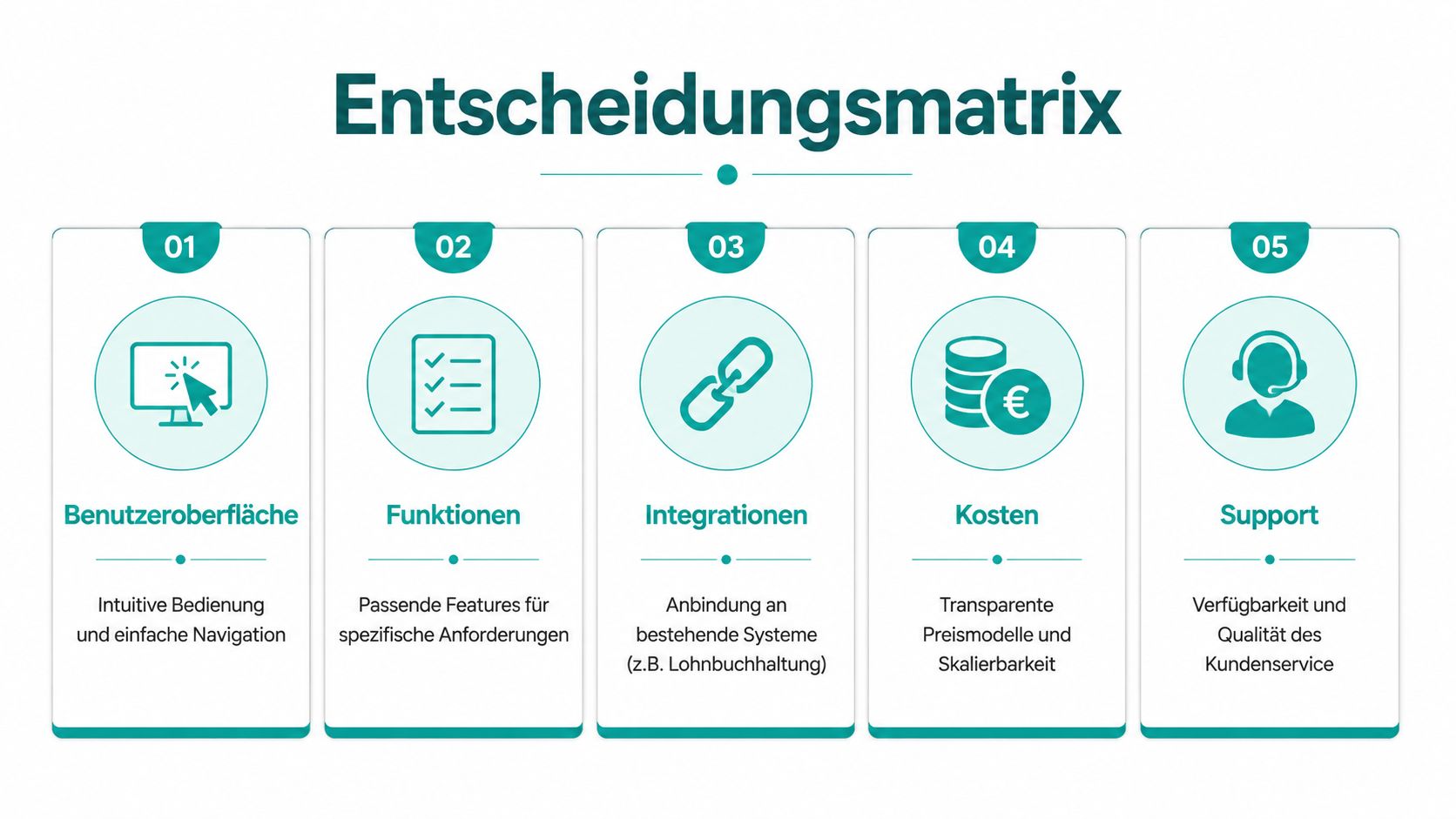
Five evaluation fields for selection
I would never judge a provider solely by a feature list again. Better is a matrix with five fields that you rate per tool.
| Evaluation field | What it’s about | Good provider answer |
|---|---|---|
| Usability | How quickly your team works confidently with it | Concrete process for scheduling, app, and approvals |
| Business logic | Whether temporary processes are truly mapped | Qualifications, locations, roles, approvals |
| Integrations | How data flows into other systems | Clear description of data flow |
| Legal | Traceability of access and changes | Roles, logs, deletion logic, data location |
| Costs | What really incurs | Transparent model without hidden add-ons |
If you know such comparisons from other operational industries, it’s worth looking at Vork’s software comparison for craftsmen. Not because craftsmanship and temporary work are identical, but because the same fundamental question arises there: Which software holds up in the field and not just in presentations?
Questions you should ask in every demo
You recognize the quality of a demo by the answers to concrete follow-up questions. Don’t just ask “Is there an interface?”. Ask more precisely.
-
About payroll integration
“Which fields do you transfer to my payroll system, and what does my team still have to check manually afterward?” -
About the employee app
“How does a person report changed availability, and how quickly does it appear in scheduling?” -
About same-day absence
“Please show me live how you find a replacement with the right qualification.” -
About data protection
“Who sees what, and where can I see in the system who changed an assignment or time booking?” -
About price and operation
“What does initial setup cost, what does support cost, and what does an additional feature cost later?”
What I watch for: I always ask to see a real process. Record assignment, request staff, receive acceptance, book time, approve, export. Everything else is just a sales pitch.
A practical example: A tool seems fast in the demo because the provider works with sample profiles. In real operation, multilingual app texts are missing, qualifications are only stored as free text, and changes to assignment times are not clearly marked. These points separate a nice planning tool from a solution that withstands your operation.
Integration with payroll and time tracking
Many bad purchases happen here. Planning still somehow works. Problems arise afterward.
CSV is not a real integration
A CSV export is better than typing. But not much more. If your team exports, checks columns, adjusts formats, calculates surcharges separately, and then imports again, manual effort remains high.
Especially in the Swiss market, the value of other approaches becomes clear. In a comparison list for shift planning, job.rocks’ overview of shift planning tools notes that solutions like Planerio or TimeTac often show their benefit in the transition from time tracking to payroll. That’s where it decides whether planning really saves work or just shifts it.
What a usable process looks like
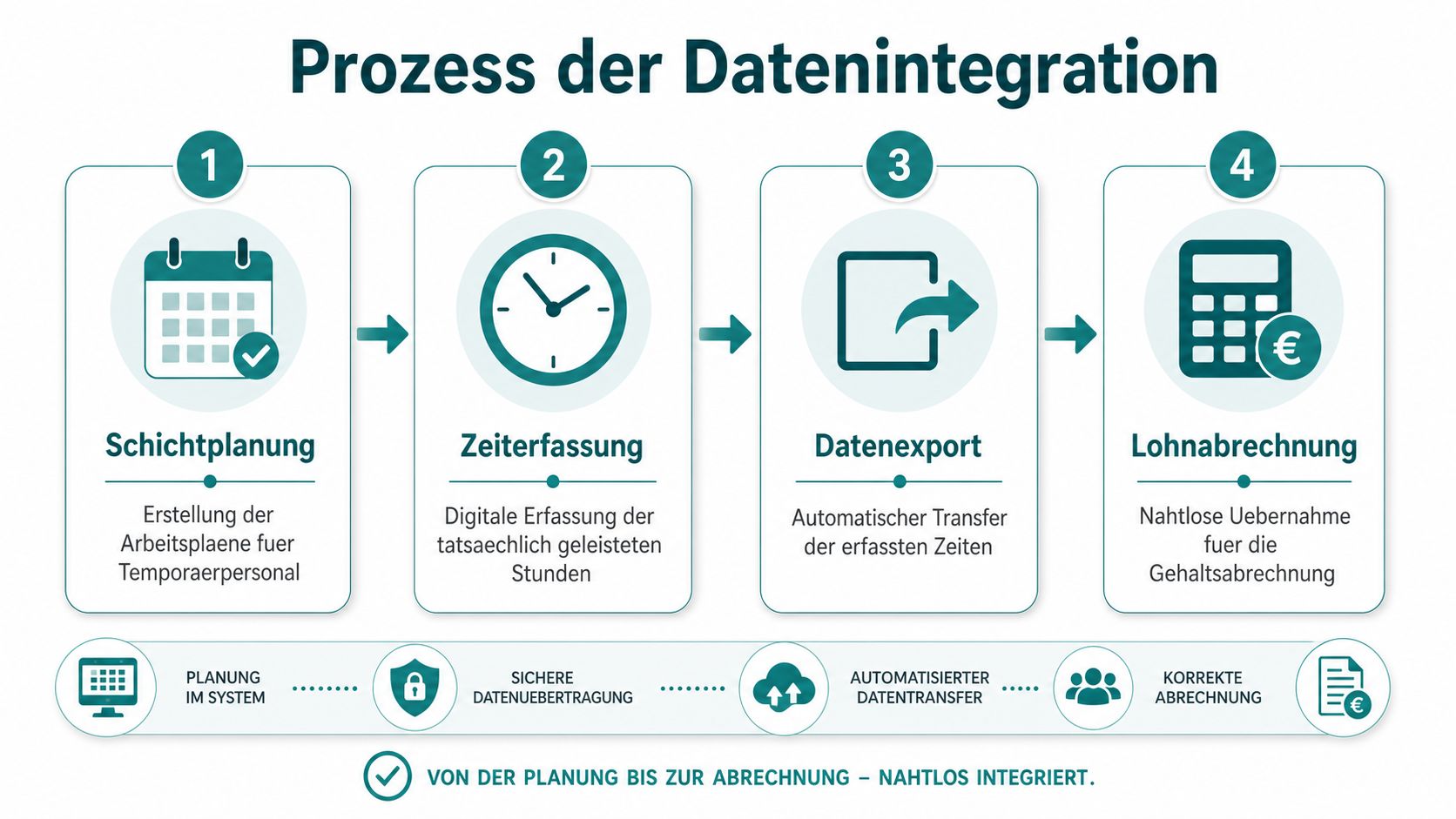
A clean process has a clear sequence:
- An assignment is planned with location, time, and role.
- The assigned person sees the assignment on mobile.
- The hours worked are digitally recorded.
- A responsible person checks and approves.
- The data is forwarded in the appropriate format.
If a provider only shows you steps one and five, the most important part is missing. Then approvals, corrections, and evidence get stuck somewhere in between.
Check these three things especially carefully:
-
Approval logic
Who is allowed to confirm hours, and what happens with deviations between plan and reality? -
Location reference
Can hours be clearly assigned to a site, order, or client? -
Field mapping
Can wage types, surcharges, and time types be transferred appropriately?
A typical example from the security industry: An employee works at two sites in the same night. If the system only knows one shift as a block, the client reference no longer matches. Then a small inaccuracy quickly becomes a billing problem.
If you want to dive deeper into how real connections between systems look, the overview of API integrations and interfaces in practice helps. The keyword is not important. What matters is whether your process requires fewer manual steps afterward.
You recognize poor integrations when the provider talks about “export” even though you actually need ongoing data transfer.
Legal security focus: GDPR and Swiss nDSG
Many providers sound reassuring here. They say “GDPR compliant,” show a lock icon, and quickly switch back to planning. For Swiss temporary staffing companies, that’s not enough.
The blind spot of many tools
In everyday work, you process personal data, assignment locations, working hours, and often documents about qualifications or contracts. As soon as multiple schedulers, client contacts, or team leaders collaborate in the process, the question of roles, access rights, and change logs becomes concrete.
The sharpest question is not whether the tool can display shifts. The real question, as job.rocks puts it in the article about temporary office software in Switzerland, is: “Can I prove in case of dispute who worked where and when, and do the data remain compliant with GDPR/nDSG and collective agreements?” For that, you need legally secure time tracking and traceable change logs.
What you need to check specifically
Have these points shown in the system, not just mentioned in the contract:
-
Change log
Who moved a shift, adjusted a time, or granted approval? -
Roles and rights
Does a client see only their site or the entire employee pool? -
Deletion and retention logic
What happens to data when employees are no longer active? -
Right of access
Can you provide a person’s data in an orderly manner if they request access? -
Location-based time tracking
Is it traceable later on which assignment or site the hours originated from?
An example from staffing agencies: An employee later disputes having worked at a certain location or having taken the recorded break. If your system only shows one overall shift without change history and without reference to the specific site, it gets uncomfortable. If you can prove time booking, approval, and correction with history, you are in a completely different position.
Many general software tests overlook this part. They evaluate calendar view, app, and design. For Swiss use with GAV and nDSG, that’s not enough.
Cost models and the true price of implementation
The price on the website is almost never the whole price. You don’t just buy licenses. You buy a new process.
What’s on the quote and what comes later
Typical models are price per user, per scheduled person, per location, or as a package. None of these is automatically wrong. It becomes wrong if the model doesn’t fit your business.
If you work highly seasonally, a fixed package price can be more pleasant than a model that spikes in peak months. If you have many schedulers but a small deployment team, you have to calculate differently than an agency with a large employee pool and few internal users.
Watch out for these cost blocks:
- Initial setup. Data import, role setup, forms, shift types.
- Training. Especially for scheduling and approval processes.
- Add-on modules. App, time tracking, export functions, reports.
- Support. What is included in the contract, what is charged separately?
Where the investment still pays off
The better comparison is not “software versus no software” but “software versus today’s effort.” As soon as your team back-enters times, collects reports, discusses corrections, and reworks payroll, real costs arise—even if they don’t appear in any license line.
The description from zvoove about electronic time tracking in personnel deployment names a very tangible point: A web-based, mobile-capable software with electronic time tracking can reduce the need for physical work reports to zero and reduce administration time per assignment on average by 30 to 45 minutes. Especially with many short assignments, that’s no small detail.
An example from hospitality: If you coordinate many last-minute assignments over a weekend, it’s not planning that consumes most time but following up on reports and approvals. If this block disappears or is greatly shortened, the calculation changes noticeably.
Never buy based on monthly fees alone. Buy based on the effort your team still has after the shift.
The best software for your industry
Monday morning, 6:15 a.m. Two employees call in sick, a client changes the assignment location, and the plan must be ready by 8:00 a.m. At this moment, no long feature list helps you. You need software that fits your operational daily work and does not cause follow-up errors in the Swiss market.
The most important difference rarely lies in the calendar but in the rules behind it. An event agency needs different processes than a staffing agency in healthcare. And in Switzerland, there’s something extra: nDSG, GAV-related processes, clean documentation, and traceable approvals. If the tool only maps these points marginally, you buy yourself extra effort in scheduling, payroll, and compliance later.
Events, hospitality, and logistics
In events, promotion, and logistics, speed counts. You must quickly request suitable people, bundle feedback, and replace absences without chaos. The better solution here is not the one with the deepest demand logic but the one with short paths on the phone, clear status displays, and clean grouping by location, availability, and qualification.
Watch for four things in these industries:
- Targeted group requests to suitable pools instead of broad distribution.
- Mobile acceptance and rejection without hurdles in login or app.
- Clean assignment data on location, time window, and function.
- Fast approvals after the assignment so reports and hours don’t pile up.
In hospitality, the focus shifts. Recurring shifts, spontaneous swaps, and a simple approval process bring more than complicated forecasting models. In logistics, the situation is often reversed. There, availability, location, and last-minute replacements decide planning quality.
Healthcare, security, and staffing agencies
In healthcare, the software must first check suitability. Seeing free people is not enough. You need filters for education, certificates, permissible assignment types, and expiring documents. Otherwise, your team plans quickly but exposes itself to unnecessary risk.
In security, traceability is paramount. Location reference, change history, mobile time tracking on site, and clear approvals are more important than a pretty calendar view. If a client demands a check or proof, your team must find the information immediately.
In staffing agencies, the quality of the system shows in daily business. Can scheduling create an assignment, have hours recorded, document corrections cleanly, and provide data without media breaks for payroll preparation? If not, you only shift work from planning to administration. For a market overview of software for temporary offices and flexible teams, it’s worth comparing by process coverage rather than interface. In the Swiss environment, for example, Planerio, TimeTac, or job.rocks represent different approaches.
A practical selection aid:
| Industry | Check first | Check second |
|---|---|---|
| Event and promotion | Fast scheduling, group requests, replacement management | Complex logic for long assignment cycles |
| Hospitality | Recurring patterns, mobile communication, short approvals | Fine-grained demand calculation |
| Healthcare | Qualifications, document status, rule checks | Pure chat functions |
| Security | Location reference, proofs, change history | Visual planning view |
| Staffing agencies | End-to-end process to payroll preparation | Isolated shift planning |
When selecting for the Swiss market, always ask the same question at the end: Does the tool prevent operational errors and legal rework, or does it just make planning prettier? That’s the difference between usable industry software and a general shift planning app.
Frequently asked questions
Can I also manage freelancers with such software?
Yes, often you can. You should ensure the system cleanly separates different contract and billing logics. A freelancer usually needs different fields than a temporary employee, for example regarding documents, hourly rates, or approvals.
What if my team is multilingual?
Then mobile use is almost more important than the back office. Check whether schedulers and employees can set their language separately. Otherwise, misunderstandings arise exactly where speed matters, such as assignment details or last-minute changes.
How long does it take to set up such software?
That depends less on the tool and more on your data. If profiles, clients, and assignment types are disorganized, cleaning up takes time. If you start well prepared, it goes much faster. Plan enough time for tests with real assignments, not just for master data import.
What is the most important question in the selection process?
Not “Can the software plan?”. Almost every tool can do that somehow. The better question is: Does the system support your real process from the first assignment to the approved hour and correct payroll run?
Is a general shift planning software enough?
Sometimes yes. Often no. As soon as you work in the Swiss market with temporary staff, multiple clients, GAV proximity, and sensitive time tracking questions, you need more than a calendar with an app.
If you want to check how such a process looks concretely in a platform for flexible employee pools, take a look at job.rocks. For selection, a test with your real process is especially worthwhile: report availability, fill assignment, record time, check approval, and forward data for payroll preparation. That’s how you recognize whether the tool holds up in daily work.
Meta description: Are you looking for software to plan temporary staff? Here you learn how to properly select tools for scheduling, time tracking, payroll integration, and nDSG- and GAV-compliant processes in the Swiss market.