
Workforce Planning in the Swiss Social Sector: Your Success in 2026
Learn how to implement demand-oriented workforce planning in the Swiss social sector with clear steps, manage shifts and qualifications, and ensure compliance.
On Monday morning, the phone is already ringing in the social services department. A caregiver is sick, someone is missing for the late shift at the residential home, and a client urgently needs a person with the appropriate expertise. Although names are listed in the calendar, no one can immediately see who is actually available, which qualifications are required, and whether switching from the night to the early shift is permitted.
This is exactly where good workforce planning in the Swiss social sector begins. You don’t just schedule shifts; you connect care needs, qualifications, workloads, absences, travel times, and feedback from the team. This is different from pure nursing planning, Spitex scheduling, or software for case management, client documentation, and billing.
The Swiss social sector employed 153,281 people in 2022. In 2023, there were around 10,800 institutions with 17,300 workplaces, as shown by the SGSA specialist information. Distributed locations and changing teams quickly make paper planning confusing.
You therefore need a process that first clarifies the demand, then filters suitable people, and only then assigns shifts. Communication is also part of it. Employees must report availabilities, see changes, and confirm swap requests transparently. For applications and team building, a current professional application photo for social workers can also be useful, especially when new specialists are sought for float or part-time positions.
Table of Contents
- Introduction
- Developing Demand Assessment and Deployment Analysis
- Setting Up Shift and Qualification Management
- Regulating Compliance and Data Protection
- Integrating Payroll Processes and Time Tracking
- Implementing Change Management and Success Monitoring
- Summary and Next Steps
Introduction
Just before seven o’clock, you check the daily plan for a supervised residential group. The early shift is staffed, but the assigned person does not have the required language skills for a new care setting. At the same time, another location is waiting for a replacement for the evening. In the group chat, two employees report different availabilities, while a third already wants to have taken over the shift.
Such situations initially seem like isolated absences. In fact, they show whether your workforce planning is reliably structured. A name in the calendar is not enough. You need to know which role is needed, which qualification is mandatory, when someone can work, and how much lead time remains for a binding confirmation.
Pressure is high in the social sector. A specialist study reports a turnover rate of 22 percent for surveyed social enterprises, while the nationwide industry average is 16 percent, according to the INSOS specialist study. This directly affects the duty roster: replacements must be found quickly, knowledge is distributed among several people, and last-minute changes become more frequent.
Practical rule: First plan for care security and required competencies. The person who is currently free is not automatically the right assignment.
This guide shows you a practical approach from demand assessment to mobile feedback. You won’t get software for case management or client documentation, but a clear logic for shifts, availabilities, absences, and qualification gaps. In the end, you can review your existing lists and arrange the first fields so that you no longer just look at free names but at suitable availability.
Developing Demand Assessment and Deployment Analysis
Reliable planning does not start with the calendar. It starts with the question: What care must be provided at what time with what competence?
Conduct demand assessment in four steps:
- Record care mandate: Note per location, residential group, or service which tasks arise. Separate routine tasks from peaks, such as intake interviews, accompaniment to appointments, or increased care needs in the evening.
- Define must-have criteria: Record which education, experience, language, authorization, or internal briefing is mandatory. Wishes belong in a separate field; otherwise, you might mistakenly treat them as exclusion criteria.
- Match availability: Record working hours, part-time workloads, holidays, training, illness, and binding lead times. A verbal commitment in chat should only count as booked when entered in the central plan.
- Describe the gap: Don’t just say “person missing,” but “late shift at location B, care experience required, available person without briefing.” This clarifies what search is actually needed.
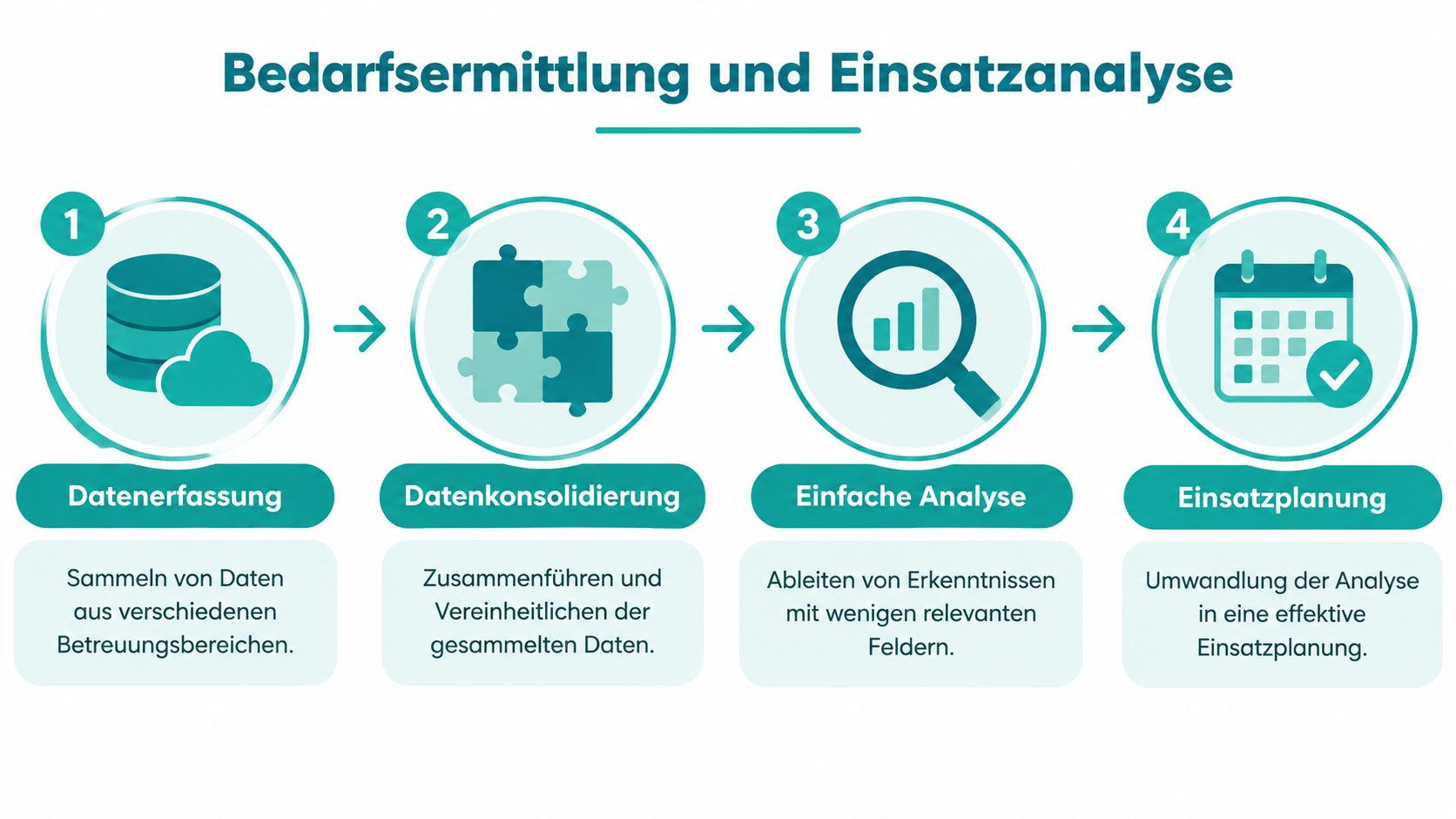
For your work matrix, a few columns are initially sufficient:
| Area | Entry |
|---|---|
| Role | Care, night watch, social work, or group leadership |
| Must-have criteria | Education, language, briefing, experience |
| Time window | Early, late, night, weekend |
| Availability | confirmed, open, absent |
| Gap description | What is missing and until when? |
| Next step | Request, swap, float, adjustment of mandate |
A residential home might look like this: Two caregivers are needed for the late shift. One person is firmly scheduled, a second is absent. Three employees are basically available, but only one knows the residential group. The gap then is not “one person needed,” but “one briefed caregiver for the late shift.” This formulation prevents you from assigning someone who has time but cannot reliably take on the task.
For multiple locations, consider the travel time between deployment sites. A person can work in one residential group in the afternoon and cover another location in the evening, provided handover, travel time, and rest periods remain realistic. A pure hour calculation is not sufficient.
For fluctuating demand, you can check workforce planning with forecasting as the next digital step. The key remains that your base data is clean. The Swiss social landscape is large in personnel and spread over many workplaces, so an incomplete list quickly leads to wrong assumptions.
Setting Up Shift and Qualification Management
For early, late, and night shifts, you need a fixed shift logic but not a rigid plan at all costs. Demand in the social sector fluctuates more than in a uniform production process. A residential home needs different roles in the morning than at night; a social service has conversations and appointments during the day, while on weekends care and presence are most important.
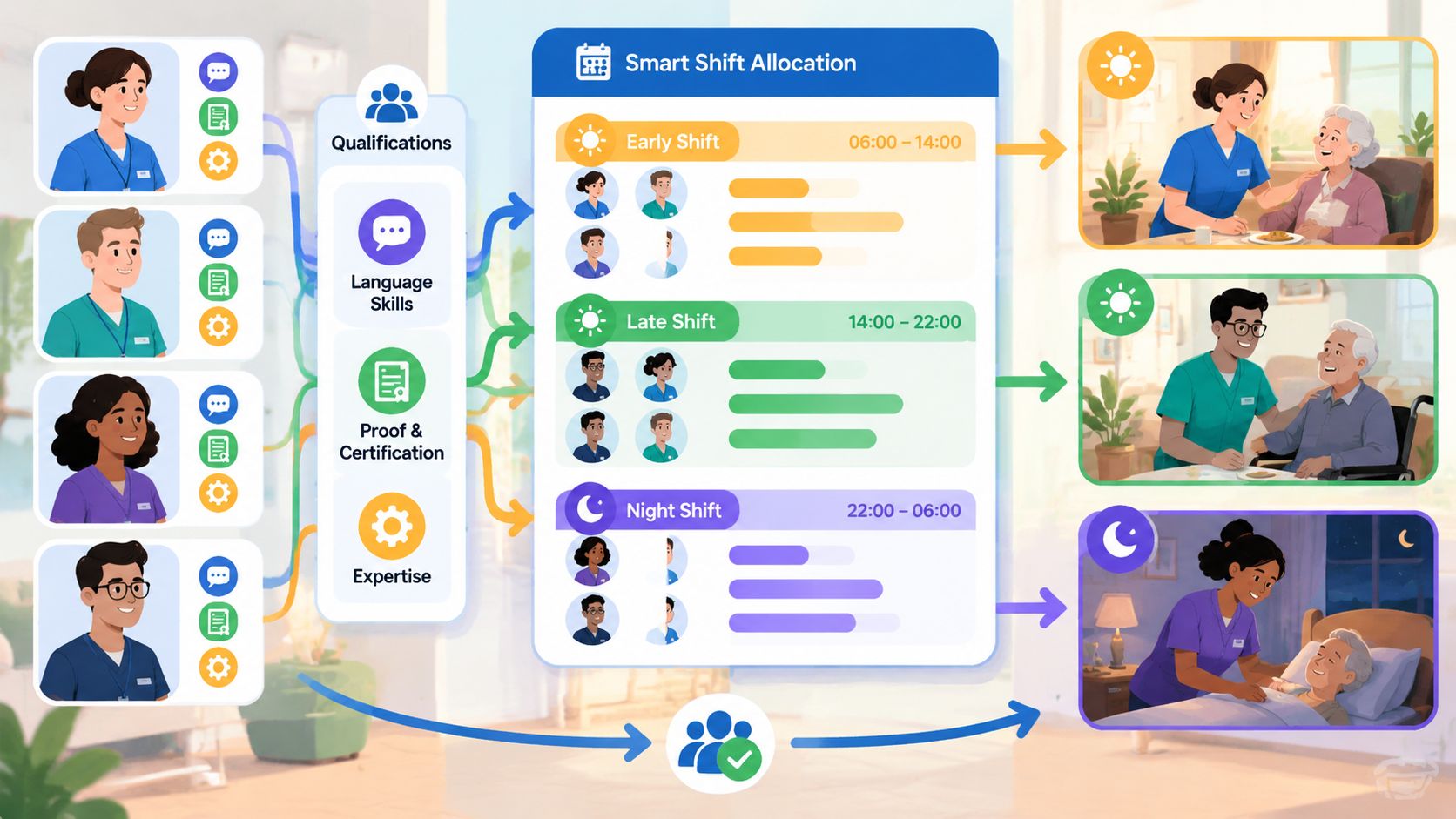
First define the shift types and their minimum staffing. Then set the qualification filters. A sensible sequence looks like this:
- Choose role: Search first for care, night watch, social work, or management.
- Check must-have criteria: Filter by education, internal briefing, language, and proven experience.
- Match time window: Consider confirmed availability, weekend readiness, and deployment location.
- Send proposals: Only request people who fit professionally and temporally.
- Document feedback: A confirmation, rejection, or open request must remain visible in the plan.
A concrete example: For a night watch, you need a person who knows the location and has confirmed the night shift. An available specialist without location knowledge is not automatically assigned. You can earmark them for later introduction, but they do not close the current gap.
A qualification matrix for workforce planning helps with this assignment. Record not only degrees but also expiry dates of certificates, location clearances, and special care experience. Qualifications should not be kept in private notes of individual planners.
Employees also need a simple feedback channel. A mobile planning page or app can query availabilities, display shift details, and map a swap process. This does not replace your review but shifts feedback from scattered messages into a traceable process.
A spontaneous confirmation is only plannable when assigned to the correct shift, location, and qualification profile.
Shift systems must be legally reviewed. SECO describes shift work as staggered work of several groups at the same workplace. With two shifts, the individual shift including breaks must not exceed 11 hours, with three or more shifts the limit is 10 hours including breaks, according to Art. 34 of ArGV 1.
For a small operation, a basic plan with a float pool may fit better than a rigid rotation model. If demand and personnel fluctuate strongly, you need visible reserves and clear rules for changes. A plan that closes every gap with the same person may seem convenient short-term but increases the burden and worsens later absences.
Regulating Compliance and Data Protection
Working time rules belong in the planning process, not in subsequent control. For hospitals and homes, a maximum working time of 50 hours per week generally applies, there must be 11 hours rest between two shifts, and for more than 5.5 hours of work a 15-minute break is due, as the overview of the labor law in nursing explains.
Check every plan on at least four points:
- Weekly working time: Add planned shifts and clarify if additional assignments change the limit.
- Rest between shifts: Especially check changes from night to early and late to early.
- Breaks: Schedule breaks visibly within long shifts.
- Night and weekend: Check applicable permits, collective agreements, and company rules separately.
The warning in the planning system is only a tool. If a shift violates a rule, a responsible person must clarify the cause. A red symbol does not replace professional review.
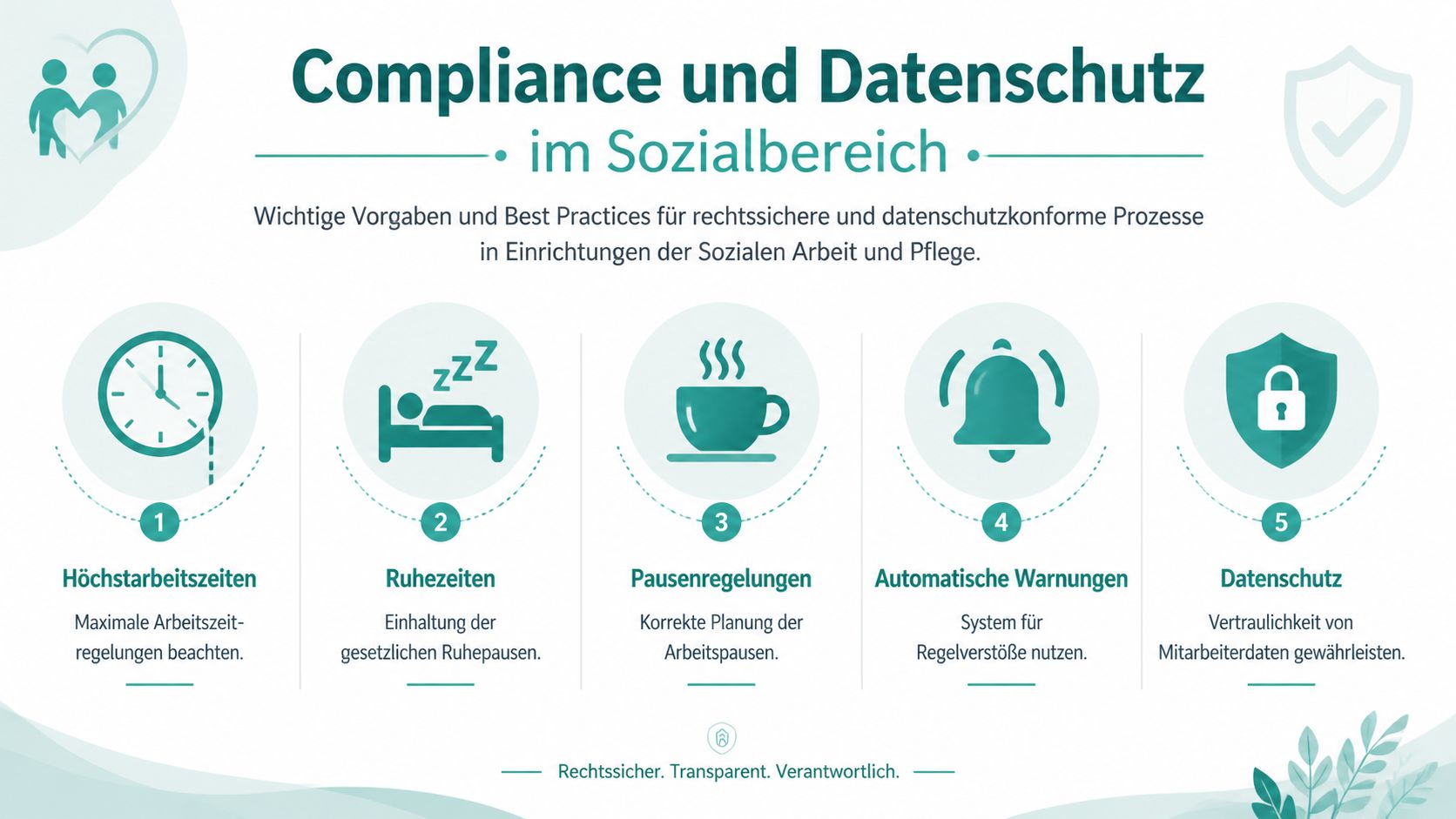
Data protection follows the principle of data minimization. For workforce planning, you normally need name, role, qualifications, availability, absences, and deployment location. Sensitive case details of clients do not belong in a shift field if the information is not necessary for staffing.
Case one: A residential group needs a person in the evening with experience in handling a specific care situation. The required competence is listed as an internal attribute in the duty roster. The concrete diagnosis or personal history of the client remains in the responsible specialist system.
Case two: An employee calls in sick. The absence is recorded in the plan with period and status. Medical details are not distributed to the entire team. Planning receives the information necessary for replacement.
For questions about implementation, you can use the guide to GDPR compliance as supplementary orientation. For Swiss companies, also check your own data protection requirements and have open legal questions professionally assessed. An overview of Swiss data protection in workforce planning helps you separate necessary fields from unnecessary data.
Integrating Payroll Processes and Time Tracking
A duty roster shows what was planned. Payroll preparation additionally needs what was actually worked. These two levels must not be mixed. If someone leaves earlier, stays longer, changes location, or swaps a shift, the change must remain traceable.
The personnel stock in care and support services grew by around 19 percent between 2012 and 2019, according to BAG fact sheet on stock and demand. More part-time workloads, additional deployment locations, and changing working hours increase the effort for time tracking and payroll interfaces.
A clean process starts with recording:
- Planned shift: Role, location, start, end, and break are fixed.
- Actual time: Clock-in and clock-out or manual correction document the time worked.
- Check deviation: The responsible person clarifies overtime, delay, early end, or shift swap.
- Assign absence: Illness, vacation, training, or unpaid absence are recorded separately.
- Release: Only after review do the time data go into payroll preparation.
An example from a residential home: The late shift is planned until the end of handover; the night watch starts later than planned. Actual times are not simply overwritten. You record the deviation, check the break, and let the responsible party approve the correction. This keeps visible why the payroll time differs from the plan.
Before handing over to payroll, you should define a uniform export format or use an existing interface. Which fields are needed depends on your payroll system. Typical are personnel number, date, shift type, start, end, break time, surcharge attribute, and absence code. This field list must be coordinated with payroll, not taken unchecked from a template.
Control point before export: No open time correction, no unresolved absence, and no shift swap without approval.
If you work with job.rocks, first check which time data, change logs, and payroll connections are available for your specific process. The platform is intended for workforce planning and time tracking, not for professional client documentation. Case notes, care histories, and billing belong in the designated systems.
Implementing Change Management and Success Monitoring
A new planning process rarely fails because no one can open a calendar. It fails when employees don’t know which feedback is binding, who approves changes, and why certain shifts cannot be freely swapped.
Start with a small working group from workforce planning, care, and payroll. Let them review a real weekly plan. Usually, fields that were previously missing become immediately visible, such as location knowledge, night readiness, briefing, or a deadline for feedback.
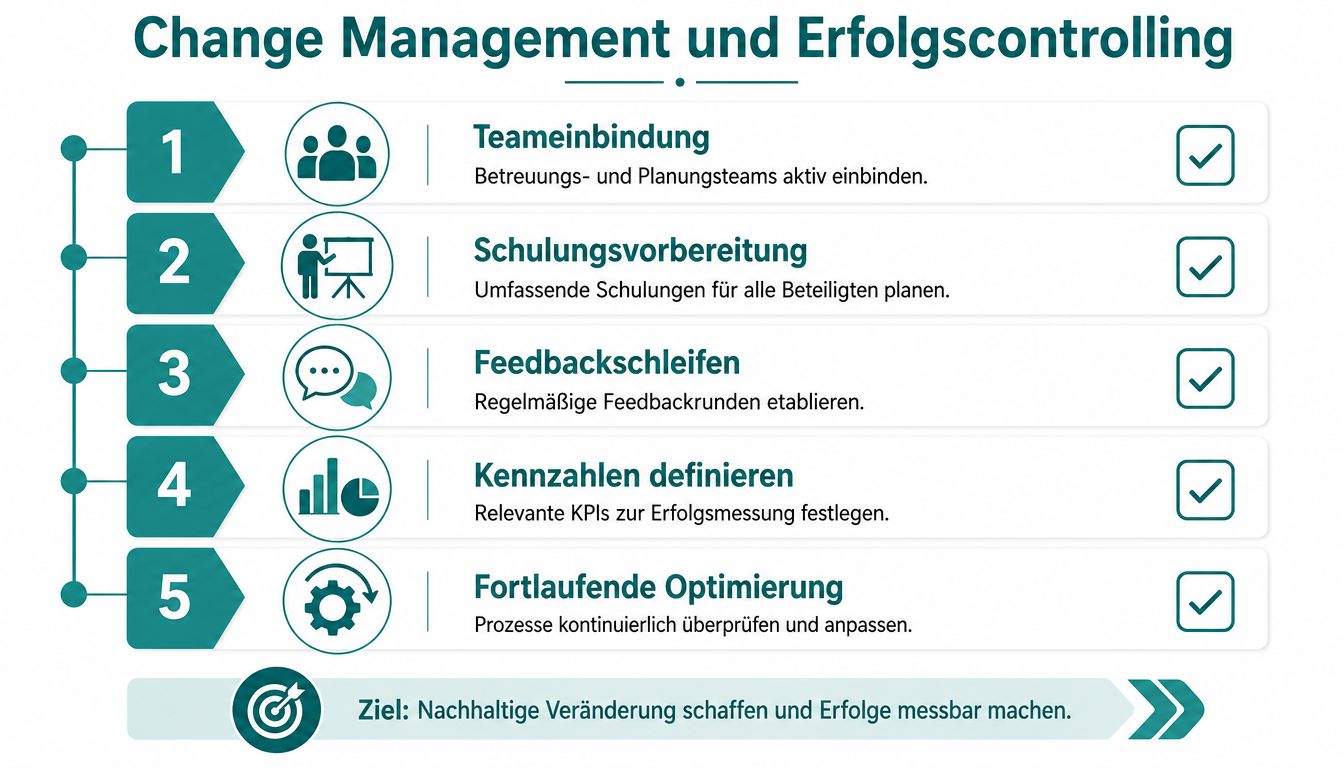
A clear introduction process might look like this:
- Involve the team: Ask employees for concrete feedback on shift swaps, availabilities, and last-minute changes.
- Put rules in writing: Define who confirms a swap and when a request is considered rejected.
- Conduct training with real cases: Use a sick leave, a weekend shift, and a qualification gap instead of abstract slides.
- Define key figures: Measure plan stability, timely staffing, qualification matching, open requests, and satisfaction.
- Schedule meetings: Regularly review the values and only change rules whose effects you can understand.
Measurement is not only about whether a shift is staffed. In the social sector, around 90 percent of advertised positions are filled, but only about 60 percent on time and with the desired qualification, as described in the specialist article on personnel situation in the social sector. For your planning, this means: staffing is only successful when timing and competence match.
Therefore, do not build your dashboard with too many values. A practical monthly view shows:
| Check Field | Question |
|---|---|
| Staffed shifts | Are all required time windows covered? |
| Qualification match | Does the assigned person meet the must-have criteria? |
| Plan changes | Which changes were made after publication? |
| Feedback | Where are availabilities or confirmations still open? |
| Team feedback | Which rule repeatedly causes conflicts? |
If you are looking for a new checklist for organizational changes, a checklist for stress-free company moves can serve as a thinking model. Also when introducing a planning system, you need responsibilities, deadlines, checkpoints, and a clear sequence.
Employees accept new processes more readily when they see the benefit in daily work. Don’t just show functions. Show how an open request becomes visible, how a swap is confirmed, and how payroll receives verified time. This turns a technical change into a comprehensible workflow.
Summary and Next Steps
A sustainable workforce planning Swiss social sector connects four questions: What must be cared for, which qualification is needed, who is actually available, and which working time rules apply? If you record these points separately and only then combine them, you recognize skill and deadline gaps earlier.
Your starter checklist:
- Record care needs per location and time window.
- Separate must-have criteria from wish criteria.
- Centrally document availabilities, absences, and workloads.
- Check night, weekend, and handover shifts separately.
- Control rest periods, breaks, and maximum working time.
- Make mobile feedback binding.
- Release actual times before payroll handover.
- Monitor plan stability, qualification matching, and timely staffing.
Start with one location and a real planning period. Then check which fields are missing, which rule causes conflicts, and where a float pool is needed. This way your process grows from real care cases and remains understandable for your team.
With job.rocks you can organize workforce planning, employee pools, qualification assignment, availabilities, and time tracking for flexible teams in one place. Visit job.rocks if you want to develop your social sector planning from scattered lists to a transparent process.