
Workforce Scheduling for Craft Technicians: Your Practical Guide
Master workforce scheduling for craft technicians: Step-by-step to better route planning, qualification filters, and mobile workflows for your team.
Monday morning, 6:45 a.m. A sick note arrives by phone, an emergency lands in the email inbox, and two technicians are still simultaneously at different job sites on the whiteboard. You shuffle orders, check qualifications from memory, and hope no one has forgotten the travel time between Winterthur and Zurich. This is exactly where it is decided whether your workforce scheduling for craft technicians really holds up or only works until the next change.
For Swiss craft businesses, it’s not just about which job is available. You have to assign employees according to qualification, location, availability, working hours, and priority. The following processes help you make Excel’s limits visible, handle last-minute substitutions cleanly, and provide mobile information where your technicians work.
Table of Contents
- Why Technician Scheduling Fails Without a System
- The Four Stages of Workforce Scheduling in Craft Trades
- Filtering Qualifications and Availabilities Correctly
- Designing On-Call Duty and Time Tracking Legally
- Distinction from Route Planning, ERP, and Construction Site Logistics
- Mobile Workflows and Measurable KPIs
Why Technician Scheduling Fails Without a System
On Monday morning, three people are missing. One technician is sick, another still has the vehicle key from the last job, and an emergency with a heat pump must be staffed immediately. Your Excel file contains names but no reliable answer to who has the appropriate certification, is in the region, and still has enough time.
Then what happens in many companies daily occurs: You call individual technicians, reschedule appointments, and enter changes in multiple places. A job remains on the calendar even though it has long been reassigned. Another technician drives off and only finds out on site that material or customer access is not yet clarified.
Where Excel Hits Its Limits in Daily Use
According to industry-related Swiss sources, over 40% of craft businesses work with Excel or whiteboards. Without digital planning, 10 to 15% of potential productive time can be lost due to idle times, double bookings, and planning errors, as Swiss sources on digitalization in crafts describe. Additionally, craft businesses report 5 to 8 hours of admin time per week spent on scheduling and follow-up.
The weak point is rarely the calendar itself. The problem lies in missing links:
- Double bookings: The same technician is scheduled with a customer in the morning and at a location in the afternoon that is unreachable due to travel time.
- Incomplete qualifications: A job for gas, refrigeration, or electrical work is assigned to someone whose certification has expired or was never recorded.
- Forgotten absences: Vacations and sick notes are in an email but not in the plan.
- Invisible travel times: The working hours fit, but the day does not because the transfer between two job sites is missing.
- Unclear communication: A WhatsApp group distributes changes quickly but creates no reliable, central plan and can raise data protection issues with personnel data.
Practical rule: A free cell in the calendar does not automatically mean free capacity. Only qualification, absence, job location, and travel time make an assignment reliable.
The First Lever Is Clean Personnel Data
When introducing digital workforce scheduling, you should not start with the prettiest calendar view. Start with the data that supports decision-making: What work is the technician allowed to perform? Which vehicles may they drive? In which regions do they work? When are they available? Which certifications will expire soon?
For a deeper look at digital planning processes, the practical guide to digitizing workforce scheduling is worthwhile. The basic idea is also known from other industries. For example, those who assign personnel by availability and qualification will find in the guide to the best software for care planning a cross-industry comparison showing how strongly a clean personnel structure shapes daily planning.
The Four Stages of Workforce Scheduling in Craft Trades
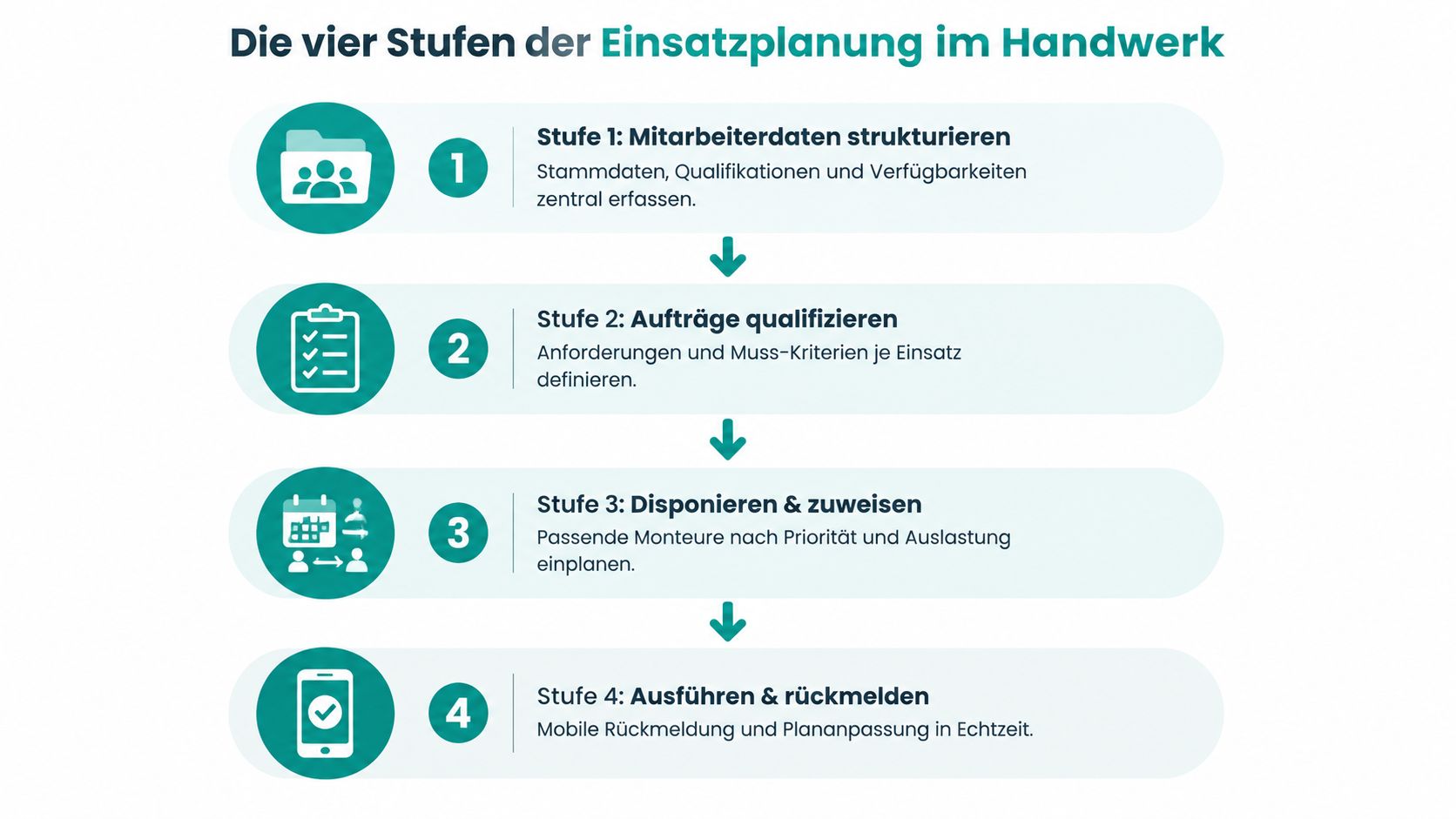
A reliable plan does not arise from a single calendar click. Swiss practical guides describe a 4-stage approach that ranges from building employee data to ongoing feedback. The practical sources on digital workforce scheduling in crafts mention a rough plan over 4 to 12 weeks, a condensed weekly plan, and immediate follow-up of absences.
Stage 1 with Usable Employee Data
First, record master data, qualifications, availabilities, and absences in a central place. For an electrical company, this includes installation authorizations, vehicle permits, regional deployment areas, and vacation periods in this profile.
A name without additional information hardly helps with urgent staffing. A well-maintained profile shows whether the technician can professionally take over the job and whether their workday allows the appointment.
Stage 2 with Clear Job Requirements
Every job needs must-have criteria. For heat pump maintenance, this could be a specific training, a suitable vehicle, and a time window at the customer. For troubleshooting, readiness for a short-term deployment may be added.
Separate must-have criteria from preferred features. A certain qualification must not be replaced by proximity of residence. Language skills or experience with a manufacturer can ease selection but are not always prerequisites.
Stage 3 with Rough and Detailed Planning
In rough planning, you reserve capacities over several weeks. You recognize that a team will be tied up for a larger installation while individual service technicians remain free for smaller jobs. The weekly detailed plan for the following week then sets specific days, locations, and persons.
Take an electrical company with six service technicians. For the coming week, a control cabinet inspection, several repairs, and a planned meter replacement are scheduled. The rough plan keeps the big blocks free, the detailed plan assigns the individual jobs to the right people and considers the routes between customers.
Stage 4 with Feedback and Follow-up
After every change, the plan must again reflect the actual status. A sick note does not remain in a chat but is directly recorded for the affected person. A completed job is reported back so that scheduling does not build the next assignment on outdated information.
According to Swiss practical sources, common errors include incomplete qualification data, late absence notifications, and missing travel times. Those who clearly separate the four stages can reduce planning effort by 60 to 70% compared to whiteboard or Excel, as the practical guide to workforce scheduling describes. For clients with many renovation questions, an additional guide for homeowners on all-in-one renovation can help capture typical service scopes more clearly before scheduling.
Filtering Qualifications and Availabilities Correctly
Not every technician fits every job. A good filtering logic starts with the question which condition must be met and which property only influences the order of selection.
Check Must-Have Criteria First
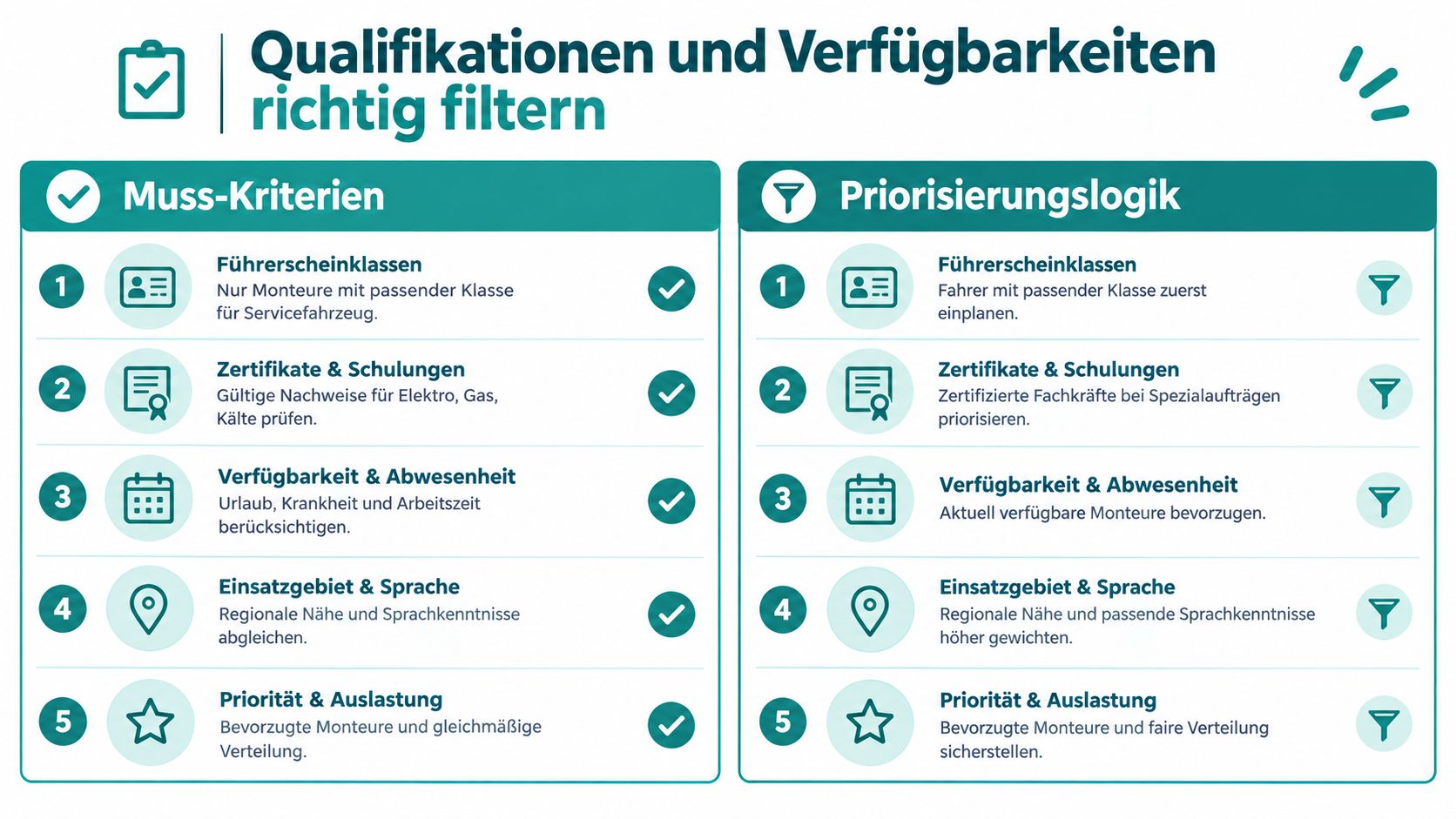
In a plumbing emergency, expertise, a valid certificate, and a suitable vehicle may be mandatory. Proximity to the job site is then a selection criterion. A technician who lives five minutes closer must not be preferred over a professionally suitable colleague if they lack the necessary authorization.
Meaningful must-have criteria can be:
- Driver’s license class: The vehicle and required class must match.
- Certificates and training: Proofs for electrical, gas, or refrigeration work belong in the profile with validity.
- Working hours and availability: Vacations, sickness, planned absences, and already confirmed assignments must be considered.
- Deployment area and language: Regional proximity and communication with the customer can influence selection.
Do not maintain expiration dates only on the day of the job. If a certificate expires soon, scheduling must see this before assignment. Otherwise, a seemingly staffed position opens again shortly before deployment.
Priority Instead of Gut Feeling
If several people are professionally suitable, you need a comprehensible order. You can first check proximity to the customer, then current workload, and finally preferred customer experience. This keeps the decision explainable even if a technician questions the selection later.
A Friday evening from the plumbing business shows the difference. A job for leak detection comes in. The filter shows only available people with appropriate expertise, suitable region, and free time window. Instead of calling the entire team, you check the few matching profiles and send the assignment request specifically.
Employees should be able to report availabilities themselves. A mobile query with clear selection options is more reliable than free text messages where information is missing or formulated differently. When choosing a suitable system for qualification matrix and workforce scheduling, check whether this data can be maintained in daily operations, not just during initial setup.
Designing On-Call Duty and Time Tracking Legally
For emergencies, a free calendar slot is not enough. You must include the rules for on-call duty and working hours in Switzerland in your planning. For on-call duty, a period of four weeks applies. In this window, a person may perform on-call duty on at most seven days. After the last on-call duty, two weeks without on-call duty must follow, as the State Secretariat for Economic Affairs states about on-call duty.
Clearly Distinguish Two Types of On-Call Duty
Whether standby counts as working time depends on where it is performed. If your technician performs on-call duty at the company, the entire time they are available counts as working time. For off-site on-call duty, time is only counted if an actual deployment occurs. Travel time to and from the deployment then also counts as working time, as the rules on working and rest times explain.
| On-Call Type | Working Time Credit | Travel Time | Technician Example |
|---|---|---|---|
| On-call at the company | The entire provided time counts as work | Part of provided time | The technician waits at the workshop and responds to a fault |
| On-call outside the company | Only actual deployment counts | Travel time counts if deployment occurs | The technician waits at home and drives to the customer on an emergency call |
Plan this distinction directly in the service model. A company with two service teams can only rotate on-call duty cleanly if on-call days, rest periods, and actual deployments are visible separately.
Document Start, End, and Breaks
For time tracking, start and end of daily and weekly working hours as well as breaks of 30 minutes or more must be traceably documented, as SECO describes for working time recording. A practical example: You start at 6:30 a.m., take a break at 12:15 p.m., and finish the workday at 5:10 p.m. These times must be visible in the records.
Time tracking does not replace workforce scheduling but provides the basis for wages, overtime, and proofs. For mobile teams, a time tracking app for crafts fits particularly well when clocking in and out happens directly on the road and changes are not transferred from paper lists only in the evening.
Distinction from Route Planning, ERP, and Construction Site Logistics
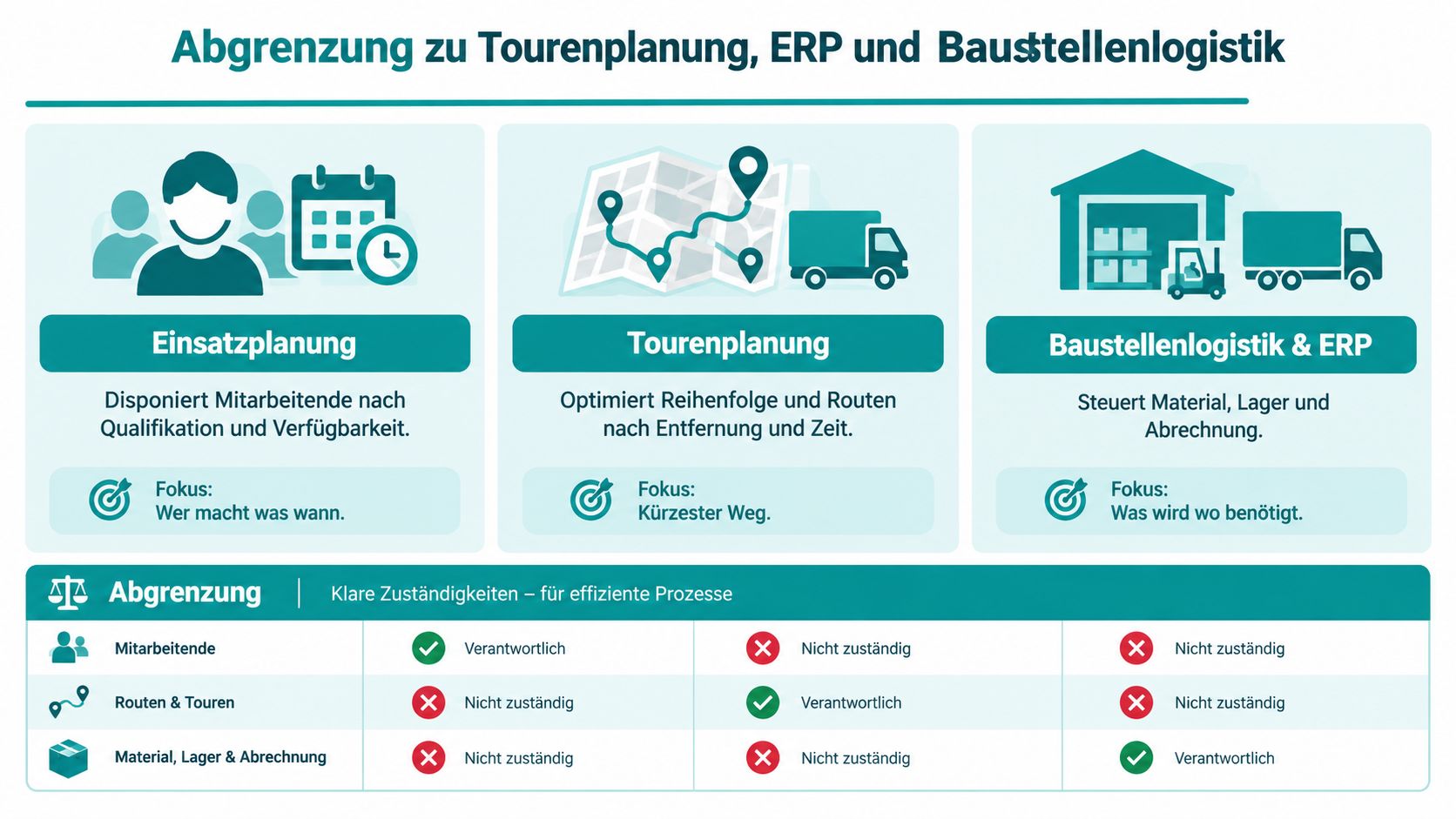
You don’t need the same software for every task. Workforce scheduling answers who takes which job when. Route planning calculates routes and sequences. An ERP manages orders, materials, and commercial processes. Construction site logistics coordinates deliveries, equipment, and space on the site.
| Area | Responsibility | Practical Question |
|---|---|---|
| Workforce Scheduling | Assign employees by qualification and availability | Who does what when? |
| Route Planning | Calculate order and routes between stops | Which route makes sense? |
| ERP | Manage orders, materials, inventory, and commercial data | What was ordered and billed? |
| Construction Site Logistics | Coordinate deliveries, equipment, and access | What is needed where and when? |
The boundaries are important in daily work. An ERP may contain the order but does not necessarily tell you which technician fits professionally. Route planning can find the fastest route but does not replace checking vacations, certificates, or working hours. Construction site logistics prevents missing materials and equipment but does not automatically schedule your employees.
job.rocks focuses on workforce scheduling and time tracking for this topic. The platform is therefore not to be understood as ERP, route optimization, or construction site logistics. Before choosing, you should note which task is already covered by another system and which gap remains in personnel assignment.
Mobile Workflows and Measurable KPIs
Your technicians rarely sit in front of an office computer all day. They drive to customers, change job sites, and receive last-minute changes on the road. A usable mobile plan must therefore not only display the calendar but also integrate feedback into the workflow.
What the Technician Needs on the Road
A technician should be able to report availability, request a swap, and access assignment details without calling the office every time. In case of a change, they need at least address, time window, job, and special notes on their smartphone. Scheduling must simultaneously see whether the change was accepted.
Clear separate processes have proven effective:
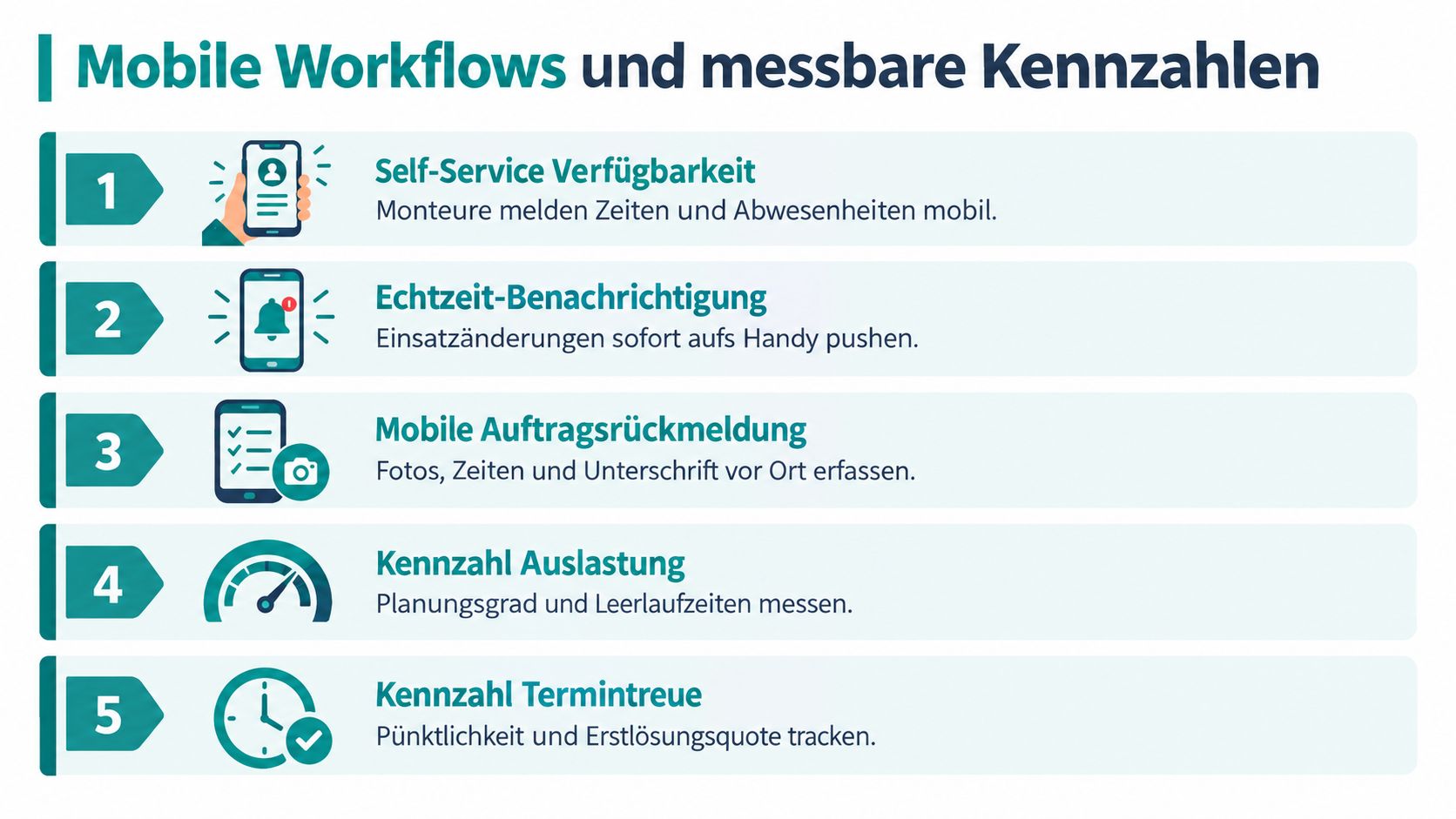
- Report availability: The technician enters free times and absences themselves.
- Receive change: A notification indicates a new or rescheduled assignment.
- Check job: Address, time window, and work order are accessible on mobile.
- Record time: Start, end, and break are documented for the respective assignment.
- Send feedback: Scheduling receives the status instead of waiting for a callback.
KPIs Without Number Games
You can measure the planning status without monitoring every team movement. Crucial are KPIs that trigger a concrete decision:
- Occupancy rate: How many planned assignments are confirmed with a suitable person?
- Change reaction: How long does it take from a sick note to a new assignment?
- Admin time: How many hours per week go into calls, additions, and plan maintenance?
- On-time performance: How often does a job start within the agreed time window?
- Feedback rate: For how many assignments are times and status available at day’s end?
Don’t just mark poor values. Check the cause. A low occupancy rate may indicate missing qualification data, a long reaction time late absence notifications. The KPI is only useful if you derive a concrete adjustment in the process from it.
Dispatcher’s view: Measure first where you have to call back today. Every recurring query indicates missing information in the plan.
For your company, job.rocks offers functions for scheduling assignments, shifts, and availabilities as well as time tracking. If you want to check how these processes can be transferred to your technician teams, visit job.rocks and compare the features with your current planning process. Start with a concrete process, such as sick notes, substitutions, and mobile time feedback, instead of changing all workflows at once.