
Duty Roster Software Comparison 2026: Find the Top Tools
Duty Roster Software Comparison 2026: Find the ideal tool for gastronomy, events & healthcare. With checklist – quickly & easily the best solution!
For the maintained shortlist with a Swiss selection focus, see the direct comparison of shift-planning software.
You’re sitting in front of the next duty roster. The early shift is somewhat organized, the late shift still has gaps, and at the same time availabilities come in via chat, sick notes by phone, and shift requests by email. In Excel everything looks neat at first. In everyday life, that quickly falls apart. Someone works at the wrong location, a person without the right qualifications slips into a sensitive assignment, and in the end the team asks which version actually applies.This is exactly where a meaningful duty roster software comparison begins. Not with colorful feature lists, but with the question: Does the tool really solve your daily planning problem? What counts for event agencies is different from restaurants. A security service needs different proofs than a care service. And an agency with a large pool of floaters often doesn’t fail because of the plan view, but because of availability, qualifications, and last-minute replacements.
So that you don’t end up in a demo that looks fancy but annoys in operation, here is a comparison from the perspective of shift planning. With clear differences, real everyday scenarios, and a sober view of costs, benefits, and industry fit.
Table of Contents
- When Excel and WhatsApp Are No Longer Enough
- The 7 Evaluation Criteria for Your Software Choice
- Top Providers in a Direct Feature Comparison
- Detailed Analysis of Leading Tools
- Industry-Specific Recommendations
- Understanding Pricing Models and ROI Analysis
- Your Decision Checklist and Next Steps
When Excel and WhatsApp Are No Longer Enough
At the beginning, Excel is often enough. You have a small team, shifts are similar, and changes don’t come every minute. Then the business grows. Suddenly you’re not just planning names in cells, but availabilities, rest times, absences, locations, qualifications, and spontaneous absences.
A typical example from the event business: You plan a weekend with hostesses, setup and teardown crew, and a team leader. Availability comes from a chat group, two people cancel last minute, one person can only arrive by car, another is not allowed to take the assignment because the briefing is missing. Excel shows you none of this. It only saves what you entered.
It’s similar in gastronomy. The chef changes the plan in the afternoon, the service still sees the old file, and in the evening someone is missing at handover. No one worked incorrectly on purpose. The problem lies in the tool.
If you have to explain the plan manually every day, the problem is not your team, but your system.
Typical Warning Signs
These points clearly show that you have outgrown Excel and chat lists:
- Too many channels: Availabilities via messenger, vacation by email, sick notes by phone.
- No clear plan version: Employees work with screenshots or old PDFs.
- Missing checks: Qualifications, breaks, or deployment rules you have to keep in your head.
- Lots of rework: Timesheets, corrections, and payroll preparation are done twice.
- Last-minute hectic: Open shifts are redistributed every time by round queries.
If you still work with spreadsheets, a good work schedule Excel template for download can bring short-term order. But it will never replace software that thinks along in the long run.
What Goes Wrong in Practice
The expensive mistakes are often not the big disasters, but the small everyday errors. A shift is double-booked. An important position remains unnoticed open. Payroll preparation has to gather hours from multiple lists. This costs time, nerves, and trust.
The real damage is often invisible. Planners spend their days calling back instead of managing the business. Employees react annoyed because changes arrive too late. And you only realize at the end of the month how much friction is in your processes.
The 7 Evaluation Criteria for Your Software Choice
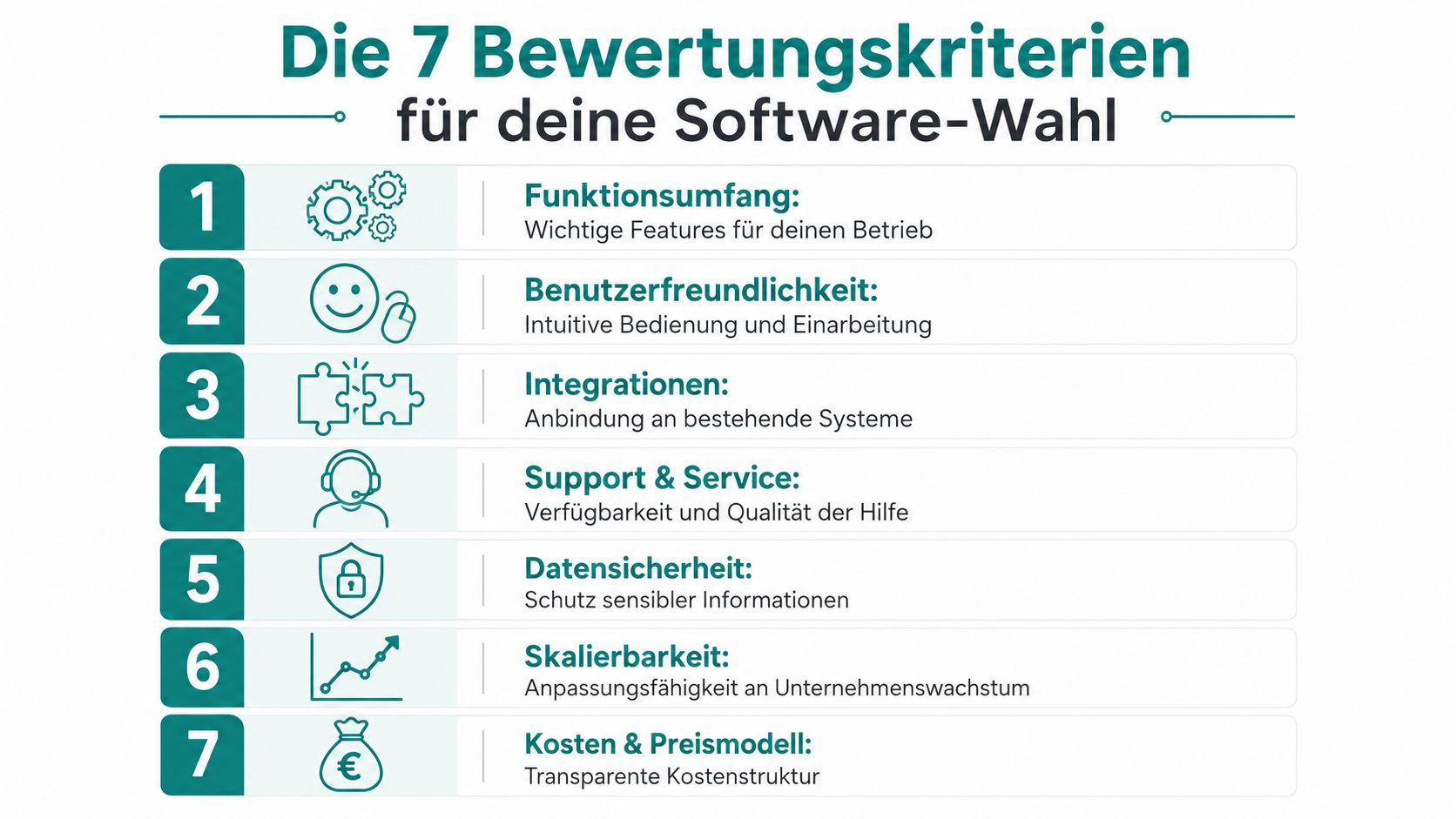
When choosing duty roster software, people often first look at the interface. That’s not enough. What matters is whether the system reliably solves the problems in the business. A calendar with an app is not yet a good planning solution.
How to Recognize a Usable Solution
The seven points below separate usable tools from systems that only look good in the demo.
-
Feature Scope
Not every feature is equally valuable in every industry. An event agency often needs availability queries and qualification filters. A restaurant needs shift swaps, absences, and mobile confirmations. Always ask: Which feature concretely saves me calls, corrections, or downtime?
-
User Friendliness
If the planner has to open five screens for every change, the tool will be avoided in everyday use. The same applies to the team. An app is useless if employees can’t find shift requests or clocking out is too complicated.
-
Time Tracking
Planning without time tracking creates media breaks. You plan target times in one system and collect actual times elsewhere. In practice, this ends in manual work. Especially with changing locations, you want to see who really started and stopped when.
-
Legal and Data Protection
Duty rosters contain personal data. Plus working hours, absences, and sometimes sensitive deployment information. You need role rights, clean logs, and a system that not everyone on the team can arbitrarily change.
What Is Often Underestimated in Everyday Use
-
Connections to Other Systems
As soon as payroll, HR, or recruiting come into play, it gets serious. If the connection is missing, you export lists, clean fields, and create new error sources. If you want an overview of useful API integrations and interfaces, it’s worth checking connectivity before purchase.
-
Automation in Suggestions and Staffing
Some tools help you with open shifts, others leave you completely alone. In businesses with many temps or multiple locations, a good suggestion logic saves a lot of coordination. Poorly made automation annoys because it fits formally but suggests the wrong people in practice.
-
Reports
A report is only useful if you can act on it. You want to see where undercoverage regularly occurs, which shifts are hard to fill, and where hour accounts get out of control. Colorful dashboards without clear benefits don’t help you.
Practical rule: Test every software with a real week from your business. Not with the provider’s demo team, but with your shifts, your absences, and your special cases.
A good sign is if you get fewer questions during the test phase. A bad sign is if you revert to Excel or chat because it’s faster.
Top Providers in a Direct Feature Comparison
Before you get lost in demos, you need a quick overview. The following matrix is not a judgment on marketing promises but a working tool. It shows which points in the duty roster software comparison are immediately relevant.
Duty Roster Software Feature Matrix
| Feature | job.rocks | Provider A | Provider B | Provider C |
|---|---|---|---|---|
| Duty roster with templates | ✔️ | ✔️ | ✔️ | partial |
| Mobile employee app | ✔️ | ✔️ | partial | ✔️ |
| Capture availabilities | ✔️ | partial | ✔️ | ❌ |
| Shift swapping | ✔️ | ✔️ | partial | ❌ |
| Mobile time tracking | ✔️ | partial | ✔️ | ❌ |
| Qualification checks on shifts | ✔️ | partial | ❌ | ❌ |
| Manage multiple locations | ✔️ | ✔️ | partial | partial |
| Payroll preparation | ✔️ | partial | partial | ❌ |
| Role and rights management | ✔️ | ✔️ | partial | partial |
| Reports for planning and hours | ✔️ | partial | ✔️ | partial |
The table helps you filter out options. Nothing more. A checkmark at “time tracking” can mean the app works cleanly with location and approval. But it can also mean employees enter their times manually at the end of the day. On paper, both look the same. In operation, that’s a big difference.
How to Read the Matrix Correctly
Take a security service as an example. There, “mobile time tracking” alone is not enough. You want to know if a deployment can be assigned by location, if changes remain traceable, and if you can deliver deployment proofs cleanly to the client.
For an event agency, “capture availabilities” is often more important than a particularly nice plan board. If you regularly activate large pools, you need a system that quickly makes available and suitable people visible. Everything else leads back to broadcast emails and chat groups.
A gastronomy business evaluates the same matrix differently. There, shift swaps, last-minute sick notes, and a simple app usually weigh more than deep rights management. If the crew doesn’t understand the plan without questions, the strongest admin interface won’t help.
The best software is rarely the one with the most checkmarks. It’s the one where the right checkmarks are in the places that cost you most.
Detailed Analysis of Leading Tools
Feature lists tell you little about how a tool feels at six in the morning with a sick note. That’s exactly where it shows whether a solution supports or slows down.
Who Fits Which Solution
job.rocks fits especially where flexible pools, changing locations, and last-minute replacements are common. This is interesting for event service providers, promotion teams, hospitality, and security companies. The strong point is not just planning, but the interplay of availability, deployment assignment, time tracking, and payroll preparation. If you often have to staff from a larger employee pool, this is noticeable in everyday use.
Provider A often appears accessible at first glance. The plan view is clean, shifts can be created quickly, and small teams get in well. It usually gets weaker when you need more rules. Qualifications, different roles per deployment, or complicated approvals make things tougher.
Provider B fits businesses that want to keep planning and classic time tracking closely together. For branches or locations with stable teams, this can work well. But if you dispatch very last-minute or manage many temps, sometimes speed in staffing is missing.
Provider C is often chosen by teams who just want to plan digitally instead of in Excel. That can be enough for small businesses. At the latest with mobile processes, shift changes in daily business, or proofs for payroll and clients, you notice the limits.
Where Tools Fail in Everyday Use
Most wrong purchases don’t happen because a tool can’t do anything. They happen because the tool maps the wrong everyday reality.
An example from gastronomy: The software can create shifts, but shift swapping is cumbersome. Then the team writes in the chat again. The planning logic stays in the system, the real coordination happens outside. That’s exactly where misunderstandings arise.
An example from events: The system plans cleanly but hardly helps activate available staff. Then every replacement starts again with lists, messages, and callbacks. The digital plan exists, but staffing remains manual work.
Good tools don’t just save clicks. They reduce the number of special cases that end up outside the system again.
My Practical View on the Selection
I wouldn’t buy a tool without testing three things live:
- Sick note shortly before shift start: How quickly do you find a replacement?
- New person without full documents: Does the system block properly or let them slip through?
- Payroll preparation at month-end: Do the data come out clean or does the list work start then?
If software works well in these three moments, it usually works well in the rest of the operation.
Industry-Specific Recommendations
A useful duty roster software comparison only becomes helpful when you break it down to your industry. Otherwise, you compare tools that solve very different problems.
Event Agencies and Promotion
Here, staffing speed counts first. You work with large pools, changing locations, and many single jobs. A tool must collect availabilities cleanly, filter qualifications, and quickly assign open shifts to suitable people.
Imagine a trade fair day: You need hostesses with foreign languages, plus setup team and floaters. Two people drop out in the morning. If the system only knows fixed shift plans, you’re back in broadcast mode. What you need is targeted activation instead of mass chaos.
Important here are especially:
- Qualifications and tags: Language, experience, driver’s license, briefing.
- Fast replacements: Immediately assign open shifts to suitable people.
- Mobile deployment details: Meeting point, dress code, contact person, timing.
Gastronomy and Hospitality
In restaurants, bars, and hotels, the pace is different. It’s less about large pools and more about constant small changes. Someone swaps the evening shift spontaneously, someone calls in sick, a temp sees the new plan only on the bus.
That’s why shift swaps, clear push notifications, and mobile time tracking are so valuable. If you plan gastronomy, it’s worth looking at work schedule software for gastronomy, because these processes make the difference there.
A practical example: Friday evening, terrace full, a service staff is missing. With a good system, you immediately see who is available, who had enough rest, and who knows the location. With an unsuitable tool, you start the phone round again.
Security Services and Healthcare Providers
These two areas have different processes but a common requirement: traceability.
In security services, you often have to prove who was where and when on duty. There are objects with clear requirements, sometimes with special approvals. A pretty plan view helps little if proofs or approvals are shaky.
In healthcare, the situation is even more tightly scheduled. You need rules for qualifications, shift models, and clean documentation. A too simple solution quickly becomes dangerous because it plans but does not sufficiently secure professional restrictions.
For events and gastronomy, speed counts. For security and healthcare, reliability under pressure counts. Your tool should reflect that.
Understanding Pricing Models and ROI Analysis
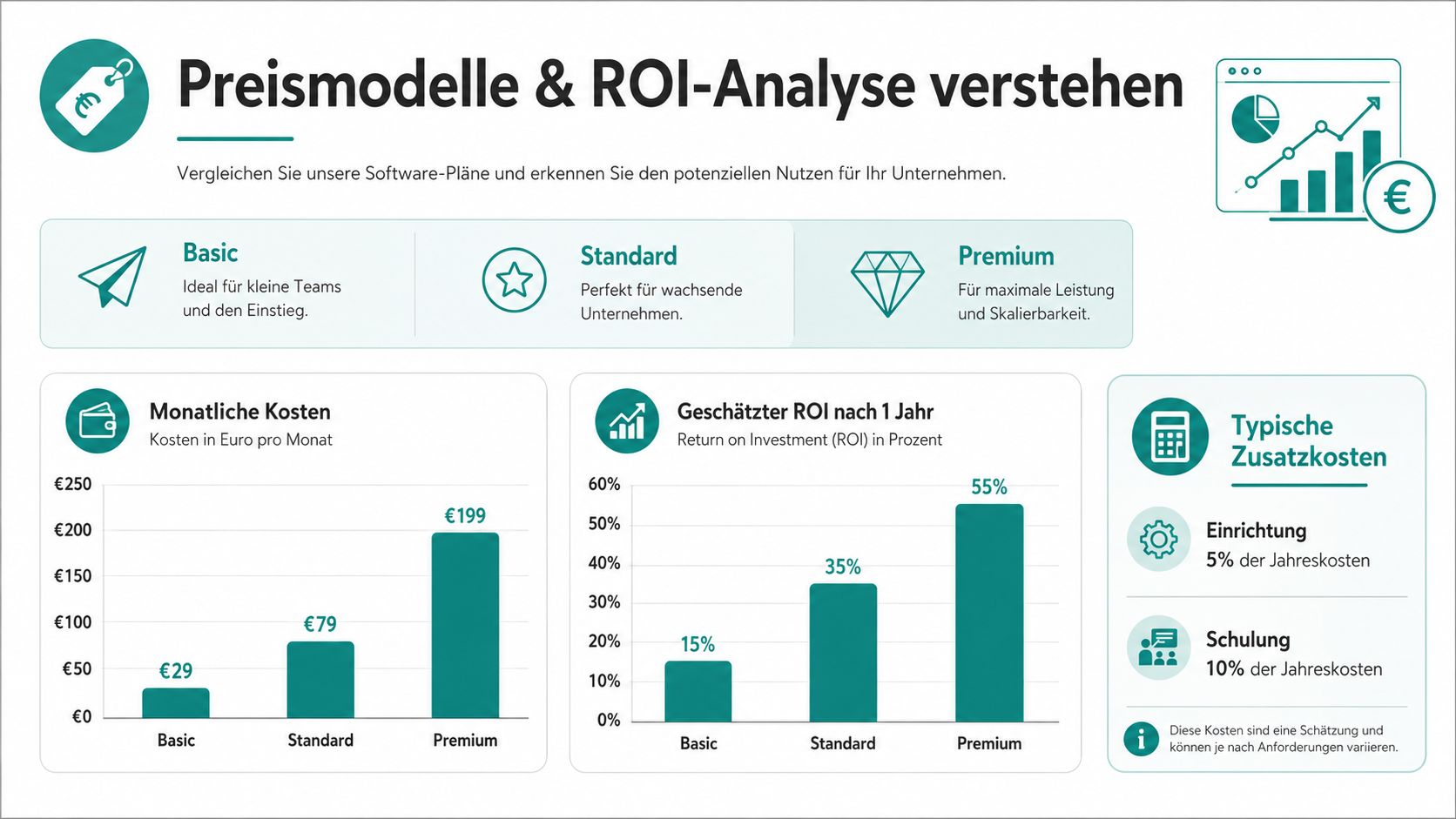
Prices for duty roster software often seem clear until you look closer. Then add-on modules, training, setup effort, or separate access for planners and employees appear. That’s why you should never compare only the monthly fee.
Right at the start, a look at typical model differences helps.
How Providers Charge
In practice, you mostly encounter these variants:
- Per user: Useful if your team is stable and almost everyone actively works in the system.
- Per planner or admin: Sounds cheap at first but becomes expensive if employees need extra licenses for app, swaps, or time tracking.
- Per location or business: Can fit well for gastronomy, branches, or deployment sites with many people.
- Module prices: Planning cheap, time tracking, reports, or payroll export cost extra.
The mistake is often not the price but the wrong model. An event agency with a large pool often pays unnecessarily much with a rigid user price. A small restaurant sometimes fares better with a location model.
How to Calculate the Benefit Cleanly
You don’t have to calculate the benefit academically. Calculate along your real friction points:
- How much time is spent today on planning and rework?
- How often do errors arise from double lists or unclear plan versions?
- How complex is the month-end handover to payroll or accounting?
- How quickly do you fill open shifts?
If a tool takes work off here, the value is not only in hours. It’s also in less misplanning, clearer communication, and a calmer operation.
The video below helps sharpen your view on software costs and selection.
A simple example from everyday life: If your deployment management spends noticeably less time each week on inquiries, replacements, and hour corrections, software often pays off sooner than expected. It becomes even clearer if you fill short-term vacancies faster or prepare payroll runs more cleanly.
Don’t buy the cheapest tool. Buy the tool where manual extra work decreases the most.
Your Decision Checklist and Next Steps
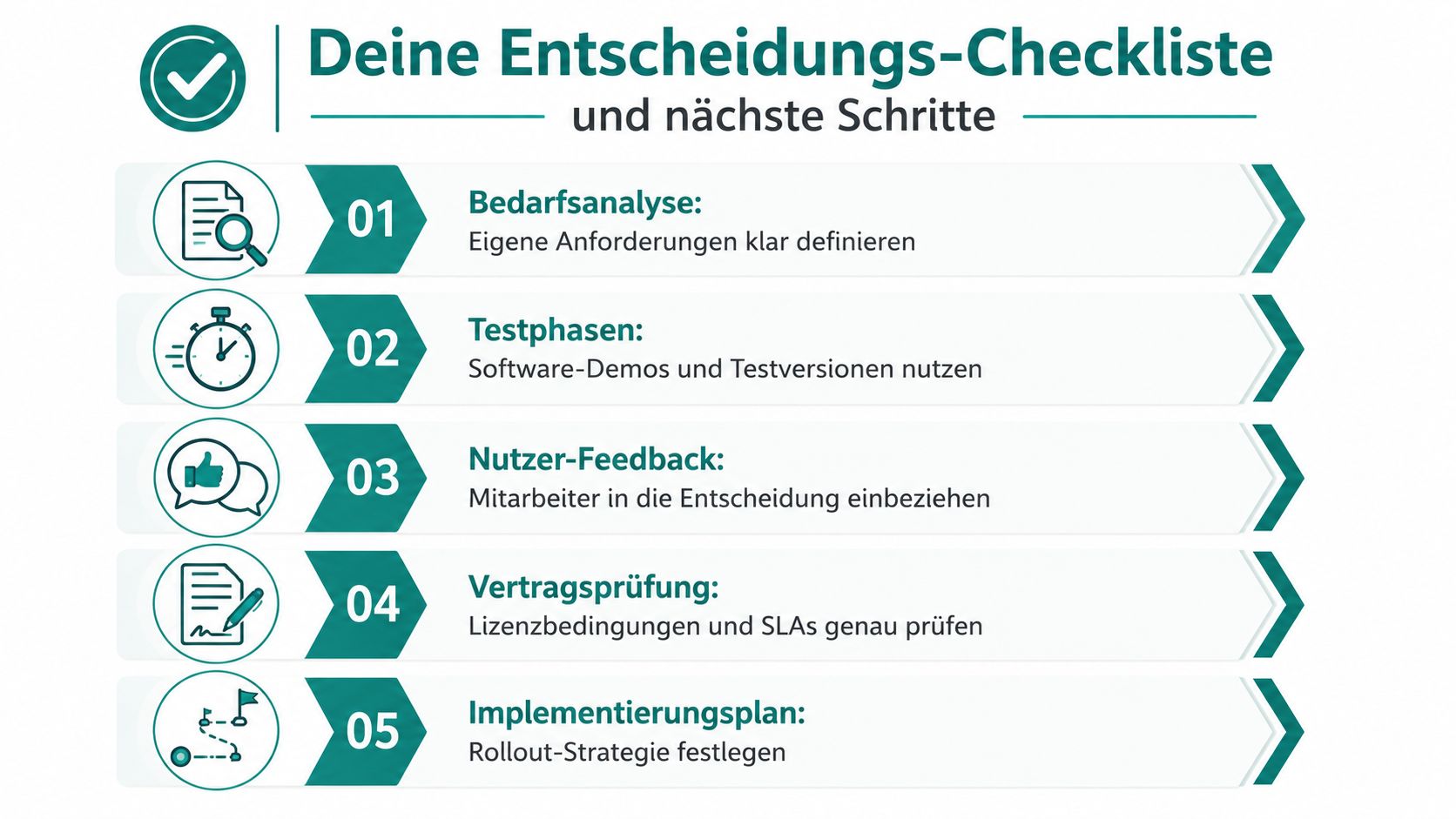
If you have two or three favorites on the table, you don’t need another glossy demo. You need a clean decision. For that, a concise checklist oriented to the operation, not the sales talk, is enough.
The Checklist for Your Selection
Check your candidates with these questions:
- Does the tool fit your industry: Can it map your real processes, not just standard shifts?
- Does the team understand the app immediately: Or do you need explanations for every little thing?
- Do planning and time tracking run together: Or does list work arise again later?
- Does the system check rules and qualifications: Or does everything depend on individual memory?
- Does payroll preparation come out clean: Without a correction marathon at month-end?
- Are changes traceable: Especially for sensitive shifts and multiple dispatchers?
- Is the pricing model suitable for your business: Not only today but also with growth?
The First Steps After the Decision
After the selection, the real work begins. Many teams underestimate the start and then wonder why the new system supposedly doesn’t work. Usually, it’s not the tool but an unclean rollout.
Here’s how to proceed sensibly:
-
Choose a real pilot area
Don’t start immediately in the whole company. Take a location, an object, or a team of manageable size with real shifts.
-
Clean up master data thoroughly
Names, roles, qualifications, locations, contract types. If this base is sloppy, the plan will be sloppy too.
-
Involve a team of planners and employees
Don’t just let admins test. The people on the front line immediately notice if app, swaps, and time tracking are really workable.
-
Keep parallel operation short
A short double operation can make sense. Don’t drag it out too long. Otherwise, everyone stays mentally in the old system.
-
Document rules in writing
Who approves shifts, who confirms hours, how does a swap work, how is a sick note recorded? Without clear rules, even good software becomes soft.
In the end, it’s not about introducing just any digital planning tool. It’s about your business running more smoothly, your team calling back less, and you not starting from scratch every time there’s an absence.
If you’re looking for a solution for event deployments, gastronomy, security, or other shift operations that bundles availability, shift planning, mobile time tracking, and payroll preparation in one process, check out job.rocks. The most sensible approach is always a test with your real shifts, real roles, and real bottlenecks.