
Shift Planning Software Comparison: The Right Solution for 2026
Find the right solution in the 2026 shift planning software comparison. This guide shows you core features, costs, and the best choice for your industry.
You’re probably exactly in this situation: The shift schedule lives in Excel, changes end up in WhatsApp, vacation requests come by email, and at the end of the month someone compares handwritten timesheets with a table that is no longer accurate. That’s not a system. That’s improvised damage control.
For a Swiss SME, the real question in the shift planning software comparison is not which app has the nicest interface. The crucial question is: Does the tool lead your planning directly into time tracking and further into payroll preparation, or are you just building the next isolated solution? That’s exactly where you lose time, nerves, and control every month.
A simple example: You schedule an employee for an event, they clock longer on site, the night allowance must be correct, and the hours should flow into payroll without rework. If your tool fails at this point, your team pays the price.
Table of Contents
- End Excel Chaos: Your Path to the Right Shift Planning
- Core Features of Every Good Shift Planning Software
- Concrete Software Solutions in Direct Comparison
- Compliance and Integrations That Save You Headaches
- Which Software Fits Your Industry
- Your Decision Checklist for Selection
- Frequently Asked Questions About Shift Planning Software
End Excel Chaos: Your Path to the Right Shift Planning
Excel seems like the cheap solution for a long time. Until the first Sunday shift is recorded incorrectly, two people are supposed to cover the same shift simultaneously, or no one can clearly say who even has the confirmed version of the schedule.
In practice, it often looks like this: An event agency schedules 40 people for a weekend. Three call in sick. A team leader writes in the group chat, calls freelancers in parallel, and changes the Excel file on the side. In the end, someone shows up at the wrong location, someone else works longer than planned, and payroll preparation turns into a search party. Such processes not only destroy order but also make management unnecessarily difficult.
Practical rule: If your schedule lives outside the tool, you don’t have a functioning system yet.
Even in industries with high personnel pressure, this issue is no longer marginal. Anyone who feels staff shortages in daycare centers or related care areas will recognize many patterns immediately. The article P1 Pedagogy Insights on Daycare Staff Shortages shows well how quickly understaffing turns into operational chaos. This applies not only to care but equally to gastronomy, events, security, and nursing.
Good software reverses the process. Your team doesn’t chase information; the system keeps availabilities, assignments, changes, and times together in one place. If someone is absent, you check directly in the tool who is available and suitable. If someone steps in, the change goes immediately into the schedule. When the shift is over, hours no longer go through sheets but directly into the next step.
If you want to set up your process cleanly from scratch, the practical guide to digital deployment planning can help. The point remains the same: You must move away from individual files and towards a process chain that holds up in daily use.
Core Features of Every Good Shift Planning Software
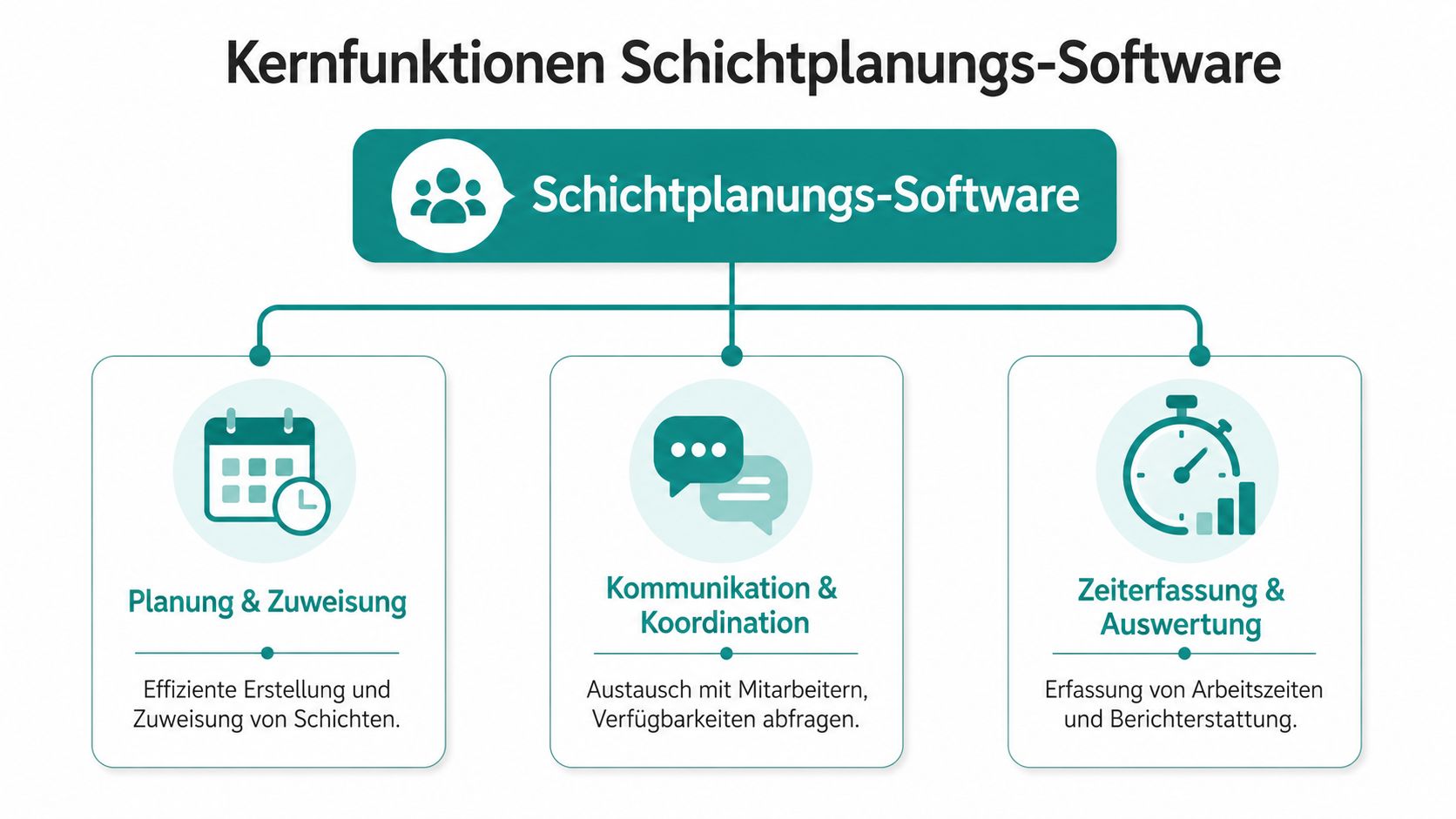
Before you compare providers, focus your view. Many tools sound similar in sales. In daily use, they separate brutally fast. You need three building blocks. Not one, not two, but all three.
A good overview helps:
Planning Alone Is Not Enough
The first building block is planning and assignment. You must create shifts quickly, save recurring patterns, and see if someone is available, on vacation, or has the required qualification. If you build the weekly schedule in a restaurant, you don’t want to check three lists before assigning someone to the late shift.
The second building block is communication and coordination. Employees enter their availabilities themselves, receive changes on their phones, and can swap shifts without your deployment management having to follow ten message threads. Especially in teams with part-time workers, temps, or freelancers, this is not an add-on but daily protection.
It gets interesting with the third building block: time tracking and evaluation. This is exactly where many tools fail. They plan properly, but when it comes to actual times, the media break starts again. Then the team clocks in a second app or on paper, and later someone tries to reconcile plan and reality.
According to Aivy’s comparison of shift planning software in Switzerland, shift planning software avoids up to 85% of manual errors common in Excel-based solutions and reduces the time required to create schedules on average by 60%, with short-term changes like sick leave handled in real time. This fits exactly the everyday reality of many Swiss companies.
What You Need to Watch for in Daily Use
This video shows well how modern planning should be thought of in daily operations:
Pay attention to these points when choosing:
- Planning logic: Can you map templates, roles, locations, and qualifications cleanly?
- Team access: Is there a mobile solution where employees can really do things themselves?
- Time flow: Do recorded hours flow directly into payroll preparation without detours?
- Warnings: Does the system report conflicts before you have to deal with them in operations?
If you want to look at functions on the market, check the overview of deployment planning software. What matters is not the longest list but whether planning, communication, and time work together in your daily routine.
Those who buy only planning usually buy the next manual intermediate step as well.
Concrete Software Solutions in Direct Comparison
The market is big enough to overwhelm you with feature lists. For Swiss teams, that’s little help. You need a tight selection by use case. According to job.rocks in the comparison of shift planning software, over 12 relevant providers for the DACH region were compared in 2026 in Switzerland. The clear shortlist for Swiss teams is based on job.rocks, POLYPOINT PEP, and shyftplan, each selected by use case.
In practice, another name regularly appears for many SMEs: Ordio. Not because it covers every conceivable special logic, but because it combines planning and time in an accessible setup. For small to medium-sized businesses, this can be very suitable.
Comparison of Shift Planning Software
| Feature | job.rocks | shyftplan | Ordio |
|---|---|---|---|
| Focus | Flexible personnel pools, assignments, freelancers, mobile teams | Large companies with complex shift models | SMEs wanting simple planning plus time tracking |
| Suitable for | Events, promotion, hospitality, security, distributed teams | Industry, larger companies, complex rules | Gastronomy, smaller shift operations, operational teams |
| Planning | Deployment and shift planning with availabilities and qualifications | Automated planning for complex models | Shift scheduling with clear usability |
| Communication | Mobile employee app, invitations, changes directly to team | Strong in structured staffing | Mobile use for team and management |
| Time tracking | Included in workflow, linked to payroll preparation | Strong mainly in planning logic and staffing | Planning and time tracking in one platform |
| What convinces | Good for quick replacements and changing pools | Good for fairness rules and many dependencies | Good if you want to start simply |
| Where to check carefully | Depth for very rigid clinic or industrial plans | Fit for smaller teams | Depth in highly branched processes |
Three Tools and Three Use Cases
job.rocks fits if you work with many changing personnel. Typical example: A promotion agency builds different teams for various cities each week. You need availability queries, qualification filters, mobile feedback, and a direct transition into time tracking and payroll preparation. This is exactly where this type of platform shows its strength.
shyftplan fits if planning itself is your biggest problem. In an industrial company with several shift types, fixed workplaces, and contractual limits, simple drag-and-drop planning is no longer enough. You need rules, weighting, and automatic staffing suggestions. shyftplan is built for that.
Ordio fits if you want a more compact setup. For example, in a gastronomy business with multiple shifts per day, many part-time workers, and the desire to keep planning and recorded times in one system. Its great strength is not maximum depth but a clear path from plan to time.
If you’re looking for a tool, don’t ask about features first. Ask first where the most manual effort currently occurs in your operation.
My advice is clear:
- For events, promotion, and flexible pools: Choose a tool that keeps availabilities, communication, and time in one workflow.
- For industry and large shift systems: Choose shyftplan or a similarly deep solution.
- For smaller operational teams wanting easy operation: Check Ordio very carefully.
Many bad purchases happen because companies buy strong planning logic but map the rest of the process again in Excel or a second app. Then you don’t have a clean workflow, just a new frontend.
Compliance and Integrations That Save You Headaches
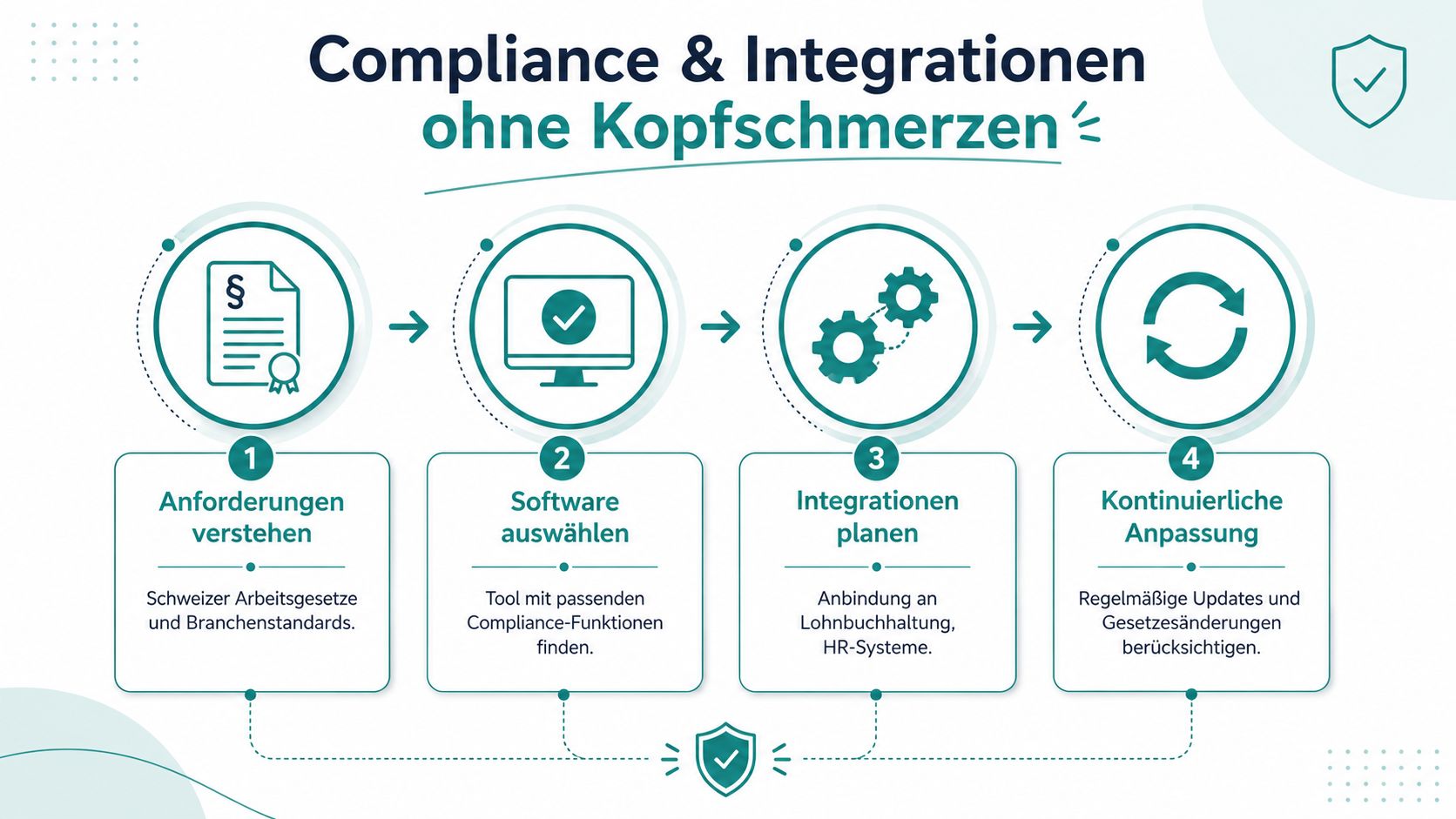
Most comparisons stay on the surface. Creating shifts, notifying employees, maybe shift swaps. That’s too short-sighted. For Swiss SMEs, another point decides daily life: Does everything from planning to payroll preparation happen without double entry?
This process view belongs at the center of your decision:
Payroll Preparation Is the Litmus Test
Let’s take a real pattern from everyday life. You schedule a security employee for an evening shift. On site, they stay longer because the assignment is extended. There is also night work. If your tool only knows the planned shift but does not pass on the actual time cleanly, manual correction begins. That’s exactly where discussions, errors, and unnecessary work arise.
According to Ordio’s guide to shift schedule software comparison, 55% of Swiss SMEs see double entries as the main problem in payroll accounting. That’s the core issue. Not the pretty planning, but whether your company has to handle the same data multiple times.
Direct advice: If a provider separates planning and time, check them twice as hard. Usually, you pay the price later in administration.
What Your Tool Must Handle in Switzerland
In Switzerland, you must pay attention to three main things when choosing:
- Working time rules: The system should make rest periods, conflicts, and borderline cases visible in the schedule.
- Time tracking without breaks: Planned shifts and actual worked time must not diverge without you noticing.
- Payroll-relevant data: Allowances, deviations, approvals, and exports must be prepared cleanly.
Even better if your tool can connect to existing systems. Then your administration doesn’t have to juggle CSV files as soon as a month ends. If you want to check such connections, look at the API integrations and interfaces of job.rocks as an example of the necessary functional framework. What matters is not the provider’s name but whether your data flow remains closed.
Many managers underestimate this point at the start. They test the planning, not the month-end closing. That’s a mistake. The month-end closing shows whether your tool supports you or just looks good.
Which Software Fits Your Industry
Not every industry fails at the same point. That’s why a general comparison only helps to a limited extent. You have to measure the software against your operational reality.

Events and Promotion
Here, agility counts. You work with changing teams, multiple locations, short-term requests, and often freelancers. A suitable tool must quickly collect availabilities, target qualified people, and distribute changes directly.
Practical example: An agency schedules hostesses for a trade fair, promoters for a retail assignment, and setup and teardown staff. If you need three lists and two chat groups for that, your setup is wrong. In this industry, you need a system for personnel pools, invitations, feedback, and mobile time tracking.
Gastronomy and Hospitality
Here, speed is crucial. Someone calls in sick in the morning, and by noon the shift must be set. A good mobile solution with shift swapping, availabilities, and clear feedback is often more important than deep special logic.
A restaurant with lunch service, evening service, and weekend operation doesn’t need a heavy enterprise system. It needs planning that can be adjusted quickly and doesn’t end up as manual work in payroll preparation at month-end. For these businesses, more compact solutions often work better than overloaded systems.
In gastronomy, you don’t lose out on missing features. You lose out on slow reactions.
Healthcare and Security-Related Services
In nursing, care, or security services, rules and qualifications quickly become bottlenecks. Not every person may cover every shift. Locations, night work, and reliable documentation also come into play.
A Spitex-related service or a security company with changing sites needs more than just shift boxes in a calendar. You must ensure the right person is at the right place, with the right authorization and clean time tracking. For such cases, deeper rule sets and clear proofs are crucial.
My recommendation by industry logic:
- Events and Promotion: Tool with personnel pool logic and strong mobile communication.
- Gastronomy and Hospitality: Fast, easy-to-use system with direct time flow.
- Healthcare and Security: Tool with clean mapping of qualifications and rules.
Your Decision Checklist for Selection
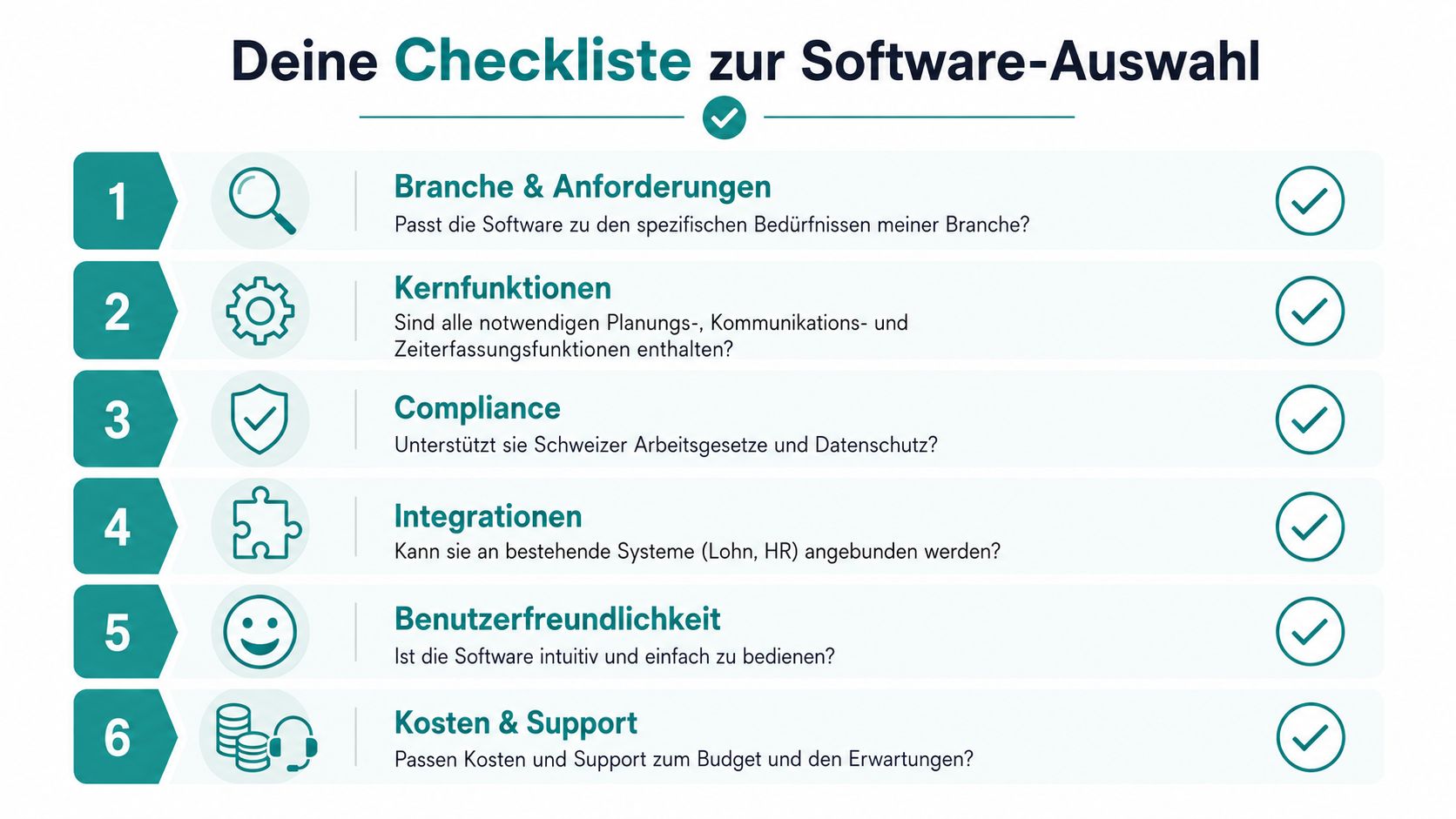
In the end, you don’t need another demo with pretty screens. You need questions that force a provider to be concrete.
This checklist works for that:
Questions You Must Ask Every Provider
- Industry fit: Can your team map typical cases from my operation in a live demo? Not general examples. My real ones.
- Plan to time: Does a planned shift directly become a clean actual working time, or is a second step needed?
- Payroll preparation: Which data can I pass on directly at month-end without manual rework?
- Rules and warnings: Does the system detect conflicts in times, availabilities, or roles already during planning?
- Employee side: Can employees manage availabilities, swaps, and assignments themselves without everything hanging on deployment management?
- Implementation: Who sets up the system with you, and how much work really remains internal?
A good additional question is especially revealing: Please show me a complete workflow from shift planning to prepared payroll handover. If the provider dodges here, you already know the problem before signing.
Never buy based on a feature list. Buy based on workflow.
Always test the tool with a real mini scenario. Take a sick leave, a shift swap, and a changed end time. Then you immediately see whether the software supports you or only looks good in the demo.
Frequently Asked Questions About Shift Planning Software
What Does Switching from Excel to Software Really Bring?
The biggest gain is less manual rework. According to shyftplan on shift planning software, creating shift schedules with AI-supported systems is up to 70% faster compared to manual Excel lists. For you, that means less corrections, less back and forth, and a clearer process when changes occur.
How Complex Is the Implementation?
For an SME, implementation is usually manageable if you start with a clear pilot team. First set up roles, locations, shift types, and a small test team. Don’t start with all special cases at once. You want a functioning core process first.
Should You Test Before Buying?
Yes. Absolutely. Don’t just test planning but a real weekly workflow. Create a shift, make a change, record time, check approval, view data for payroll preparation. Only then do you see if the tool fits your operation.
If you are looking for an end-to-end solution for events, promotion, hospitality, security, or other flexible deployment models, check out job.rocks. What matters is that you test planning, availabilities, time tracking, and payroll preparation in one continuous workflow. That’s exactly what you should measure every demo by.
Meta description: Are you looking for the right shift planning software for your Swiss company? Here you get a direct comparison, clear recommendations by industry, and a checklist for planning, time tracking, and payroll preparation.