
Work Schedule Software for Gastronomy: Finding the Best Solution in 2026
Find the optimal work schedule software for gastronomy: Your guide to features, costs, ROI & GDPR-compliant planning in 2026. Save time & money in your business.
On Sunday evening, you’re still sitting in the office. In front of you lies an Excel file with colored fields, notes, and three open questions: Who covers the lunch service on Tuesday? Who can no longer work the late shift due to rest periods? And who already entered their day off weeks ago but it got lost in the rush? At the same time, messages come to your phone because two employees want to swap shifts.
This is exactly where many businesses end up. The problem isn’t that you don’t put in enough effort. The problem is that an analog or semi-digital planning process in Swiss gastronomy quickly reaches its limits. In 2023, a total of 187,300 people were employed in Swiss gastronomy. The sector is strongly characterized by small and medium-sized businesses that rely on cloud-based solutions to reduce administrative effort and manage the complexity of shift planning (Statista on Gastronomy in Switzerland).
If you organize your business today with notes, chats, and spreadsheets, you almost always pay twice. Once with time. Once with errors. Those who make the transition properly get the schedule back under control. You can also find a good introduction to the process in the Practical Guide to Digital Shift Planning.
Table of Contents
- From Paper Chaos to Digital Work Schedule
- What Work Schedule Software Can Really Do
- Essential Features for Your Gastronomy Business
- Choosing the Right Software Your Checklist
- Does It Really Pay Off Calculating the ROI
- Avoiding Typical Pitfalls During Implementation
- Your Path to a Digital Work Schedule in 3 Steps
From Paper Chaos to Digital Work Schedule
The classic gastro schedule often looks like this: The week starts, someone is sick, a service employee can only work until 8 p.m. on Friday, and the head chef suddenly needs someone experienced at the pass. You somehow manage that in Excel. But only as long as nothing unexpected happens. In gastronomy, something always happens.
A digital work schedule doesn’t completely eliminate this friction. But it shifts it to the right place. Instead of constantly fixing things, you build a clean process. Availabilities are in the system. Absences are recorded. Open shifts become visible before they turn into problems.
An Everyday Example
Take a café with lunch and evening service. On Thursday, a part-time employee calls out, and at the same time another wants to swap shifts. With a paper schedule, you call around, manually check hours, and hope you don’t overlook breaks or rest periods. With work schedule software for gastronomy, you first check who is available, who can take the right role, and whether the swap is even allowed.
This not only saves paperwork. It reduces pressure in daily operations. Your schedule turns from an annoying obligation into a tool that helps you run the business more calmly.
Practical rule: If you have to manually follow up on shifts more than once a week, your planning system is too weak for your business.
What Changes Noticeably in the Business
Three things usually stand out first:
- Fewer inquiries: Employees see shifts, changes, and days off in an app instead of chat threads.
- Less double work: Master data, working times, and hours no longer end up in multiple lists.
- More calm with last-minute changes: You react faster because all info is in one place.
Many businesses look for one big feature. Usually, it’s the sum of small reliefs that makes the difference. That’s exactly why work schedule software in gastronomy should not be treated as a tech topic but as a leadership tool.
What Work Schedule Software Can Really Do
A good solution is not a digital calendar with a pretty interface. It connects planning, time tracking, and team coordination. Only when these three parts work together does the software really bring value in daily operations.
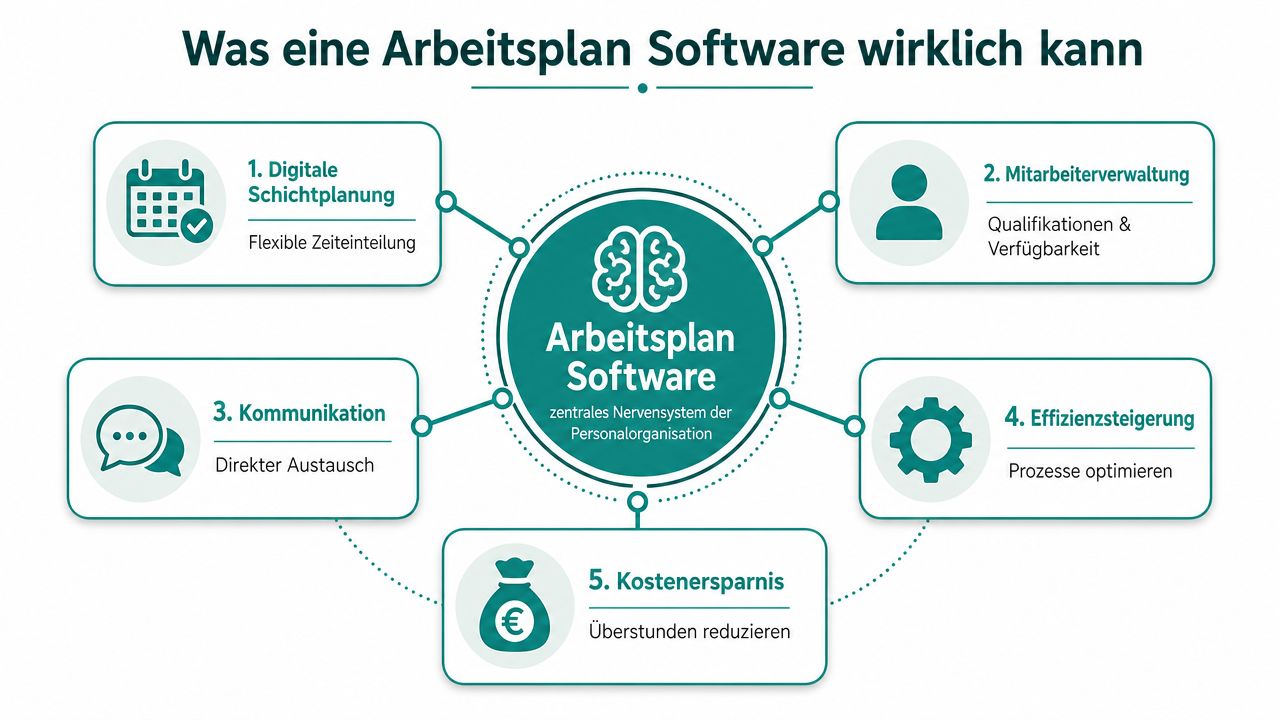
Planning Instead of Patchwork
In a spreadsheet, you assign names to shifts. In software, you plan with conditions. You see availability, roles, workloads, and absences directly where you build the week. That’s a real difference.
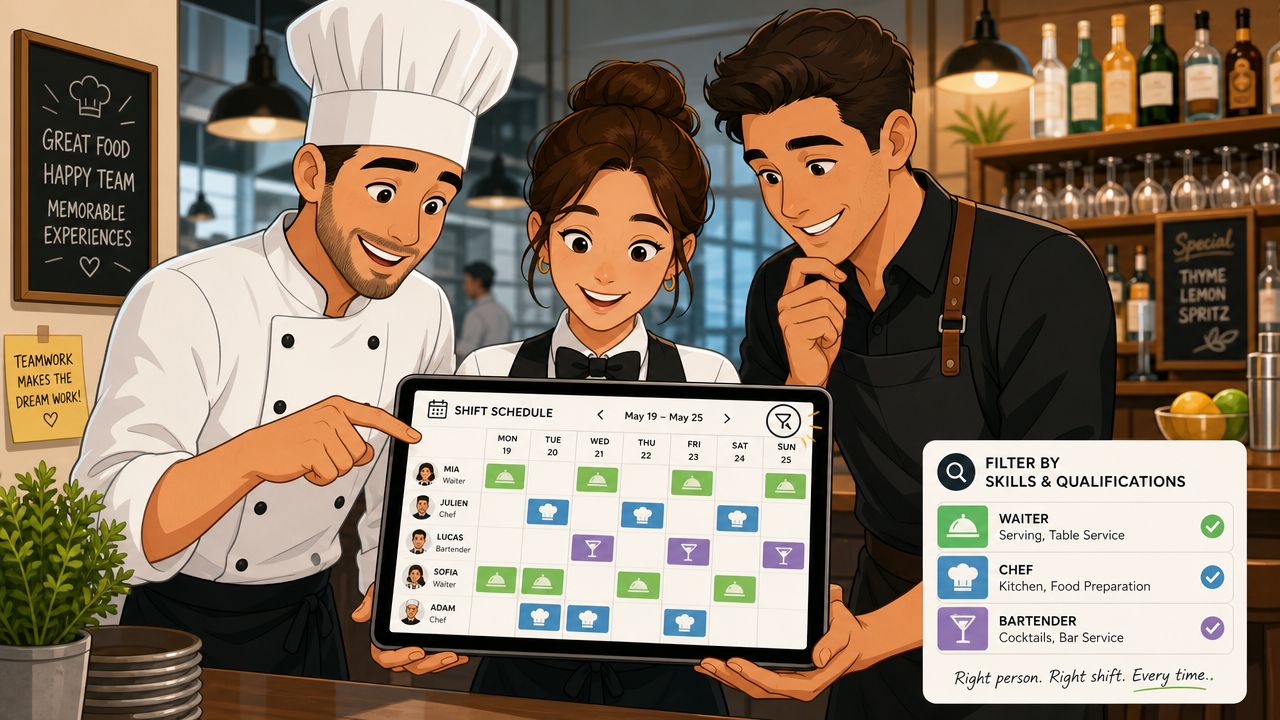
Take a Friday evening in a restaurant. You need two people in service, one at the bar, and someone for reception. A decent solution shows not only who is available but also who is suitable. This prevents someone from ending up in a role they shouldn’t cover.
A provider like job.rocks bundles exactly these points in one system: shift planning, time tracking, and payroll preparation. For businesses with changing shifts and multiple roles per employee, this is a sober, practical approach.
Time Tracking and Communication in One Place
Many problems don’t arise during planning but afterward. Someone arrives early. Someone leaves late. Breaks are recorded differently. Two people agree on a swap in chat, but the schedule remains unchanged. Then at month-end, neither hours nor payroll preparation match.
Digital terminal, tablet, or app solutions for time tracking allow real-time recording of working hours. This minimizes errors in payroll and increases legal security during audits, as all personnel data is centrally managed (Explanation of time tracking in gastronomy).
If planning and time tracking run separately, your business builds a new reconciliation error every month.
Especially with larger teams or multiple locations, the communication side is often underestimated. A shift change doesn’t belong in three WhatsApp groups, two calls, and a handwritten note on the door. It belongs in the app so everyone sees the same version.
If you want to see how other industries handle similar shift problems, flexible working time models in nursing offer an interesting comparison. The processes differ from gastronomy, but the lesson is the same: availability, rules, and last-minute changes must be clearly mapped in the system.
Essential Features for Your Gastronomy Business
Provider websites like to show long feature lists. In daily operations, only a few points really matter. When choosing work schedule software for gastronomy, you should focus less on colorful add-ons and more on where your business currently loses money or time.
What Helps Immediately in Daily Operations
The first essential function is clean shift planning with role reference. In practice, this means: You want to see not only who is free but who can cover bar, service, office, or kitchen. In a small bistro team, this might not be obvious. In a restaurant with temps, part-timers, and changing tasks, it quickly becomes confusing.
Next comes availability requests via app. This ends the phone calls. Employees enter blackout times, vacation wishes, or preferred shifts themselves. You plan with current data instead of old assumptions.
Also very useful is an employee app with clean self-service. Your team sees shifts, open duties, and changes there. If you want to know how such an app can be structured in gastronomy, check out a staff app for gastronomy.
What Really Matters for L-GAV and Payroll
In Switzerland, this is where the wheat separates from the chaff. A pretty shift view doesn’t help if the system doesn’t correctly map hospitality rules. A good gastro shift planning app must automatically evaluate break, night surcharge, and split-shift logic according to L-GAV; for example: 25% night surcharge from 10 p.m. and 15% for split shifts, which manually is a frequent source of errors (Planery on features for gastro shift planning).
What does this mean in daily life? A few typical cases:
- Late shift at the bar: When surcharge time starts, the system must mark it correctly.
- Split shift in the restaurant: If someone works lunch and dinner, the surcharge logic must not be manually added.
- Overtime on a hectic weekend: You need clear hour balances, or you’ll argue later about every extra minute.
From practice: If the surcharge only appears during payroll, the planning was already too inaccurate.
Another topic is payroll preparation. You don’t want to clean up exports, check shifts afterward, and calculate surcharges separately at month-end. The software should prepare hours, breaks, surcharges, and deviations so your accountant or internal team can work directly with it.
In short: You recognize good features not by how much they promise, but by how many inquiries, corrections, and add-ons they save you at month-end.
Choosing the Right Software Your Checklist
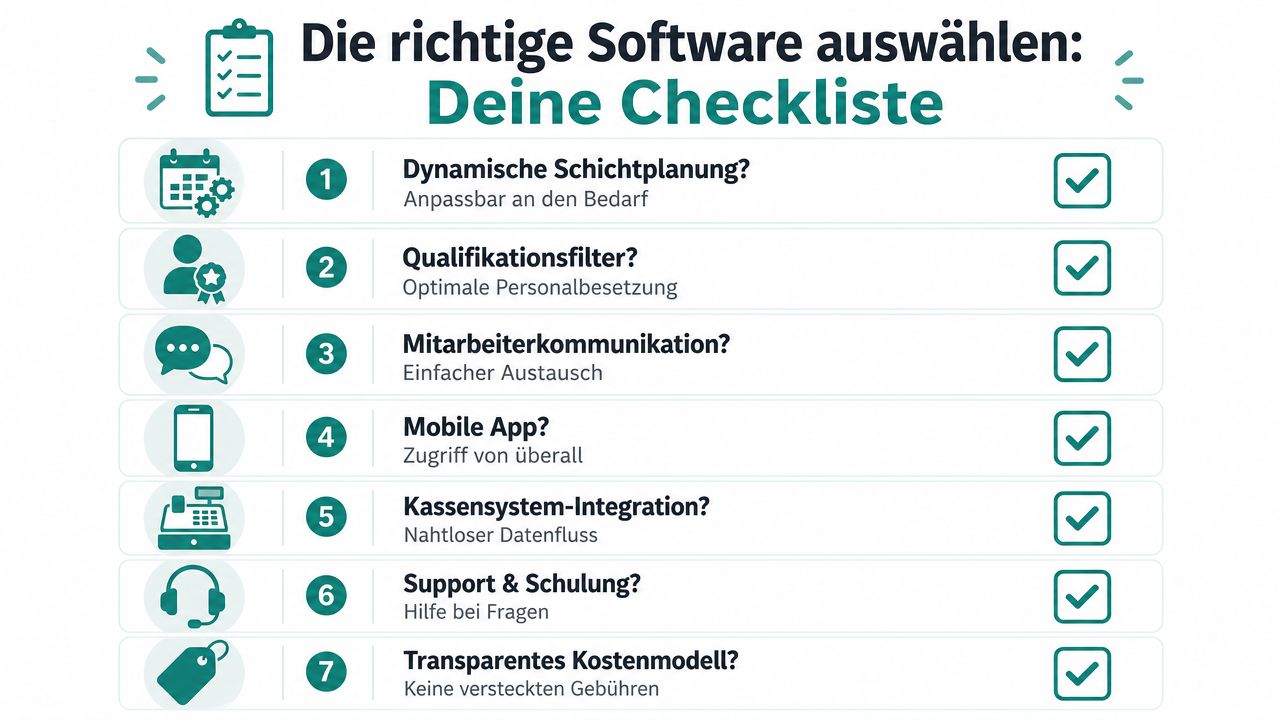
The selection seems bigger at first than it is. Many systems look good in demos. The key is whether they really reflect the Swiss gastro everyday. You don’t need a show. You need clear answers.
Questions You Must Ask During the Demo
Bring real cases from your business into the demo. No provider should just click through sample schedules. Have them show how the system handles real situations.
Weekly working hours by business type must be properly mapped. In Swiss gastronomy, the weekly working time is 42 hours, in seasonal businesses 43.5 hours, and in small businesses with up to four employees up to 45 hours; a shift planning app must automatically capture these differences and consider them in scheduling to ensure L-GAV compliance (Gastropedia on shift and duty planning in hospitality).
So ask directly during the demo, not just generally about working time rules:
- Can the system map different weekly working hours depending on the business?
- Does it check rest periods and breaks automatically during planning or only afterward?
- Can a shift swap be approved without manually checking qualifications and hours?
- Do the data go directly to your payroll solution or your accountant?
How to Spot Weak Providers Immediately
A weak provider answers evasively. A decent provider shows you the process live. That’s a big difference.
Watch out for these warning signs:
- Only general statements: If someone says the software fits all industries equally well, it often lacks gastro depth.
- No test with real data: If you can’t check vacations, part-time workloads, or swap processes, you see the risk too late.
- Unclear data transfer: If exports must be manually prepared, you just shift work from planning to administration.
- Unclear cost model: If extra fees for app, support, or payroll export appear later, the bill quickly goes wrong.
Include a week with sickness, swaps, and vacations in the test phase. If the system stays clean then, it’s also good for everyday use.
Does It Really Pay Off Calculating the ROI
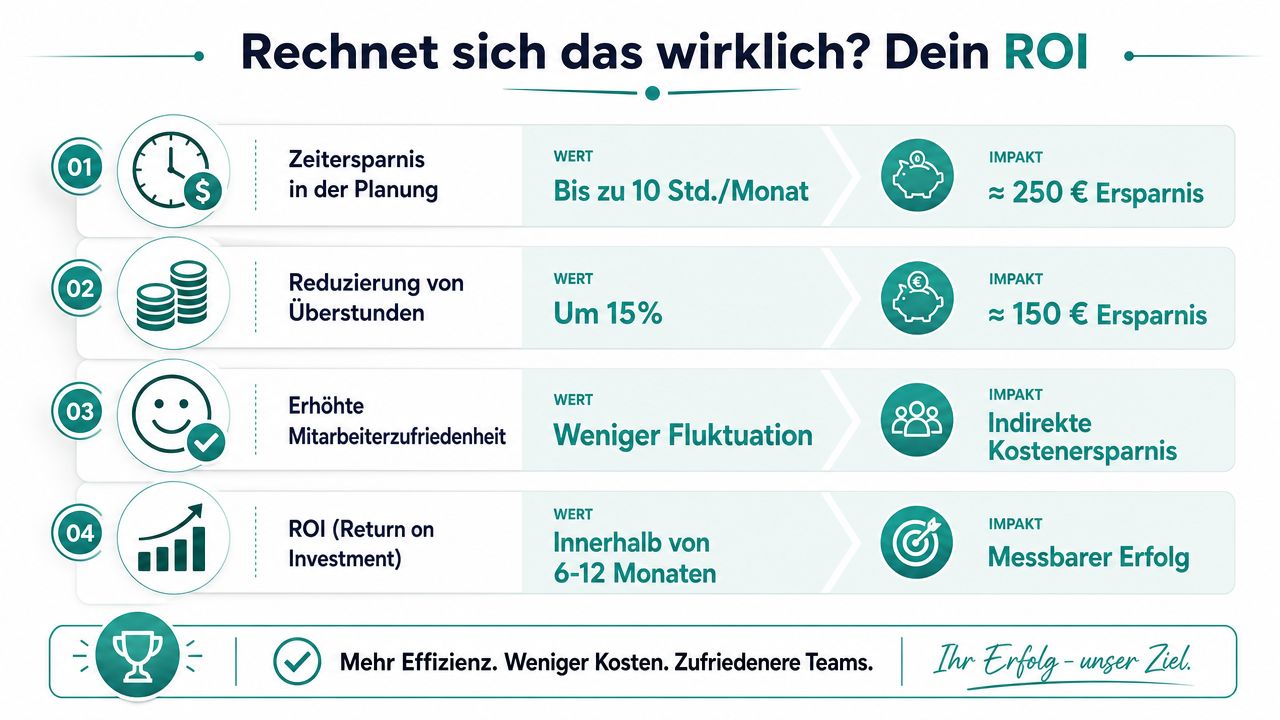
Many hesitate to switch because they only look at the monthly fee. That’s too short-sighted. You have to calculate what your current planning costs you. Not theoretically, but with your real processes.
How to Calculate with Your Real Numbers
The cleanest starting point is administration. Digital solutions with interfaces to payroll systems reduce administrative effort for HR departments from an average of 4.5 hours per week to under 1 hour (Job.Rocks on gastro shift planning app in Switzerland). If you currently spend several hours weekly on schedule adjustments, inquiries, and payroll preparation, that’s your first lever.
A simple calculation looks like this:
| Area | Question | Your Value |
|---|---|---|
| Planning | How many hours per week do you or your management spend on scheduling and changes? | Your value |
| Payroll Preparation | How long does it take to check breaks, surcharges, and corrections? | Your value |
| Error Costs | How often do you have to rework wages, hours, or surcharges? | Your value |
| Software Costs | What does the solution cost per month including app and payroll transfer? | Your value |
If you want to set up the calculation, this guide on calculating cost savings can help.
A Simple Gastronomy Example
Take a business where the restaurant management currently spends hours each week on schedule changes and payroll preparation. Then calculate like this:
- Record current time spent: planning, changes, inquiries, payroll prep.
- Estimate time after switch: don’t set to zero. Coordination is still needed with software.
- Value hours with internal wage rate: this shows the monthly amount.
- Add rework: corrections for surcharges, breaks, or overtime cost not only money but nerves.
- Subtract software costs: only then do you see if the switch pays off.
The cleanest calculation is not the prettiest but the honest one. Plan cautiously and calculate with real monthly values instead of wishful numbers.
Many businesses notice quickly that not only office time decreases. Disputes over hours also drop because everyone looks at the same data basis. This doesn’t appear in a brief price overview but has a strong effect in daily life.
Avoiding Typical Pitfalls During Implementation
Most problems don’t arise because the software is bad. They arise because the business treats the switch as a pure tech project. That’s the mistake.
The Most Common Misconception
Many managers say: We buy a system, then it runs. That’s not true. If your team doesn’t know how to confirm shifts, record times, or request swaps, you end up back with chats and calls. Then you have two systems instead of one.
Therefore, you must clarify three things before starting:
- Who maintains master data: workloads, roles, hour balances, and absences must be entered cleanly.
- Who answers daily questions: one person in the business needs the overview.
- How the start runs: training for all, clear rules, no parallel operation for weeks.
A half-hearted switch is usually more expensive than a clean full change.
Where It Gets Expensive
In Swiss gastronomy, one more point applies. Many tools only check general working time rules. That’s not enough. Data shows that 68% of Swiss gastronomy businesses incur unnecessary payroll costs due to GAV violations in shift swaps or last-minute absences because their software only checks general labor laws (Gastrora on shift planning software in Switzerland).
That means for you: If a provider only mentions the GAV in passing, you need to ask further. Especially shift swaps, part-time workloads, and spontaneous absences are where errors happen. Not in the nice sample schedule but on chaotic Fridays.
Typical stumbling blocks are also:
- Unclean legacy data: vacation accounts, hour balances, and roles are imported too quickly.
- No clear process for shift swaps: employees continue swapping outside the system.
- Separation of planning and payroll: then the old search work starts again at month-end.
- Too little testing with real weeks: without a stressful week, you don’t see weaknesses.
Those who address these points properly save a lot of trouble in the first weeks.
Your Path to a Digital Work Schedule in 3 Steps
The switch doesn’t have to be a huge project. In gastro businesses, it works best when you keep it concise, practical, and with real shifts.
Setting Up Steps 1 to 3 Properly
Step 1. Honestly assess the current state.
Track for two to three weeks where time is lost. Not only in schedule creation but also in inquiries, swap approvals, corrections, and payroll prep. From this, derive what your future work schedule software for gastronomy really needs to do.
Step 2. Test two or three systems with real cases.
Don’t take a demo on trust. Have vacations, sickness, part-time, late shifts, and swaps mapped. Bring one person from service and one from the kitchen into the test. These people often see faster than any management where a process breaks down.
Step 3. Lead the start clearly.
Set a fixed date. Migrate data cleanly. You don’t need hours of training but clear instructions. Who enters availabilities, who approves swaps, how to clock in, what applies if bookings are forgotten. When these four questions are answered, the start runs much smoother.
In the end, it’s not about your business looking digital. It’s about being able to plan reliably, treating your team fairly, and having payroll prepared without late-night office work. That’s when the switch really pays off.
If you’re looking for a solution that combines shift planning, time tracking, employee app, and payroll transfer in one system, check out job.rocks. For gastronomy businesses in Switzerland, it’s especially interesting that you can manage availabilities, shift coverage, and hours in one place instead of jumping between Excel, chat, and separate time tracking.
Meta Description: Want to organize your gastro shift schedule without Excel chaos? Learn what to look for in work schedule software for gastronomy, how to map L-GAV correctly, and how to calculate the switch transparently.